Table of Contents
This guide covers hp launched the new pavilion 14 and 15 generation models with practical context and easy-to-follow details. Use it to understand the subject and apply the information confidently.
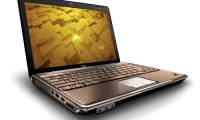
HP Pavilion 14 and 15 series Have 25% Thinner design compared to previous versions, while storage capacity is increased and all connection ports are maintained. This is the plus point for followers of high-quality movies and music or those who have to move frequently.
 HP Pavilion 14 and 15 have 25% thinner designs compared to older versions.
In addition to the two gray and white colors, the new HP Pavilion 14 and 15 generations also added two new colors in their color collection, which diversifies the choice of personality and style of users to be black The youthful Goji type and red replace the dark red gram that has become familiar for many years.
You can comfortably experience on the smooth HD tap screen and breakthrough improvements of Windows 8. 1 Operating system to optimize apps on a "tap" Screen computer. Pavilion 14 and 15 have a block-like interactive interface that makes Tap "intuitive" and easy.
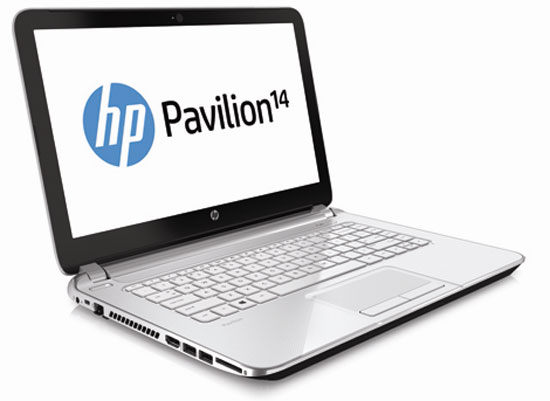 Tap screen.
Intel technology breakthrough - The 4th generation Intel Haswell microprocessor is also integrated in two new products this time. With Intel's new generation of processors, battery life and graphics processing capability are significantly increased when the size of the device is thinner. Intel Haswell has been identified as the best choice for laptops with tap screens. Graphics users and gamers can still choose discrete graphics up to 2 GB to support personal work and entertainment.
HP Pavilion 14 and 15 fully support the necessary connections such as USB ports, HDMI ports to connect to large screens, memory card reader ports from cameras, audio jacks and especially a harmonic beveled DVD drive. Machine body. Users can combine Windows 8. 1's new Broadband Tethering feature to turn their computer into a personal Wi-Fi hotspot, which is also considered a plus point of Pavilion 14 and 15 about link technology. Wireless connection and sharing.
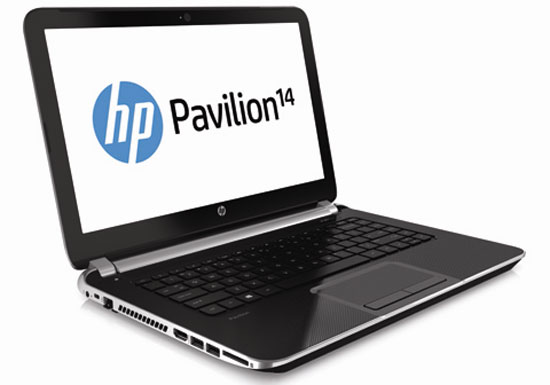 HP Pavilion 14 and 15 are equipped with 4th generation Intel Haswell processors.
Besides the basic features required of a modern laptop such as HDD capacity up to 1 TB, HD screen, excellent graphics support and vivid DTS audio system, the series is so The new system also provides users with the exclusive privileges of different utilities and features with many of HP's proprietary proprietary technologies.
The first is a Snapfish account, which allows users to easily sync photos from their smartphones to their laptops with the exclusive HP Connected Photo app without the need for connecting cables. Or feature HP TrueVison HD webcam with image sensor technology for vivid pictures and high-resolution video calls in all lighting conditions.
Smart HP CoolSense cooling technology has the ability to manually adjust the fan speed, cooling the machine properly to help users feel secure when using. For those who need to move, the exclusive HP ProtectSmart technology can detecting the device's falling status, automatically shocks, locks the hard drive to protect data safely when the device is dropped or direct collision.
While HP SimplePass feature helps users log into the machine safely and conveniently with just one fingerprint scanning operation.
FAQ
What should I check before following these steps?
Confirm device and software compatibility, save important data, and make sure you have the required permissions, files, and account access.
Why might the process not work?
Common causes include outdated software, missing permissions, incompatible hardware, an unstable connection, or completing a step in the wrong order.
Can I undo the changes if necessary?
That depends on the tool or setting. Use built-in restore options when available, keep a backup, and record the original configuration first.
Related Articles
 See the New Generation HP Pavilion3 minutes read
 HP Pavilion dv4, dv5, dv7 Series4 minutes read
 HP Launched the 2012 Pavilion Laptop Series4 minutes read
 HP Puts the Touch Screen into the Pavilion Line4 minutes read
 HP Pavilion G6 Costs from 13. 7 Million in Vietnam3 minutes read
 HP Pavilion Dropped 100 USD4 minutes read
Reader Comments 0
Sign in with email or Google to join the discussion.