Table of Contents
This guide covers hp pavilion dv4, dv5, dv7 series with practical context and easy-to-follow details. Use it to understand the subject and apply the information confidently.
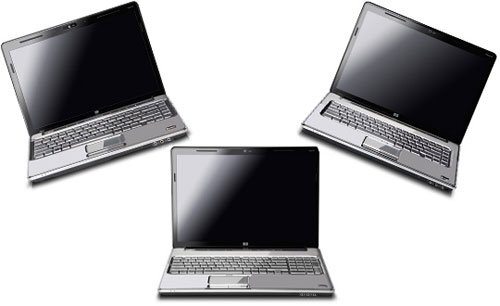 Trio dv4, dv5, dv7 new Photo: Cnet .
In terms of design, HP Pavilion line dv4, dv5, dv7 have a soft design with rounded corners that make it feel flexible and generous. The main colors are silver and black combined quite smoothly in every corner. The case is painted with the exclusive HP Imprint Finish technology with a dot pattern engraved in a stylish fashion. HP logo is arranged neatly at the corner and can self-glowing when the machine is operating. The entire surround is HP 'design' again in a 'liquid metal' style with a strong bright coating. The keyboard design is a major improvement for the company because of its soft, elastic buttons and silver plating on the entire surface. In addition to the purpose of blending with the overall, this also makes the keys minimize the possibility of abrasion due to contact with the user's hand sweat during use.
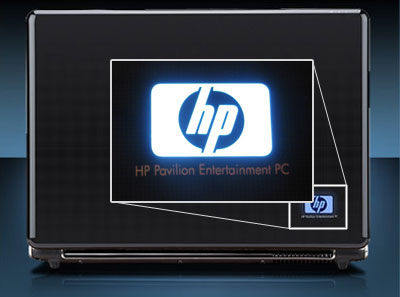 HP logo glows automatically when the machine is operating.
HP Pavilion dv4, dv5, dv7 are fully equipped with high-tech entertainment features. Included is a high quality HDMI sync audio transmission capability, Light Scrible live disc label recording and printing technology, remote control for media center, built-in webcam and mic, Altec Lansing Stereo speakers, DVB or Analog TV tuner receiver (optional). A prominent improvement is the high-resolution mirror screen with an 'endless flat' design that gives users a sense of no limit on the ledge. This feature can be found in some mid-range and high-end models that cost over $ 1, 200. In this new product line, HP also has a hard drive with eSATA high-speed data transfer technology, HP Protect Smart Driver hard drive protection technology, a feature that was previously available only on computer models. HP's business notebook. Connectivity is maintained with Wi-Fi, Bluetooth, Infrared, LAN / Modem and a connected 'series' of ports are arranged on both sides of the machine. The new HP Pavilion is equipped with various connectivity ports: eSATA / USB Combo, HDMI, Docking, IEEE1394, Card reader. ( Continued )
FAQ
What should I check before following these steps?
Confirm device and software compatibility, save important data, and make sure you have the required permissions, files, and account access.
Why might the process not work?
Common causes include outdated software, missing permissions, incompatible hardware, an unstable connection, or completing a step in the wrong order.
Can I undo the changes if necessary?
That depends on the tool or setting. Use built-in restore options when available, keep a backup, and record the original configuration first.
Related Articles
 HP Launched the 2012 Pavilion Laptop Series4 minutes read
 HP Style Envy into the Pavilion Series3 minutes read
 HP Pavilion G6 Costs from 13. 7 Million in Vietnam3 minutes read
 HP Puts the Touch Screen into the Pavilion Line4 minutes read
 HP Pavilion dv4-1200 Series - Perfect Quartet5 minutes read
 HP Vietnam Launches a New Series of Laptops3 minutes read
Reader Comments 0
Sign in with email or Google to join the discussion.