Table of Contents
To carry more Brainrots in Escape Tsunami for Brainrots, enter the cyan ring at the Upgrades Shop and buy the Carry upgrade beside the arm icon. Each purchase adds capacity for another Brainrot, but the price rises sharply, so extra slots are useful only when your speed and survival rate let you bring a larger haul back to base.
The game has changed since some early guides were published. Older sources disagree about the current maximum Carry and whether Rebirth resets it. Check the live upgrade and Rebirth panels before spending money or Robux; those in-game screens are the authoritative source for your server version.
How to buy a Carry upgrade

- Earn enough in-game cash from the Brainrots placed at your base.
- Go to the Upgrades Shop.
- Step into the cyan circle to open the upgrade menu.
- Find the arm icon, which represents Carry.
- Read the displayed price and current capacity, then select the green upgrade button.
- Confirm that the capacity number increased before starting another run.
If the cash button is unavailable, compare your balance with the displayed price. The menu may also offer a Robux purchase, but it is optional; wait for passive income if you do not want to spend premium currency.
What Carry changes
Carry controls how many Brainrots you can hold during one trip. More slots can reduce repeat journeys and let you collect several worthwhile spawns before returning to base. It does not make the character faster or protect the items you are holding when a wave reaches you.
That tradeoff matters: a larger capacity has little value if you regularly lose the return trip. Raise Speed and learn the safe gaps between zones before committing a large share of your cash to Carry.
How much Carry should you buy?
Use your own runs rather than a fixed level recommendation:
| What happens during a run | Best next step |
|---|---|
| You fill every slot and return safely | Consider one more Carry upgrade if its price will not block a more useful upgrade. |
| You rarely fill the current capacity | Keep the existing Carry level and improve income or reach a better farming area first. |
| The tsunami catches you on the return | Prioritize Speed and route timing before adding more slots. |
| A limited event produces several useful spawns | Extra Carry may pay off, provided you can collect and bank the items safely. |
| The next upgrade costs most of your balance | Wait until the purchase leaves enough cash for progression and recovery. |
A moderate capacity is usually more efficient than rushing the maximum. Buy the next slot when you repeatedly leave a useful Brainrot behind, not simply because the upgrade button is available.
Check Rebirth behavior before upgrading
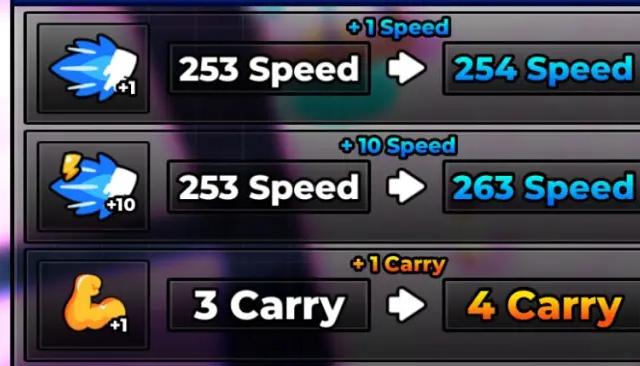
Early guides claimed that Rebirth removed Carry upgrades, while more recent community documentation says a normal Rebirth resets Speed and preserves other progress. Because this rule can change, do not plan an expensive purchase from an old article alone.
- Open the Rebirth panel.
- Read the list of stats and items that the current Rebirth will reset or preserve.
- Take note of your Carry value before confirming.
- If the panel says Carry is preserved, you can evaluate the upgrade as a longer-term purchase. If it says Carry resets, postpone a costly upgrade when you are close to Rebirth.
The current community Upgrades reference reports that only Speed resets during a normal Rebirth, but the game interface should take priority if it shows different behavior.
Get more value from every Carry slot
- Pair capacity with speed: reaching a rare spawn is not enough; you also need time to return before the next wave.
- Bank the best item first: if your route becomes unsafe, return with the highest-value Brainrot rather than risk the entire haul.
- Use safe gaps: wait in protected areas and move after a wave passes instead of treating every trip as a nonstop sprint.
- Watch the next price: upgrade costs can jump dramatically. Recheck the button after every purchase.
- Test one level at a time: confirm that the extra slot improves income per run before buying another.
Carry is an efficiency upgrade, not a substitute for a reliable route. A smaller load that consistently reaches your base is worth more than a full inventory repeatedly lost to the tsunami.
Related Articles
 Latest Fortnite Fruits vs Brainrots Codes: Complete Guide3 minutes read
 Latest Plants vs Brainrots Roblox Codes: Complete Guide4 minutes read
 Ranking All Plants in Plants vs Brainrots: Complete Guide4 minutes read
 What Is the Biggest and Most Horrifying Tsunami in Modern History4 minutes read
 How to Survive a Tsunami: Step-by-Step Guide5 minutes read
 Underwater Sound Waves Can Help to Alert Tsunami Earlier3 minutes read
Reader Comments 0
Sign in with email or Google to join the discussion.