Table of Contents
This updated guide explains how to Get Universal Studios Tickets from Costco through clear steps, practical examples, and important checks that help prevent common errors.
Method 1 of 3:
Purchasing Universal Studios Tickets Online
-
 Search for tickets on Costco's main website. Navigate to www. costco. com. In the search bar at the top, type in "Universal Studios." The search results will bring up any Universal Studios tickets if they are currently for sale, though Costco doesn't always have these tickets in stock.
- Alternatively, navigate to https://www. costco. com/theme-parks. html and look for Universal Studios tickets on that page.
-
 Choose your package. Often, the tickets are grouped in multiple-day deals. Sometimes, Universal Studios tickets will be combined with other offers, such as a "Go Card" that offers entrance to other attractions, too.
- For instance, the Go Los Angeles Card offers entrance to Six Flags, Legoland, and Knott's Berry Farm, just to name a few.[1]XResearch source
- For some deals, you must be a member to purchase them. Look for deals without the tag "members only" if you don't have a Costco membership.[2]XResearch source
-
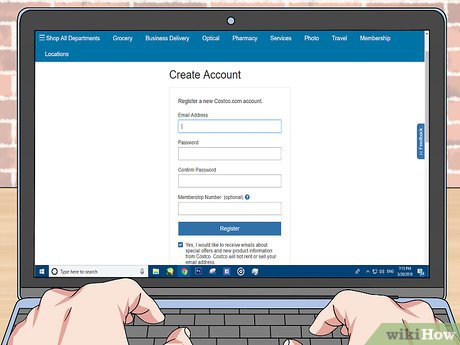 Create a Costco. com account if you don't have one. If you have a Costco membership, create an account with an email address, password, and your Costco number. If you don't have a membership, you will still need to create a Costco. com account. You just won't put in a Costco membership number.
 -
 Pay for the tickets plus the surcharge for non-members, if applicable. Once you've chosen your package, add it to your cart. Pay for the package and the shipping costs. If you're not a member, you'll also pay a 5% surcharge on the tickets.[3]XResearch source
- Some tickets are delivered electronically, so you won't need to pay shipping costs.
Method 2 of 3:
Buying Universal Packages from Costco Travel
-
 Navigate to www. costcotravel. com. This site is Costco's online source for purchasing travel deals and packages. It includes deals on theme parks, though they change from time to time.[4]XResearch source
 -
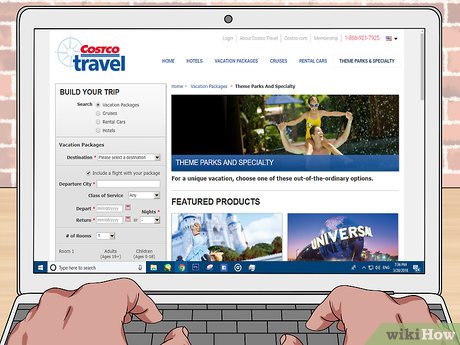 Use the trip builder to search for theme park trips. Under "Build Your Trip," click the "Destination" drop-down menu. Select "Theme Parks" to see all of Costco's current deals for theme parks.[5]XResearch source
- Universal Studios may not always be listed. If it's not, check back from time to time to see if they have these tickets again.
-
 Pick a Universal Studios package. If Universal Studios is listed under the theme park packages, select it by clicking on it. Clicking on it should take you to a page with different packages for the park. The main differences between the packages are the hotels you stay at.[6]XResearch source
- You can choose between hotels that are a part of Universal Studios or ones that are close by. Staying outside the resort is usually cheaper, and most hotels have shuttles. Staying in the resort is best if convenience is your priority.
-
 Decide if you may need to include a flight with your package. Once you've picked out a package, click it. At the bottom of the page, click "Book It." Usually, this button will bring up an option for adding a flight. If you'd like to, you can include it in the package.[7]XResearch source
- Using this option to book a flight will make the process easier. However, if you're on a budget, check with other travel sites to see if you can get a cheaper flight.
-
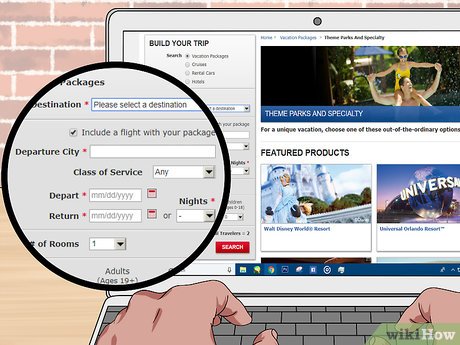 Input the details for your trip. click "Book It," and uncheck the "Include Flight" box if you don't want a flight. Put the dates you may need to travel into the form. On the next page, select which room you prefer.[8]XResearch source
- You can upgrade to a nicer room for an upcharge.
- The next few screens will show what is included with your package, such as the Universal Studios tickets and rental cars.
-
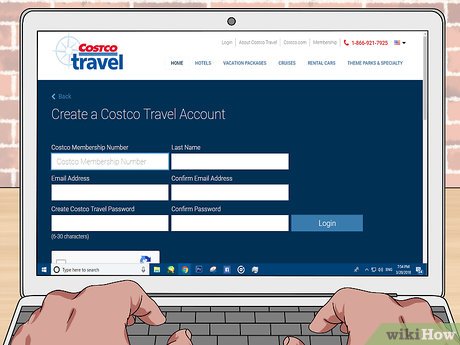 Become a member if you aren't already one. To purchase tickets from Costco, you must be a Costco member. An individual membership in 2018 is $60 USD, and it gets you access to the store and online travel purchases.[9]XResearch source
 -
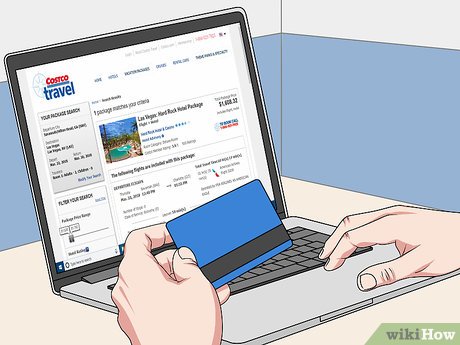 Pay for the package and shipping fees. Log in with your Costco membership number and a password, if you've created an account in the past. If you haven't, you can set up a new account. Once you're logged in, you can go to the payment page.[10]XResearch source
- Use a debit or credit card to pay for the package.
Method 3 of 3:
Purchasing Tickets in Person
-
 Visit a Southern California Costco store. Typically, Universal Studios tickets are only sold at the Southern California locations, but they don't have them all the time. If you don't live in the area, you can take a chance and visit when you get there.[11]XResearch source
- Try calling ahead to see if they have the tickets in stock.
- If they don't have tickets, you can always buy them at the park at the regular price.
-
 Find the ticket section in Costco. Items like movie tickets and theme park tickets at Costco are usually with the gift cards. However, Universal Studios tickets may also be in the "Specials" section at the front of the store.[12]XResearch source
- If you're having trouble locating the Universal Studios tickets, locate an employee. Ask them to point you in the right direction.
-
 Purchase the day tickets or annual passes. Sometimes, Costco offers Universal Studios tickets. Other times, annual passes are on sale. If you're going for more than a day, though, it's probably a good idea to buy the annual passes, as a couple of days at the park will cost as much as an annual pass.[13]XResearch source
FAQ
What is the easiest way to Get Universal Studios Tickets from Costco?
Start with the requirements in this guide, then follow each step in order. Check the result after every major change so problems are easier to identify.
Can beginners follow these instructions?
Yes. The process is organized into practical steps, and you can repeat any step before moving forward.
What should I check if the method does not work?
Confirm your software or device version, permissions, settings, file format, and internet connection when the task depends on online services.
Related Articles
 4 Websites to Book Super Cheap Air Tickets, Helping People Who8 minutes read
 How to Book Air Tickets by Phone with Momo Wallet6 minutes read
 How to Order 2018 Tet Train Tickets Online8 minutes read
 Do You Know Why Airline Tickets Are so Expensive or Not8 minutes read
 The Meaning Behind the Code Printed on Airline Tickets: Main Insights5 minutes read
 How to Scalp Tickets: Step-by-Step Guide11 minutes read
Reader Comments 0
Sign in with email or Google to join the discussion.