Table of Contents
When Pokémon storage is full, you can either transfer Pokémon you no longer need or buy a Pokémon Storage Upgrade from the in-game Shop. Transfer only after checking IVs, moves, form, rarity, and trade value; a storage upgrade is the safer option when the collection is genuinely useful.
Old fixed limits and prices are not reliable because capacity and Shop offers change. Use the current numbers displayed in your account.
Confirm which storage is full
Pokémon storage and item storage are separate. A full Pokémon collection blocks new catches and some encounter actions, while a full item bag affects PokéStop rewards and item claims. Open the Pokémon screen and read the used-versus-total count to confirm the problem.

Option 1: Transfer true duplicates
Transferring sends a Pokémon to the Professor and normally awards species Candy. The action cannot be undone, so review the individual before confirming.

Check each candidate
- Appraise Attack, Defense, and HP IVs.
- Inspect Fast and Charged Moves for event-exclusive or legacy options.
- Check Shiny, Shadow, Purified, costumed, regional, alternate-form, background, and size status.
- Consider Great League or Ultra League value; the highest stars are not always the best capped-league spread.
- Keep realistic trade, evolution, research, and collection candidates.
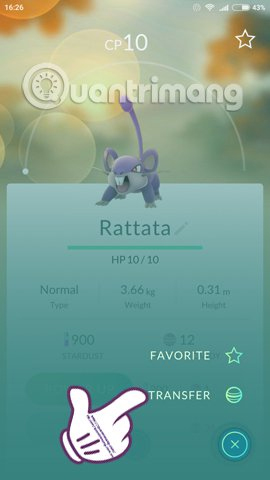
Transfer one Pokémon
Open its detail page, choose Transfer from the menu, read the warning, and confirm only if the name, CP, and form match the intended extra.
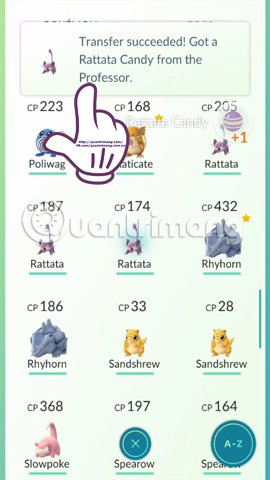
Use mass transfer carefully
Press and hold a Pokémon in storage, select multiple clear extras, and use the transfer control. Favorite valuable Pokémon first and inspect the final count. Special categories may be protected from mass transfer or may require expanded-transfer settings and an additional warning.
Option 2: Organize before deciding
If you are unsure, tags can create temporary groups such as “PvP check,” “trade,” “event move,” “evolve,” and “transfer later.” Sorting uncertainty is better than making a permanent decision under storage pressure.
Useful search filters can narrow recent catches, star ratings, species, types, forms, and other properties. Apply one focused filter at a time and verify the selected results before taking a batch action.
Option 3: Buy a Pokémon Storage Upgrade
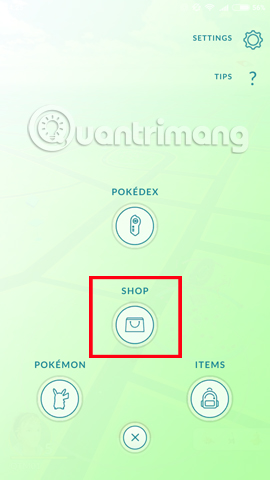
Open the Shop and locate the Pokémon Storage Upgrade. The product screen shows the current PokéCoin price, capacity added, and any applicable limit. Review those values before confirming.
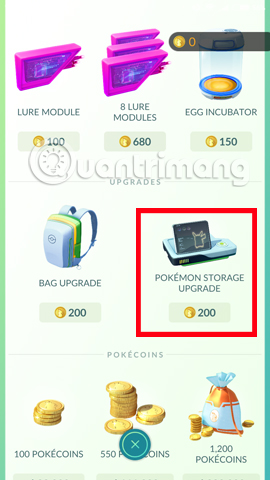

Make sure the purchase says Pokémon Storage, not an item Bag Upgrade. The two products solve different limits.
When an upgrade is worth it
- You regularly participate in Community Days, GO Fest, or long catch sessions.
- You keep PvP candidates across several leagues.
- Your collection includes many costumes, forms, Shinies, Shadows, or trade reserves.
- Normal cleanup removes very few Pokémon because most have a defined purpose.
- Storage fills so often that you miss encounters while evaluating catches.
An upgrade provides convenience, but it does not replace organization. Without tags and regular reviews, the new space will fill with unexamined duplicates.
Quick emergency cleanup
- Favorite anything rare or important.
- Filter one abundant species at a time.
- Appraise and keep the best role-specific candidates.
- Tag uncertain Pokémon instead of transferring them.
- Transfer only obvious extras.
- Leave several open slots before returning to the encounter or event.
For a one-time full-storage message, careful transfer is usually enough. For a growing multi-purpose collection, combine a Shop upgrade with tags and a recurring cleanup routine.
Related Articles
 How to Own the 'Pokémon' in Pokémon GO?6 minutes read
 What Will You Do When There Are Multiple Pokémon in Pokémon GO?5 minutes read
 Pokémon Systems When Fighting in Pokémon GO13 minutes read
 Things to Know to Upgrade Pokémon in Pokémon GO6 minutes read
 Guide How to Revive Pokémon in Pokémon GO5 minutes read
 Maximum Index of Pokémon in Pokémon GO4 minutes read
Reader Comments 0
Sign in with email or Google to join the discussion.