Table of Contents
This updated guide explains how to Create One Piece Cover Images for Facebook and through clear steps, practical examples, and important checks that help prevent common errors.
One Piece cover photo online will help you choose your favorite character in One Piece, like straw hat D. Luffy, Dr. Tony Tony Chopper. this guide will guide you how to create One cover art. Piece online.
Instructions to Create Facebook One Piece Cover Photos
Step 1:
The user accesses the link below to the One Piece cover creation page.
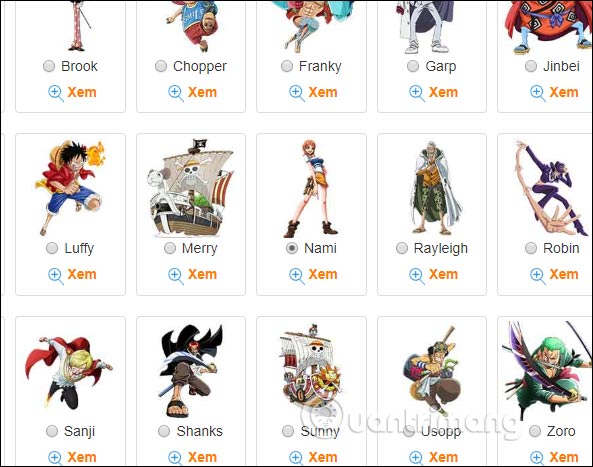
https://ephoto360.com/tao-anh-bia-one-piece-dao-hai-tac-truc-tuyen-cuc-dep-626.htmlAt the interface you will see the famous characters in the series One Piece. To search faster, enter your name in the Search bar above. In addition, you can also click View to see how the cover image was created.
Tick the character you may need to use.
Step 2:
Then scroll down below and write whatever content creates the Enter text * bar . You can write your own name, Facebook name, or website name according to each person's liking. However, you should note that the handwriting must not exceed 11 characters because if it is longer will lose characters.
Finally click Create photo below to create a One Piece cover photo.

Step 3:
The resulting pirate Island cover image is created as shown below. We click Save to download the image or share with others if desired.

FAQ
What is the easiest way to Create One Piece Cover Images for Facebook and?
Start with the requirements in this guide, then follow each step in order. Check the result after every major change so problems are easier to identify.
Can beginners follow these instructions?
Yes. The process is organized into practical steps, and you can repeat any step before moving forward.
What should I check if the method does not work?
Confirm your software or device version, permissions, settings, file format, and internet connection when the task depends on online services.
Related Articles
 How to Create Facebook, Twitter, YouTube,… Covers Quickly6 minutes read
 How to Create Facebook Cover to Celebrate Christmas with Fotor3 minutes read
 Facebook Cover Photo with Anime Theme: Wallpapers3 minutes read
 Combine the Cutest Facebook Cover Photos: Cute Photo4 minutes read
 Instructions for Creating a YouTube Account Cover Photo5 minutes read
 Top Tool to Create Avatar and Cover Photos 'Quality' for Facebook3 minutes read
Reader Comments 0
Sign in with email or Google to join the discussion.