Table of Contents
Name tags are craftable in current Minecraft releases. Combine one paper with one copper, iron, or gold nugget, then rename the finished tag on an anvil before using it on a mob. If the recipe does not appear in your game, update to a release that includes the Tiny Takeover changes.
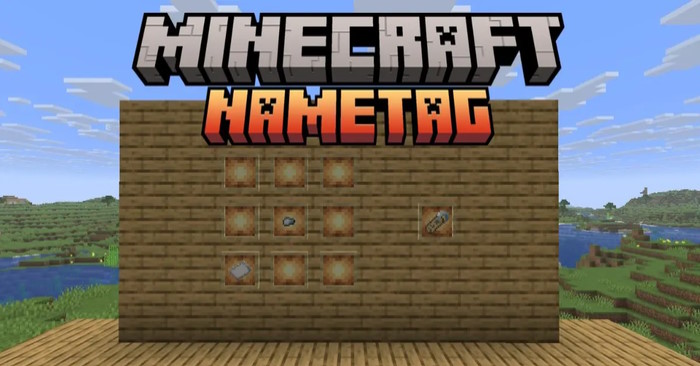
Minecraft name tag recipe
| Ingredient | Quantity | How to obtain it |
|---|---|---|
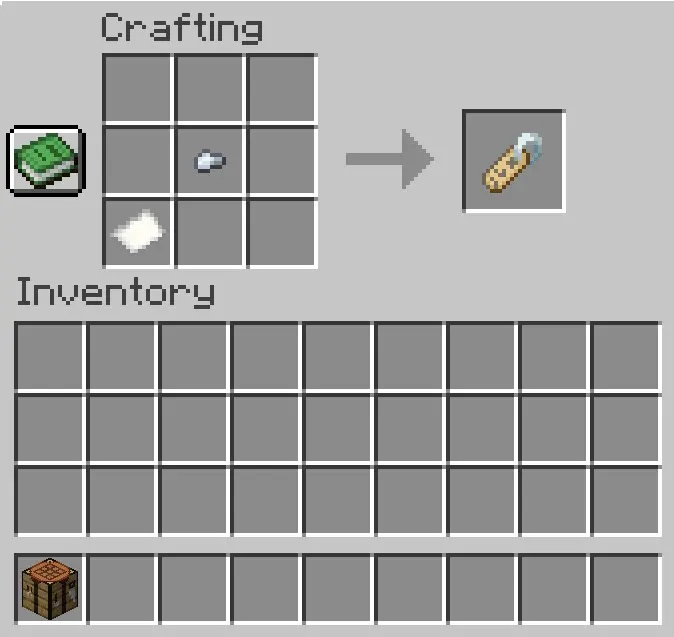
| Paper | 1 | Craft three sugar cane into three sheets of paper. |
| Copper, iron, or gold nugget | 1 | Craft a corresponding ingot into nuggets, or obtain a nugget through normal loot and processing. |
Open a crafting grid and combine the paper with any one of the supported metal nuggets. Do not use a full ingot or a metal block. The recipe was added in Minecraft: Java Edition 26.1 and the corresponding Bedrock release as part of the Tiny Takeover drop.
You can review the change in the official Java Edition 26.1 notes.
Other ways to get name tags
Crafting is now the most predictable method, but name tags remain available through exploration and fishing. Depending on the edition and current loot tables, you can find them in eligible structure chests—such as mineshafts and dungeons—or catch one as fishing treasure.
The Tiny Takeover changes removed name tags from Ancient City and Woodland Mansion chests. Librarians no longer sell them; wandering traders can occasionally offer a name tag for an emerald instead. Because chest contents and trader stock are random, crafting is faster when you only need one.
How to name a mob
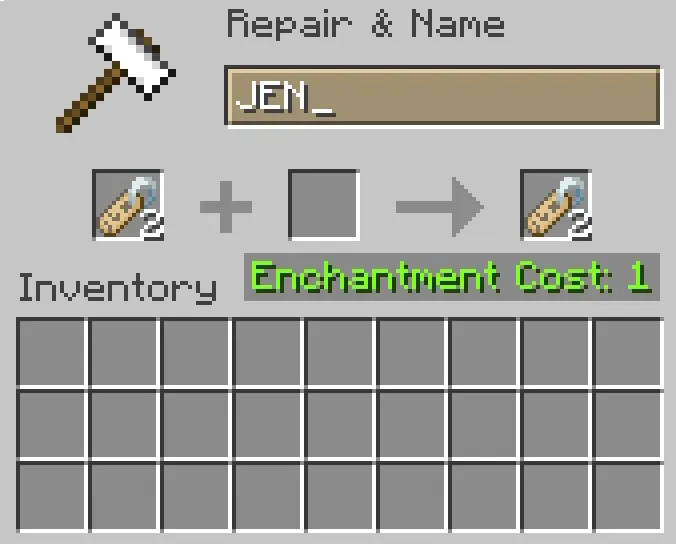
- Place an anvil and open it.
- Put the name tag in the first slot.
- Type the name you want in the text field. Renaming a tag normally costs one experience level.
- Move the renamed tag to your inventory.
- Hold it and use it on the mob. The tag is consumed and the chosen name appears above that mob.
You cannot use a name tag to rename your own player character. If you want several mobs to share a name, rename a stack of tags at once before applying them.
What naming changes
Most mobs that could normally despawn will persist after receiving a name, which is useful for keeping a particular animal or hostile mob. Naming does not make the mob invulnerable: it can still take damage, die, or be lost through other game mechanics. Some entities have special rules; for example, a named wandering trader can still despawn.
A baby's name remains when it grows into an adult. To stop an eligible baby mob from aging in Tiny Takeover, use a golden dandelion; the item is separate from the name tag and is crafted from one dandelion surrounded by eight gold nuggets. It does not work on every baby entity.
Name tag Easter eggs
- Dinnerbone or Grumm renders many mobs upside down.
- jeb_ makes a sheep's wool cycle through colors visually; shearing still drops the sheep's actual wool color.
- Toast gives a rabbit a special skin.
- Johnny changes a vindicator's targeting behavior, so use it carefully near other mobs.
These special names do not replace the normal persistence rules, and their effects depend on the mob that receives the tag.
Related Articles
 How to Craft Chains in Minecraft 1.204 minutes read
 How to Craft a Bag in Minecraft 1.20 Is Extremely Simple5 minutes read
 How to Craft a Beacon in Minecraft: Practical Guide9 minutes read
 How to Craft Paintings in Minecraft6 minutes read
 Craft and Use Honey Bottles in Minecraft 1.21: Step-by-Step Guide6 minutes read
 Crafting Forges in Minecraft 1.20 Is Extremely Simple5 minutes read
Reader Comments 0
Sign in with email or Google to join the discussion.