Table of Contents
A graphics card can raise your electricity bill during gaming, rendering, and other workloads that keep it busy. How much it adds depends on the extra power your PC draws at the wall, how long you run that workload, and what your utility charges per kilowatt-hour (kWh).

The CPU and GPU can both contribute substantially to a desktop PC’s power draw under load.
Measure power at the wall
Plug the PC into a plug-in electricity meter and measure while running a game or application you use regularly. A meter that records kWh over a whole session gives a better estimate than a single wattage reading. Keep the monitor on a separate outlet if you only want to measure the PC.
To compare two graphics cards, run the same workload on the same PC at the same resolution, settings, and frame-rate cap. The difference in wall power tells you how much the upgrade changes the system’s draw under those conditions. A GPU’s rated power is a specification, and the meter includes the actual draw of the rest of the system and power supply losses.
Calculate the monthly cost
Monthly cost = extra watts ÷ 1,000 × hours of use per month × price per kWh.
For example, if a new card makes your PC draw 150 watts more while gaming and you play for two hours a day over 30 days, that is 9 kWh more. At $0.20 per kWh, the increase is $1.80 for that month. Use the rate from your bill and account for idle hours separately if idle power also changes.
How power supply efficiency affects the result
A more efficient power supply (PSU) draws less power at the wall to deliver the same power to the components. An 80 PLUS rating measures conversion efficiency at specific loads. The PSU’s advertised wattage is its output capacity. The actual draw changes with the workload.

Power supply efficiency affects how much electricity the PC draws from the outlet.
| Certification | 20% load | 50% load | 100% load |
|---|---|---|---|
| Standard | 80% | 80% | 80% |
| Bronze | 82% | 85% | 82% |
| Silver | 85% | 88% | 85% |
| Gold | 87% | 90% | 87% |
| Platinum | 90% | 92% | 89% |
| Titanium | 92% | 94% | 90% |
The 80 PLUS program lists separate thresholds for other test categories. If you’re replacing a PSU, see what to check when choosing a computer power supply.
Reduce GPU power use while gaming
Start with an in-game frame-rate limit at a level that still feels smooth. A cap can reduce power use if the GPU was rendering more frames than you need. Lower demanding settings such as ray tracing if needed, then measure again to see whether the change saved electricity.
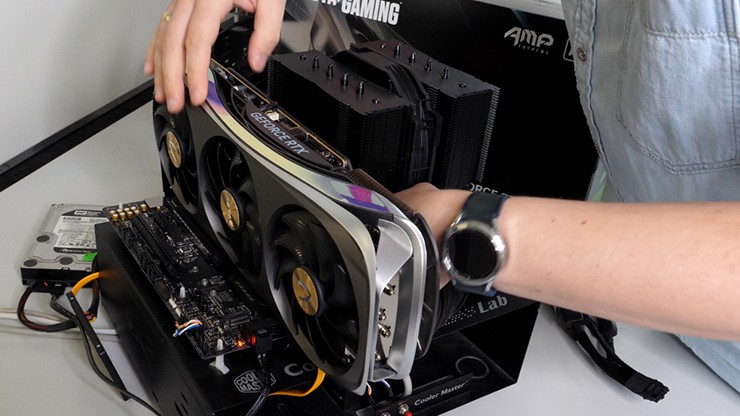
Choose a graphics card based on the resolution and frame rate you actually want to play at.
Related Articles
 List of the best graphics cards according to the price segment
 How to Update Graphics Card
 Top 7 best AMD graphics cards (GPUs) 2020
 7 things you need to know about integrated and dedicated graphics cards
 Use GPU-Z to analyze graphics card parameters
 4 mistakes to use air conditioning to waste electricity and affect health
Reader Comments 0
Sign in with email or Google to join the discussion.