Table of Contents
How to Avoid Injury When Using a PC is easier to understand when the core ideas are paired with practical examples. The sections below explain the topic clearly, highlight useful steps, and point out details that can prevent common errors.
Prolonged use of computers can lead to health problems, body aches or even injuries if not used appropriately. One of the most common problems with computer users is the mechanical damage caused by repeated use of keys and mice. This problem occurs computers and peripheral devices are not properly arranged. Studies estimate that about 1 in 10 computer users to a certain stage will experience muscle damage due to repetitive activity, with mild symptoms of dull pain in the arms, wrists or more severe than injury Serious to the arms, neck and shoulders. However, if the computer is properly arranged and used, users can avoid muscle damage and make computer time more comfortable. View 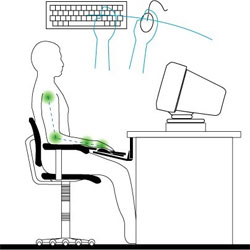 One of the most common causes of muscle damage is inappropriate computer screens, putting users in a bad posture. Experts advise against placing the computer opposite another light such as a light bulb or a window, because glare will cause the user to turn his head to one side or raise his head to look down at the screen. It causes eye strain, neck, hands and spine. Ideally, put the monitor so that the top edge of the screen is a little below eye level. The distance from the eye to the screen should approximate the length of the arm. The screen should also be placed face-to-face, avoiding the misalignment of the sitting position to one side. Sitting posture The posture of sitting in front of a computer screen also needs to be noticed. If you sit down slightly or face forward too much, you may still feel comfortable but those positions will be harmful to your back. The easiest way to correct the correct posture is to choose a chair that supports the natural curve of the spine. In addition, it is recommended to select a height adjustable seat when seated between 42-54 cm. To set the seat appropriately, stand in front of the chair and adjust the height so that the highest point of the seat surface is only slightly lower with the knee bone. In addition, the seat support should be adjusted to support the lower back. When sitting on a chair, your forearm should be parallel to the floor plane and should be straightened, although this may be a little uncomfortable. Checking your eyes often is also important, because if your eyes are poor and you don't recognize them, you will turn to the screen without knowing it. Keyboard Sitting long to type on the keyboard can also cause muscle damage. Ideally, the keyboard should be placed on a flat surface, so that the height of the keyboard places the shoulders and biceps in a perpendicular position, the forearm is horizontal and the wrist is straight. Do not press your hands on the keyboard, your hands may be comfortable but will cause wrist pain after a period of use. Ideally, type the key while the wrist is hovering just above the edge of the keyboard. This may be a bit uncomfortable at first, but gradually you will see that helps you use the keyboard more easily. In addition, you should hold your wrist straight and choose a mouse that is comfortable to use. If you see a long-term use of a mouse that causes fatigue, use many shortcuts. Using keyboard shortcuts is to limit the use of the mouse and still speed up the work. Rested A golden rule for computer users is regular rest. After each hour of working in front of the computer, there is a short rest period, a few minutes. Drinking a cup of coffee or doing something else can help relax and improve blood circulation after sitting in front of a computer. If you feel tired or stressed, doing some stretching or motion movements is also very good.
FAQ
What is How to Avoid Injury When Using a PC?
Prolonged use of computers can lead to health problems, body aches or even injuries if not used appropriately.
Why is How to Avoid Injury When Using a PC important?
A clear understanding of How to Avoid Injury When Using a PC helps you make informed decisions, avoid common mistakes, and use the relevant tools or techniques more effectively.
How should beginners approach How to Avoid Injury When Using a PC?
Start with the fundamental concepts, follow the examples step by step, and test each change in a safe environment before applying it to important systems or data.
Related Articles
 Mistakes You Need to Avoid When Hiring a Personal Injury7 minutes read
 Alzheimer's Can Help Treat Patients with Brain Injury3 minutes read
 4 Tips to Help You Out If You Find Yourself with an Injury7 minutes read
 Pointers on Getting Top Legal Advice Following an Injury7 minutes read
 Anti-rejection Drugs Can Reduce Spinal Cord Injuries3 minutes read
 Using Electricity to Stimulate the Spinal Cord Helps the Paralyzed3 minutes read
Reader Comments 0
Sign in with email or Google to join the discussion.