Table of Contents
This guide provides a clear overview of github copilot is now available for free in vs code, including how it works, key details, and practical considerations that can help you use the information effectively.
Overview
GitHub, the world's most popular developer community platform, has officially crossed the 150 million member mark. To celebrate this milestone, Microsoft is offering GitHub Copilot for free in VS Code. This free version also comes with a full suite of features including chat and code completion, multi-file editing, multiple model selection, third-party extensions like Perplexity, Stack Overflow, etc.
The free version of GitHub Copilot has the following limitations when compared to the GitHub Copilot Pro version:
- Up to 50 messages and interactions per month
- Up to 2000 real-time code suggestions
The following features will not be available:
- Summary for pull requests, issues and discussions
- Upgrade Assistant for Java in VS Code
- Code review in GitHub
- Copilot Workspace in pull requests
- Technical preview access to Copilot Workspace
- GitHub Mobile
- GitHub CLI and Windows Terminal
To get around these limitations, developers can sign up for the GitHub Copilot Pro plan, which costs $10/month. Microsoft also notes that this new GitHub Copilot Free plan with limited functionality is only for individual developers. Users assigned to Copilot Business or Copilot Enterprise are not eligible for free access.
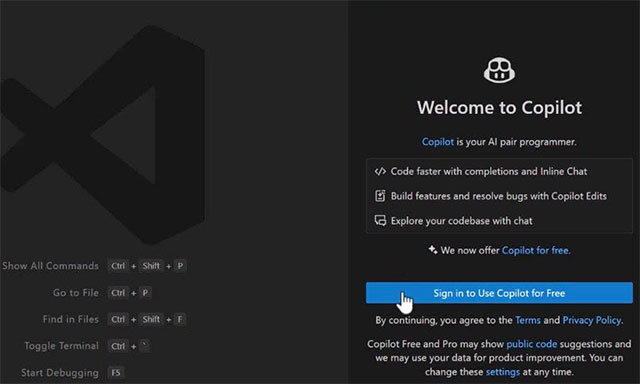
Speaking about the plan to roll out this new service, GitHub CEO Thomas Dohmke said:
GitHub has a long history of providing free products and services to developers. Starting with free open source and public collaboration, we've added free private repositories, free minutes for GitHub Actions and GitHub Codespaces, and free package and release hosting. Today, we're adding GitHub Copilot to the mix by launching GitHub Copilot Free.
Along with the announcement of the GitHub Copilot Free plan, Microsoft also announced the general availability of Copilot Chat on GitHub for all users. As part of GA, GitHub has removed the limit on the number of repositories you can index, allowing developers to use Copilot Chat across their entire codebase.
Copilot Chat's new free plan and general availability demonstrate GitHub's commitment to making AI developer tools more accessible.
FAQ
What is GitHub Copilot?
It is the main topic covered in this guide, including the relevant tools, settings, features, or steps connected with github Copilot Is Now Available for Free in VS Code.
Why is GitHub Copilot useful?
It can make github Copilot Is Now Available for Free in VS Code easier to understand, compare, configure, or troubleshoot by organizing the most important information in one place.
What should I check before using this guide?
Confirm that the instructions match your device, software version, region, and intended use, then back up important data before making major changes.
Related Articles
 GitHub Copilot - Your AI Programming Tool6 minutes read
 Should We Combine Claude Code and GitHub Copilot?8 minutes read
 3 GitHub Copilot Alternatives Worth Trying9 minutes read
 Cursor vs GitHub Copilot: Which AI Coding Tool Wins?14 minutes read
 GitHub Launches 'Copilot', an AI That Can Code with You3 minutes read
 Is GitHub Copilot or ChatGPT Better for Programming: Complete Overview8 minutes read
Reader Comments 0
Sign in with email or Google to join the discussion.