Table of Contents
Guide to Coding Flappy Bird Game Using JavaScript is easier to approach with a clear overview and reliable steps. This guide organizes the essential information, highlights practical details, and explains what to check along the way.
Key Takeaways
- Review FlappyBird by this guide.com.
- Follow the recommended steps in order to avoid common mistakes with coding flappy bird game using JavaScript.
- Review compatibility, settings, or requirements before making changes.
Flappy Bird FlappyBird by This Guide.com
In it, we declare the Canvas tag with a width of 288 and a height of 512. Below, before closing the body tag, we add the JavaScript code declaration function:
Start coding flappyBird.js
You can use different IDEs but in this tutorial we will use Sublime. The first thing we need to do is select the Canvas tab and get the context using getContext('2d'):
var cvs = document.getElementById("canvas"); var ctx = cvs.getContext("2d");The getContext('2d') function has properties and methods that allow us to draw and do various things on the Canvas.
Now, we need to create the image for the Flappy Bird game. We assign and display the value of the Image() function using the new statement. This helps you create the image.
var bird = new Image(); var bg = new Image(); var fg = new Image(); var pipeNorth = new Image(); var pipeSouth = new Image();Next, we need to set the image source using the src attribute. We recommend saving the image and video folders in the same folder as index.html and flappyBird.js. This helps you make this process simple and error-free.
bird.src = "images/bird.png"; bg.src = "images/bg.png"; fg.src = "images/fg.png"; pipeNorth.src = "images/pipeNorth.png"; pipeSouth.src = "images/pipeSouth.png";Using the same method, we create sound effects and set the sound source using the following code:
var fly = new Audio(); var scor = new Audio(); fly.src = "sounds/fly.mp3"; scor.src = "sounds/score.mp3";Declare the coordinates of the bird's first appearance, we use the code: This helps you create the free fall effect for the bird and the distance between the two obstacle pipes.
var gap = 85; var constant; var bX = 10; var bY = 150; var gravity = 1.5; var score = 0;Gap is the distance between the upper pipe and the lower pipe, here the value of gap is set to 85. The constant is used to determine the Y coordinate of the lower pipe and it is calculated by adding gap to the Y coordinate of the upper pipe. The two pipes share the same X coordinate.
BX and bY are the X and Y coordinates of the bird, the initial values are 10 and 150 respectively. Next, with the gravity function equal to 1.5, each time the bird falls, it will fall 1.5 pixels. The score function is used to calculate the player's score.
Next, we need to create a fly-up animation for the bird every time the keyboard is pressed. The player can control the bird by pressing any key on the keyboard. We need to add an EventListener variable to our code and when the player presses the key, we will run the moveUp() function, the bird will fly up 25 pixels and play a sound effect.
document.addEventListener("keydown",moveUp); function moveUp(){ bY -= 25; fly.play(); } We also need to store the coordinates of the pipes in an array. The X coordinate of the first pipe is 288 pixels (equal to cvs.width) when the game starts.
var pipe = []; pipe[0] = { x : cvs.width, y : 0 };Finally, we need to draw more pipes so that the game continues after the bird passes the first obstacles. In addition, in this last code segment, there is also code to determine the collision between the bird and the pipe. The game will be restarted when the collision occurs (coordinates match). The score will be calculated for the player if the bird passes.
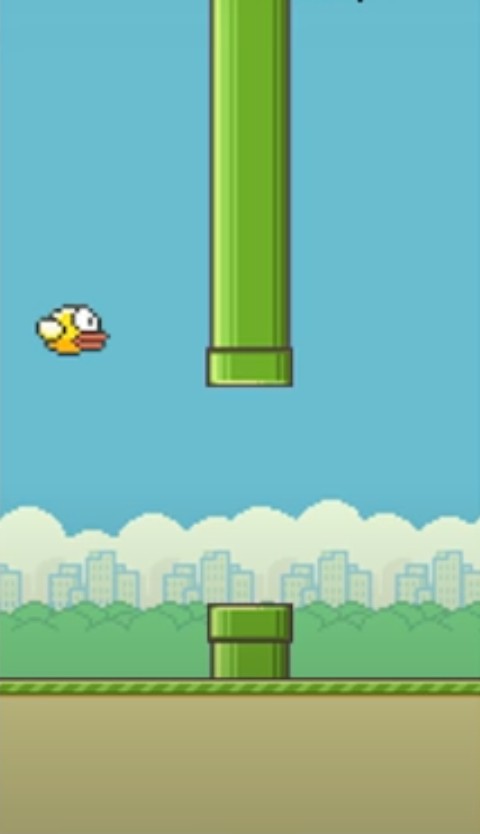
function draw(){ ctx.drawImage(bg,0,0); for(var i = 0; i < pipe.length; i++){ constant = pipeNorth.height+gap; ctx.drawImage(pipeNorth,pipe[i].x,pipe[i].y); ctx.drawImage(pipeSouth,pipe[i].x,pipe[i].y+constant); pipe[i].x--; if( pipe[i].x == 125 ){ pipe.push({ x : cvs.width, y : Math.floor(Math.random()*pipeNorth.height)-pipeNorth.height }); } // detect collision if( bX + bird.width >= pipe[i].x && bX <= pipe[i].x + pipeNorth.width && (bY <= pipe[i].y + pipeNorth.height || bY+bird.height >= pipe[i].y+constant) || bY + bird.height >= cvs.height - fg.height){ location.reload(); // reload the page } if(pipe[i].x == 5){ score++; scor.play(); } } ctx.drawImage(fg,0,cvs.height - fg.height); ctx.drawImage(bird,bX,bY); bY += gravity; ctx.fillStyle = "#000"; ctx.font = "20px Verdana"; ctx.fillText("Score : "+score,10,cvs.height-20); requestAnimationFrame(draw); } draw();Now that the code is done, you need to save the entire HTML file and flappyBird.js. You can right-select the Sublime window and select Open in a new browser to play the game you just wrote. The result you get should look like the image below: if everything goes well.
Please visit: What is JavaScript? And to refer to other JavaScript exercises, please visit: Collection of JavaScript exercises with sample code. This helps you learn more about JavaScript.
Final Thoughts
The most reliable way to handle coding flappy bird game using JavaScript is to follow the process in order, verify each important setting, and test the result before moving on. Use the guidance above as a practical reference, then adjust the details for your device, software version, or specific goal.
FAQ
What should I know first about Coding Flappy Bird Game Using JavaScript?
JavaScript is also one of the most popular programming languages today.
How do I get the best results with Coding Flappy Bird Game Using JavaScript?
Use current software or equipment, follow the steps in order, review the recommended settings, and test one change at a time so you can identify what improves the result.
What should I do if Coding Flappy Bird Game Using JavaScript doesn't work as expected?
Check compatibility, permissions, connectivity, and version-specific settings. Restart the relevant device or app, then repeat the process carefully before trying a more advanced fix.
Related Articles
 Flappy Bird's Game 'Eat by': Flappy Bird Eating Game6 minutes read
 Online Scam Alert 'Eat According to Flappy Bird'4 minutes read
 Flappy Bird Will Return to the App Store4 minutes read
 Flappy Bird Was Officially Removed3 minutes read
 Flappy Bird Author Reveals New Games on Twitter4 minutes read
 Flappy Bird Game Is About to Be Revived: What You Need to Know4 minutes read
Reader Comments 0
Sign in with email or Google to join the discussion.