Table of Contents
This guide provides a practical overview of fix sopcast screen error black, jerky or lag with clear explanations and useful details. It focuses on the information users are most likely to need.
With the ballad followers, Sopcast TV viewing software is a very familiar name. Immediately after successful installation on the computer or phone, users can watch all the top matches from many tournaments around the world, immerse in the bustling and vibrant atmosphere all over the pitch.
Some people are watching football but for some reason, the screen suddenly stopped, or sometimes snapped, only the sound but not the picture or vice versa. The steps below explain how to fix the image error, shock or lag on Sopcast.
First of all to fix this, you need to download the latest SopCast and the latest VLC Media Player software to your computer.
Step 1
You turn on Sopcast and the football game you want to watch, then mute the program.

Step 2
We open the downloaded VLC Media Player software and also mute the program.
At the interface of the program, select Media Item and select Open Network Stream.
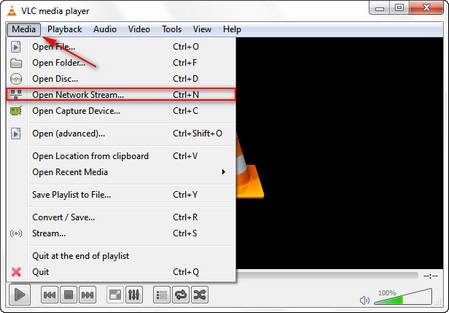
Step 3
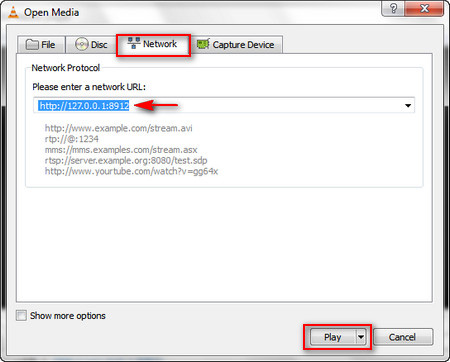
A new window appears, we select the Network Section. You will see a white frame to enter the URL Network . There will be the following 3 links:
- Link 1: http://127.0.0.1:8902
- Link 2: http://127.0.0.1:8912
- Link 3: http://127.0.0.1:8922
We will select 1 of 3 links and paste in the white frame. These stream links will increase the viewing speed of Sopcast, compared to normal, especially when watching TV. After you've paste the link, press Play To save the setting.
Go back and try to see if the error on the Sopcast has been fixed.
Refer to the following articles
- How to record a screen with VLC Media Player?
- 10 interesting hidden functions of VLC Media Player
- 6 tips of VLC you may not know?
I wish you all success!
FAQ
What is the main benefit of fix sopcast screen error black, jerky or lag?
The main benefit is a clearer understanding of the topic and a practical way to apply the information covered in this guide.
What should I check before using fix sopcast screen error black, jerky or lag?
Confirm compatibility, review the required settings, protect important data, and use the latest supported version whenever possible.
What should I do if the result is different?
Repeat the steps carefully, verify permissions and version differences, and consult the product's official support documentation for changes not shown in the article.
Related Articles
 Fix the Error 'Cannot Access Sopcast Service' on Sopcast4 minutes read
 Fix Windows 8 Error When Encountering a Black Screen4 minutes read
 How to Fix Viber Black Screen Error: Viber Error3 minutes read
 How to Fix Black Screen Error When Starting Windows8 minutes read
 How Does YouTube Get a Black Screen Error on the Browser?4 minutes read
 Guide to Watching Football Online Using Sopcast on Smart TV6 minutes read
Reader Comments 0
Sign in with email or Google to join the discussion.