Table of Contents
This practical guide walks through fix missing file * .dll manually and software dll-files, explains the main requirements, and highlights common issues that may appear along the way.
But first we will briefly learn a bit about the concept of * .dll file format. I will tell you briefly, as easy as possible to imagine.
I. What is file * .dll? and how does it work?
DLL stands for Dynamic-Link Library. This is a library provided by Microsoft that contains structured files that programs or software may call it during use.
This makes sense in helping many different programs / software can share a single file and take advantage of its capabilities at the same time.
Windows .dll library helps the operating system to minimize file duplication, making it much cleaner. The DLL file contains classes, functions, variables, interfaces, and resources such as icons, images .
On all operating systems, you will encounter two types of libraries: the static library (lib) and the dynamic library (.dll).
While the static libraries are linked to the executable at compile time, the dynamic libraries are not. A dynamic library is a standalone file that can be updated individually without altering the * .exe executable.
II. Why is the .dll file missing on the computer?
Windows operating system stores a large number of * .dll files, so the frequency of using them is very high, so DLL-related errors are also very common.
The main directory where the .dll files are stored are C: WindowsSystem32 (for Windows 32bit operating system) and C: WindowsSysWOW64 (for Windows 64bit operating system). You can access that folder to view.
III. Some warnings about missing * .dll files are common
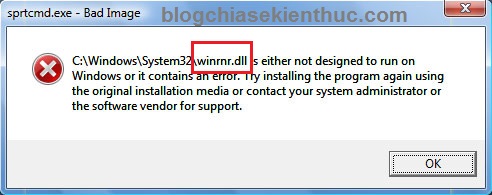
The key to dealing with this problem is that you need to read the error in the error message popup window. For example, in the picture below, the computer is reporting a missing file winrnr.dll error.
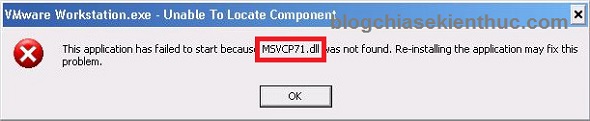
Error message file MSVCP71.dll is missing
Error message file WS2_32.dll missing

Error message file MSVCR71.dll missing

Above, we take a few examples of missing dll file errors, and countless other errors of missing dll files. To solve this .dll file missing error we have 2 ways that is to use the software and not to use the software. Here are the detailed instructions for you:
1. Fix the error of missing dll files without using the software
+ Step 1: Look at the error message popup and remember the name * .dll file that I am missing. For example, in the figure 1, I am missing the winrnr.dll file.
+ Step 2: Visit the website here.
+ Step 3: Enter the name of the .dll file in the search box => then press Enter to search.

+ Step 4: Click DOWNLOAD ZIP-FILE

Next, choose the version that matches the version of Windows that you are using to download (How to see if the computer is using win 32bit or 64bit).

+ Step 5: Extract the file you just downloaded (you can use Winrar to unzip). Then copy the extracted file to the Windows System folder. You copy the path corresponding to the system as follows:
32bit Windows version:
- Windows® 95/98/Me bạn copy vào thư mục System: C:WindowsSystem
- Windows NT/2000 bạn copy vào thư mục System32: C:WINNTSystem32
- Windows XP, Windows Vista, Windows 7/8/8.1 bạn copy vào thư mục System32 C:WindowsSystem32
64bit Windows version:
You copy the following path: C:WindowsSysWOW64
OK! Now, please reopen the program that failed to install and run again to see the results.
2. Using the software DLL-Files Fixer
Dll-files Fixer is a software provided by the website we have manually searched above which is dll-files
And of course to use this software, you will have to pay a fee for them. But in return, you will not need to search and install manually anymore, but all will be made from a to z by Dll-files Fixer software with just 1 click.
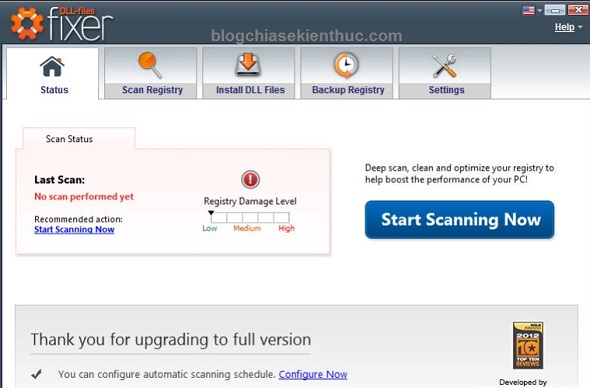
Some of the main advantages of Dll-files Fixer
- Fix missing dll file errors quickly and easily.
- Registry optimization and smart Registry defrag.
- Repair errors caused by the Registry.
- Increase the speed and performance of computer systems.
- Prevent and restrict applications and your computer from hanging during use.
You can download the trial version here .
3. Install additional Microsoft support applications
In addition to how to find the missing DLL file, Review the following DLL file missing error correction books:
- The easiest way and also the way you should try to apply it first is to try to reinstall the software / program again.
- Try to use Windows Resource Protection Tool or System File Checker (SFC) to deal with missing system files.
- Update the Microsoft Visual C ++ Redistributable packages if Windows is missing.
- Install the Microsoft .NET Framework packages that are appropriate for the Windows operating system.
IV. Conclude
Those are the most effective and common ways to fix missing dll files today. And in my opinion, I recommend that you use the manual method better, not having to waste time installing.
Unless you cannot download it manually, please use the software at this time. Good luck!
Key Takeaways
Use the information above as a practical reference for fix missing file * .dll manually and software dll-files. Review each step carefully, confirm any requirements, and choose the option that best fits your situation.
FAQ
What does this guide explain about Fix Missing File * .Dll Manually and Software Dll-files?
It explains the main concepts, practical considerations, and useful steps related to fix missing file * .dll manually and software dll-files without requiring advanced knowledge.
Who can benefit from learning about Fix Missing File * .Dll Manually and Software Dll-files?
This information is useful for readers who want a clear overview, practical guidance, and reliable steps related to fix missing file * .dll manually and software dll-files.
What should I check before applying this information?
Review the requirements, confirm that your device, software, or situation matches the instructions, and back up important data before making major changes.
Related Articles
 Fix Windows Errors: Fix the Error Missing Wmvcore.dll File4 minutes read
 What Is a DLL File, and How Does This File Work?5 minutes read
 How to Fix Missing Dll File on Windows3 minutes read
 What Are DLL Files? How Does It Work? Why Is the DLL File8 minutes read
 Top 10 Best DLL Error Correction Software for Windows 20197 minutes read
 Why Are So Many People Still Backing up Files Manually in 2025: Explained6 minutes read
Reader Comments 0
Sign in with email or Google to join the discussion.