Table of Contents
Flurry: Email for Mobile Phones is easier to understand when the core ideas are paired with practical examples. The sections below explain the topic clearly, highlight useful steps, and point out details that can prevent common errors.
Comprehensive email management is the advantage of high-end devices like BlackBerry and Palm Treo. However, two free services Flurry and Teleflip still allow you to check your email right on a regular mobile phone. 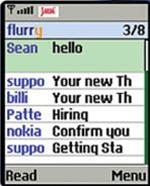
Flurry's inbox displays the header header for each email
For Flurry, you need to own a Java-enabled mobile phone and have Internet access. After registering, you will receive a text message with a link, you need to click it to download and install a Java utility. Installation takes only a few minutes. Then, each time you launch, the utility will download the header (header) of the emails. All emails that this utility downloads are processed through Flurry server - which is responsible for compressing images and removing headers to reduce data download time. You can add multiple email accounts and RSS feeds and sync contacts in CSV file format through Flurry's account management homepage. You can also set up filters, As an example,, only downloading emails sent from predefined people. Flurry does not update the inbox if it has not been requested, but you can set up an alert feature every time you receive a new email. Flurry officially announced this service to support about 700 phones worldwide. However, Flurry cannot operate on the Alltel and Verizon networks that prohibit third parties from installing software on their devices. Easy access 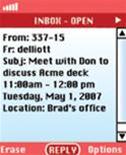
Teleflip uses SMS to display email content on mobile phones
Teleflip does not encounter Flurry's problems because it does not require users to download the software. You only need to register online via the computer and list the email addresses of those who email you to download to your phone. Teleflip's servers will immediately forward emails via SMS text messages. This makes Teleflip look like an email push and is almost accessible on all current mobile models. However, Teleflip also has some disadvantages. As an example,, the ability to create a safe sender list (whitelist) with anti-spam task makes it difficult to control the inbox, you also take a moment to put all of your existing contacts into the list. this. Similarly, because SMS content cannot exceed 160 characters, Teleflip must cut longer messages into multiple small messages. Flurry and Teleflip plan to commercialize ads placed at the end of each email. Although these two services are free, you still have to pay for the mobile network to receive data or text messages. The two free services can be found at Flurry: http://www.flurry.com and Teleflip: https://www.teleflip.com.
FAQ
What is Flurry: Email for Mobile Phones?
Comprehensive email management is the advantage of high-end devices like BlackBerry and Palm Treo.
Why is Flurry: Email for Mobile Phones important?
A clear understanding of Flurry: Email for Mobile Phones helps you make informed decisions, avoid common mistakes, and use the relevant tools or techniques more effectively.
How should beginners approach Flurry: Email for Mobile Phones?
Start with the fundamental concepts, follow the examples step by step, and test each change in a safe environment before applying it to important systems or data.
Related Articles
 Instructions for Setting up an Email Account on iPhone (SMTP / IMAP5 minutes read
 Security for Mobile Phones: Explained6 minutes read
 10 Best Mobile Phones: Digital Devices8 minutes read
 First Confirmation in the World4 minutes read
 China Mobile Plans to Deploy 5 5G Cities in China4 minutes read
 How to Add and Delete Email Accounts on Mac, iPhone and iPad13 minutes read
Reader Comments 0
Sign in with email or Google to join the discussion.