Table of Contents
This guide provides a clear, practical overview of "Remove Instagram and X Ads with This Simple Trick". It organizes the most useful details, explains important considerations, and highlights the steps or choices that matter most.
Remove Instagram and X ads on computer
Many users choose ad blocking extensions to get rid of ads on X and Instagram, but this doesn't work on mobile. That's why many people choose Brave. This free browser blocks ads by default, although you can choose to reduce them. The best part is that it works on both desktop and mobile.
For desktop users, the process is simple. Install Brave and log in to Instagram and/or X. Enjoy an ad-free experience. The browser even lets you go back to your last tab. No more dealing with a "For You" tab filled with random content you don't care about.
Bookmark Instagram and X to quickly open them whenever you do things like scrolling or posting your own content. Many people like to install the web app on their desktop, which is essentially a desktop shortcut.
After opening Instagram or X in a tab, click the Install button (the small laptop) at the end of the address bar. Click Install when prompted.
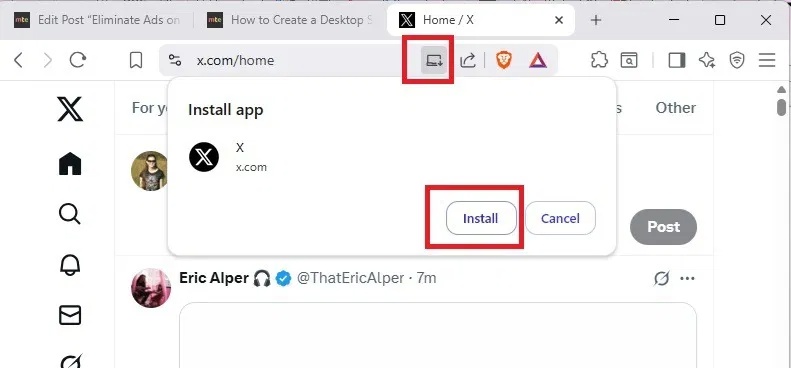
Then just click the desktop shortcut to open the desktop app, no ads.

Remove X and Instagram Ads on Mobile
Brave doesn't block ads in the mobile app. You'll have to install the web app versions of Instagram and X to get rid of ads. This is inconvenient, but it can save you a lot of scrolling time when you're stuck with ads.
Install the Brave mobile browser. Then open X or Instagram in Brave and log in to the browser. Do not use the Instagram or X apps. Again, let's use X as an example.
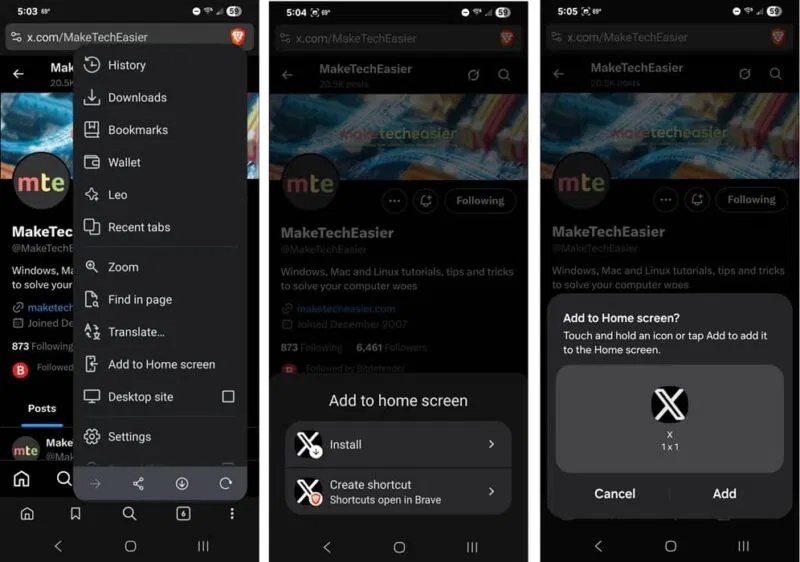
Tap the three dots in the lower-right corner and select Add to Home screen . Tap Install . This will install the web app. If you just want a shortcut to open in a new Brave tab, tap Create shortcut .
Tap Add to add the shortcut to your home screen. You can tap and hold the shortcut and move it wherever you want later.
Resolve the compromises
Remember how the article said that this ad removal trick has some downsides? You'll have to decide if these compromises are worth removing ads from Instagram and X.
The biggest issue is that you'll have to log back into X and Instagram every time you clear your cookies and/or history on Brave. Logging back in is faster than navigating through the ever-increasing number of ads.
The second issue is only with Instagram on mobile. Not sure why it doesn't happen on the X. However, if you tap on a post to comment or scroll through the comments, when you go back, you're taken straight to the top of the feed. The feed doesn't refresh, which is incredibly annoying.
Another issue users face is zoom issues on mobile devices. When you install the web app, sometimes the web app disables the zoom feature. Brave allows you to fix this.
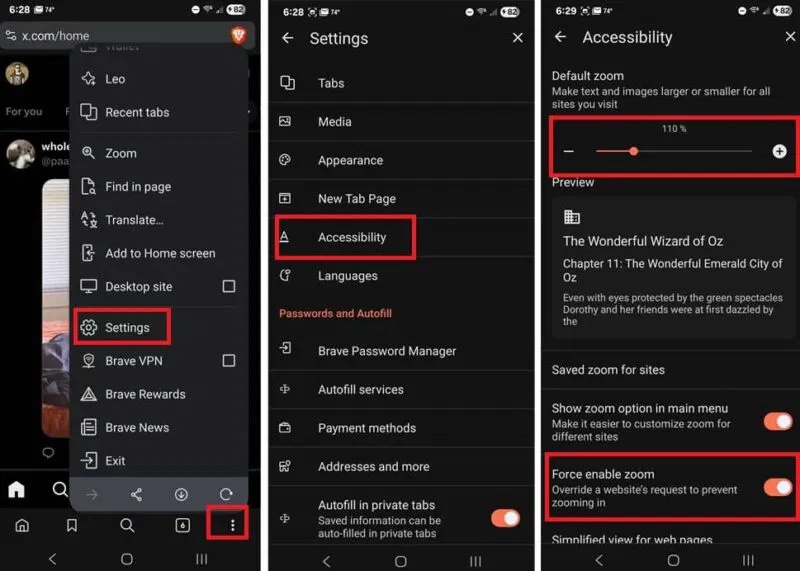
Open Brave (not the X or Instagram web app you installed), tap the three vertical dots menu in the bottom right corner, and select Settings . Scroll down and tap Accessibility . Turn on Force enable zoom . You can also use the Default zoom slider to zoom text and images by default if you want.
There's one more benefit, though. Brave blocks trackers by default, so any activity you do on X and Instagram will only be visible to those networks, rather than tracking you across all the other sites and apps you use. You can check to see if any sites are sharing your activity with Instagram. Brave doesn't anonymize you, so if you want to view someone's Instagram Stories anonymously, you'll need to use other methods.
FAQ
What should you know about remove Instagram and X ads on computer?
Many users choose ad blocking extensions to get rid of ads on X and Instagram, but this doesn't work on mobile. That's why many people choose Brave. This free browser blocks ads by default, although you can choose to reduce them. The best part is that it works on both desktop and mobile.
What should you know about remove X and Instagram Ads on Mobile?
Brave doesn't block ads in the mobile app. You'll have to install the web app versions of Instagram and X to get rid of ads. This is inconvenient, but it can save you a lot of scrolling time when you're stuck with ads.
What should you know about resolve the compromises?
Remember how the article said that this ad removal trick has some downsides? You'll have to decide if these compromises are worth removing ads from Instagram and X.
Related Articles
 Instagram Allows You to Remove Your Followers If You Find Them Annoying4 minutes read
 How to Clean up Your Instagram Account in 202112 minutes read
 How to Delete Phone Contacts from Instagram3 minutes read
 How to Change Instagram Account Information on the Computer3 minutes read
 How to See When You're Following Someone on Instagram4 minutes read
 6 Simple Steps to Have Great Photos on Instagram5 minutes read
Reader Comments 0
Sign in with email or Google to join the discussion.