Table of Contents
OpenAI introduces group chat feature for ChatGPT, allowing multiple people to chat together with contextual AI support.
OpenAI has just introduced an exciting new collaboration experience for ChatGPT users in select regions. Group chats Allow multiple people to converse in a single ChatGPT-powered conversation whenever needed.
How group chat works on ChatGPT
You can start a group chat by tapping the new person icon that appears in the top right corner of any conversation, new or old. When joining or creating a group chat for the first time, users will need to quickly set up a profile with a name, username, and avatar.
You can invite friends to join by sharing the direct link. Each group supports up to 20 members , and anyone in the group can continue to share the link to invite others to join.
If you add someone to an existing private chat, ChatGPT will automatically create a copy as a new group chat, ensuring the original chat is not disturbed. Group chats will appear in a separate section in the sidebar, making them quicker to access.
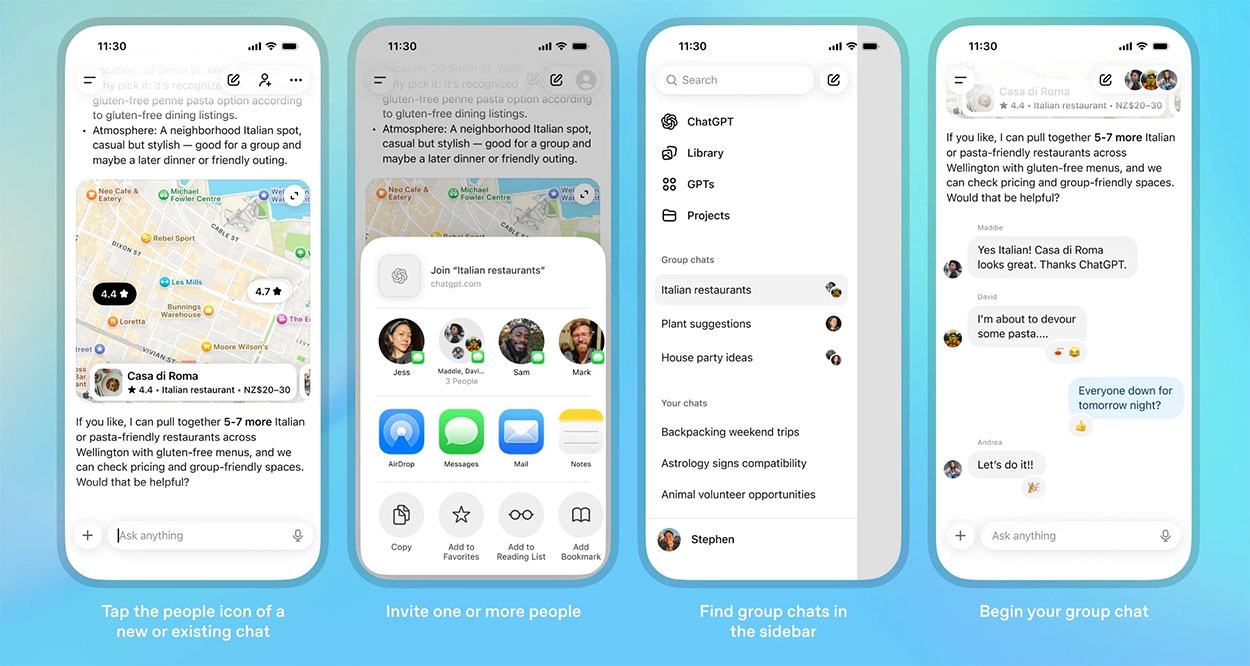
Group chat responses are handled by the GPT-5.1 Auto Model — the system automatically selects the GPT 5.1 version that best suits the user's needs and service package. All familiar features such as searching, uploading photos and files, creating images, or voice input are fully supported in group chat.
OpenAI emphasizes that the usage limit only counts when ChatGPT responds, and messages between members will not count towards the limit.
ChatGPT is 'taught' additional social behaviors
To suit the group chat environment, ChatGPT has been adjusted to behave in a more natural way. The AI will not automatically respond to every message, but will observe the flow of the conversation and decide when to speak up. You can also 'summon' ChatGPT by tagging its name in a message. Additionally, ChatGPT can drop emojis to respond with more human-like emotions.
You can rename groups, add or remove members, turn off notifications, or set Custom instructions For each group chat so that ChatGPT responds in the desired style.
The group chat feature is being piloted for ChatGPT Free, Go, Plus, and Pro users on web and mobile in Japan, New Zealand, South Korea, and Taiwan . Based on initial feedback, OpenAI will continue to refine and expand to more regions and service plans.
FAQ
What is new about ChatGPT launches group chat feature?
In practical terms, OpenAI introduces group chat feature for ChatGPT, allowing multiple people to chat together with contextual AI support.
Why does this update matter?
The article highlights that if you add someone to an existing private chat, ChatGPT will automatically create a copy as a new group chat, ensuring the original chat is not disturbed.
Is the change available to everyone?
Availability may depend on the product version, region, account, or rollout stage described in the article.
Related Articles
 What Is Auto-GPT? How Is It Different from ChatGPT?8 minutes read
 ChatGPT Launches an Assistant to Rival Siri and Google Assistant4 minutes read
 Chatgpt Will Come to Discord Chat3 minutes read
 OpenAI Enables ChatGPT to Chat Directly with Apps: Complete Guide4 minutes read
 Facebook Launches Workplace Chat Application That Supports Screen Sharing for Windows3 minutes read
 Facebook Added a New Feature That Allows Chat for 250 People in the Group3 minutes read
Reader Comments 0
Sign in with email or Google to join the discussion.