Table of Contents
This guide provides a practical overview of CASIO FX-570MS Computer Simulation Software, including its main features, benefits, limitations, and important considerations.

First, we download Casio FX-570MS emulator software here:
Copyright of CASIO FX-570MS computer simulation software belongs to Ho Chi Minh City University of Education and Binh Tay Import Export Joint Stock Company (BITEX)
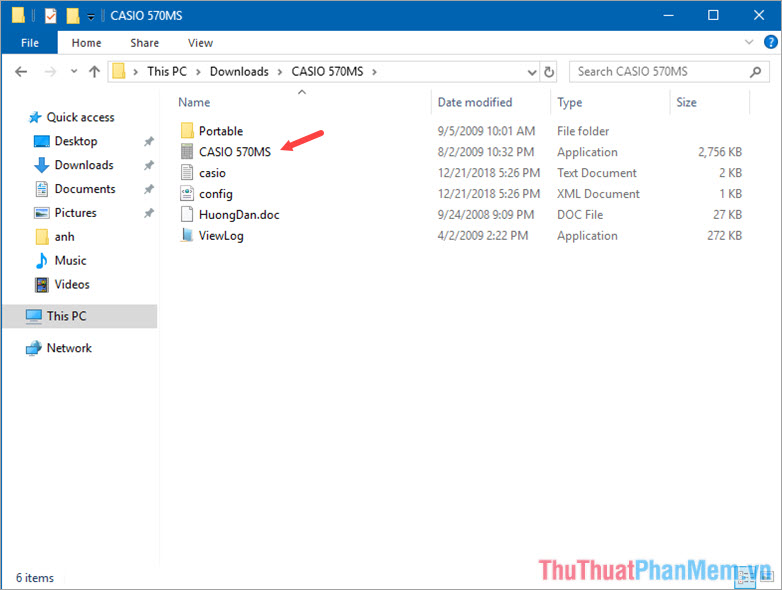
Step 1: After downloading and extracting, run the CASIO 570MS file as shown below. (Requires the machine to install . Net Framework 3.5 or higher software).
Step 2: After opening the software, the handheld computer interface Casio FX 570MS appears. Use your mouse to select the buttons.

To enlarge the results screen, right-click on the Casio FX-570MS computer interface and select Show large screen .

Large Screen interface ( Large Screen ) of Casio FX-570MS emulation software.

With the CASIO FX-570MS emulator software, we can use it to solve complex math and equations in case we don't have a handheld calculator by our side.!
FAQ
What should I know about CASIO FX-570MS Computer Simulation Software?
Focus on the key features, requirements, limitations, and practical use cases explained in this guide.
How do I get the best results with CASIO FX-570MS Computer Simulation Software?
Follow the recommended steps, use current software or information, confirm compatibility, and review settings before major changes.
Are there any risks or limitations?
Potential limitations depend on compatibility, data quality, cost, privacy, support, and how the product or method is used.
Related Articles
 Classwiz Casio 580 VNX Computer Simulation Application for Free on3 minutes read
 How to Simulate CASIO Fx-580vn X on the Computer6 minutes read
 Discover the Most Memorable Special Edition Casio Watches5 minutes read
 The Most Reliable Casio Watches4 minutes read
 How to Emulate a Computer CASIO Fx-580 VNX on Windows 7/8/104 minutes read
 CASIO FX 570VN PLUS Computer Math Guide10 minutes read
Reader Comments 0
Sign in with email or Google to join the discussion.