TipsMake.com
  • Tips Make home page Home
  • wifi tips Wifi Tips
  • Fix computer error Fix Computer
  • Windows 10 Windows 10
  • Windows 11 Windows 11
  • Artificial intelligence Artificial Intelligence
  • Space Science Space Science
  • Strange story Strange story
  1. Home
  2. Hardware

Hardware

  • USB - Flash DriveUSB - Flash Drive
  • Speaker headsetSpeaker headset
  • PrinterPrinter
  • PC hardwarePC hardware
  • Network equipmentNetwork equipment
  • Laptop hardwareLaptop hardware
  • Computer componentsComputer components
  • Advice ComputerAdvice Computer
  • The best Travel Router you need to bring in your tripThe best Travel Router you need to bring in your trip
    Travel Routers are often considered the 'Swiss army knife' of the Internet. This small device is no bigger than a credit card but don't let its small physique fool you.
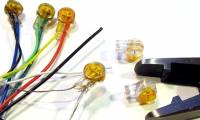
  • How to connect the network with a bugHow to connect the network with a bug
    Bed bugs are used to connect two telephone lines, network wires, data signal cables and other types of electrical wires.
  • What is Travel router?What is Travel router?
    Travel router is a type of broadband router designed for those who want to travel and need to connect to the Internet when there is no power.
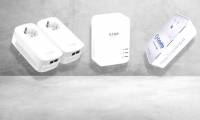
  • Top 5 Powerline Adapter for the best home network 2018Top 5 Powerline Adapter for the best home network 2018
    Powerline adapters (devices that transfer Internet via home electrical systems) are really great. Although Wi-Fi for Internet access is not disrupted, sometimes users need a
  • 8 best Wifi security routers8 best Wifi security routers
    For many people, online today is as important as the need to dress, but using a Wifi router is not always appreciated. Wifi routers perform very good security, users hardly
  • Network basics: Part 2: Understanding the RouterNetwork basics: Part 2: Understanding the Router
    Routers are an important networking device that almost every home owns but they really don't know much about them. In fact, most people don't even know what the router looks like,
  • Why need to change the wireless channel of the router?Why need to change the wireless channel of the router?
    The 2.4 and 5GHz Wi-Fi signal range is divided into a number of smaller strips called wireless channels. Each wireless channel translates to a specific radio frequency
  • How to choose the best WiFi channel for the routerHow to choose the best WiFi channel for the router
    Your Wi-Fi speed can really be affected if you are in a crowded area. However, you can speed up immediately. It is to choose a single Wi-Fi channel that only you use.
  • Instructions for choosing the right Wi-Fi routerInstructions for choosing the right Wi-Fi router
    How to choose a router to suit your needs? In this article we will give you some tips on choosing the best router for your needs.
  • Summary of the best Wi-Fi Router devicesSummary of the best Wi-Fi Router devices
    Whether computers can catch Wi-Fi is stable and good depends a lot on Wi-Fi transmitters. The transmitter has quality, the signal transmission speed is guaranteed.
  • Restart the router and modem properly?Restart the router and modem properly?
    Restarting network devices in the correct steps can make a difference.
  • The router is not as safe as you thinkThe router is not as safe as you think
    It all depends on whether your router is secure. Here are 10 ways that your router may be exploited by hackers and other intruders.
  • What is Kodi Box?What is Kodi Box?
    Although we discussed the Kodi application in detail in the past, we probably haven't spent much time talking about the Kodi box. With the Kodi box becoming increasingly popular,
  • 6 best Wifi wave-enabled devices and Wifi wave amplifiers in 20186 best Wifi wave-enabled devices and Wifi wave amplifiers in 2018
    Wifi tuner, Wifi extension or Wifi amplifier are devices that relay and re-broadcast Wifi waves with almost the same intensity as the original equipment and help expand the
  • Network wire historyNetwork wire history
    We tend to see digital media as a new idea, but in 1844, a man named Samuel Morse invented 'The Telegraph'.
  • History EthernetHistory Ethernet
    Today, we obviously use Ethernet. Just plug the plug into the wall outlet or turn on the switch to have a network to use. But before that, things weren't like that.
  • Top 10 best Wi-Fi cardsTop 10 best Wi-Fi cards
    There are a lot of options and different criteria for us to classify what a good Wi-Fi card is.
  • Difference between WiFi Booster, Repeater and ExtenderDifference between WiFi Booster, Repeater and Extender
    When you want to expand the range of WiFi network coverage, you can do that with a special hardware, called 'booster', 'repeater' or 'extender.' These three terms are basically
  • Difference between Repeater and AmplifierDifference between Repeater and Amplifier
    Repeater and Amplifier are all electronic devices used to enhance the power of the transmitted signal. The most obvious difference between the two devices is that the repeater is
  • 8 best optical cable modems and cables 20188 best optical cable modems and cables 2018
    Wired network modems are like complex network hardware, but they are relatively simple, at least when compared to the diversity and flexibility of routers. If you're looking for a
  • Prev
  • 1
  • ...
  • 125
  • 126
  • 127
  • ...
  • Next
Most viewed
  • How to merge drives using MiniTool Partition Wizard, delete hard drive partitions. How to merge drives using MiniTool Partition Wizard, delete hard drive partitions.
  • How to choose a motherboard for your computer or laptop. How to choose a motherboard for your computer or laptop.
  • The computer has a driver conflict. The computer has a driver conflict.
  • Review of the Seasonic Prime 1000GD 1000W power supply Review of the Seasonic Prime 1000GD 1000W power supply
  • 5 Best 3D Printers of 2026 5 Best 3D Printers of 2026
  • What causes a laptop screen to be dark or blurry? What causes a laptop screen to be dark or blurry?
  • Keyboard shortcuts to rotate your computer screen: horizontal, inverted, 180 degrees, 90 degrees. Keyboard shortcuts to rotate your computer screen: horizontal, inverted, 180 degrees, 90 degrees.
  • How to fix a non-working USB 3.0 port. How to fix a non-working USB 3.0 port.
  • System System
  • Mac OS X Mac OS X
  • Hardware Hardware
  • Game Game
  • Tech info Tech info
  • Technology Technology
  • Science Science
  •  Life Life
  • Application Application
  • Electric Electric
  • Program Program
  • Mobile Mobile
Home | About | Terms | Privacy | Contact
© 2019 TipsMake.com