Table of Contents
This guide covers asus taichi laptop with dual full hd screen with practical context and easy-to-follow details. Use it to understand the subject and apply the information confidently.
Taiwanese manufacturer announced Taichi 31 is ready to sell. However, Asus did not specify the specific price of this model. The Taichi 31 dual-screen laptop was introduced last year but was not released to the market, and many users were disappointed.
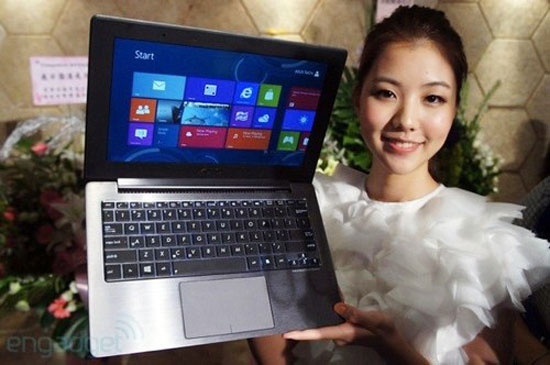 When introduced, Asus Taichi impresses by designing two unique screens (Photo: Engadget).
Asus Taichi 31 is equipped with two screens of Super IPS + Technology with an SSD. It uses Intel Ivy Bridge Core i5 or i7 processor, integrated dual-band Wi-Fi, Bluetooth 4. 0 and 5 megapixel camera to record 1080p video. In addition, the product also has a front webcam that records HD video and runs on Windows 8 operating system. The manufacturer claims that Taichi 31 can work for 7 hours continuously thanks to Asus Super Hybrid Engine II technology. .
Taichi 21, a smaller version of the Taichi 31 model with two 11. 6-inch screens, was sold in October last year. The device is priced from US $ 1, 200 to US $ 1, 500 (about VND 25 million to VND 31. 3 million) depending on the configuration. Therefore, as expected, Taichi 31 will be sold at a much higher price.
FAQ
What should I check before following these steps?
Confirm device and software compatibility, save important data, and make sure you have the required permissions, files, and account access.
Why might the process not work?
Common causes include outdated software, missing permissions, incompatible hardware, an unstable connection, or completing a step in the wrong order.
Can I undo the changes if necessary?
That depends on the tool or setting. Use built-in restore options when available, keep a backup, and record the original configuration first.
Related Articles
 Laptop Windows 8 Two Screens of Asus4 minutes read
 Laptop 'Transformed' Two Screens of Asus4 minutes read
 LG Presents the 3D Laptop Near full-HD Screen3 minutes read
 Samsung in Turn Introduced the Laptop to Reverse It3 minutes read
 Asus Dual Touch Screen Laptop3 minutes read
 Asus ROG Zephyrus Duo Launched: Two-screen Gaming Laptop3 minutes read
Reader Comments 0
Sign in with email or Google to join the discussion.