Table of Contents
This guide covers asus f80s is modern and powerful with practical context and easy-to-follow details. Use it to understand the subject and apply the information confidently.
 Asus F80S black case with many small reticle prints Photo: Asus .
Glossy black casing with many small reticle marks and large soft curves in the middle. Thanks to the advanced Infusion Technology surface coating technology, Asus claims the case is more durable and scratch resistant. If you pay close attention, users will definitely recognize the similarities in the design of the F80s with HP Pavilion dvs - glossy surfaces, easy to leave fingerprints. This makes users more or less uncomfortable because they will have to 'clean' the machine more often. Asus F80S has a 14-inch, medium-sized screen, with widths, depths and thicknesses of 34 x 24 x 4 cm, respectively. The weight is quite light 2. 39 kg (including battery). The keyboard is comfortable to use but still complains that the 'arrow' keys are too small. Important keys like 'Ctrl left', 'Alt left' or 'Windows' are also minimized while the 2 mouse buttons on the edge of the device are larger than normal. However, overall evaluation, Asus F80S keyboard is sensitive, and when used can feel the depth to create comfort when used long.
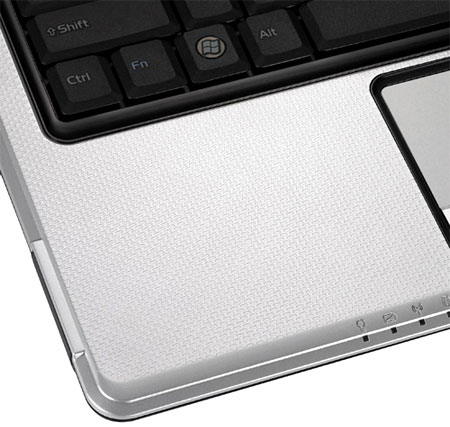 The space around the touchpad is decorated with small motifs Photo: Asus .
While the space of the cover is decorated with small textures with scratches, the touchpad surface is smooth, but not so slippery. When using the user will see good friction and quite sensitive. In contrast, two mouse buttons are a bit 'hard', which requires a lot of pressing when used. Asus F80S screen as a mirror, high brightness but not captured as bright as in many glossy screens in other models. The image on it shows vivid colors and is very suitable for watching movies or playing games. The display of text is also clear with a wide viewing angle. Regarding connectivity, like many other models in this price segment, Asus F80S is fully equipped with modern and necessary connectivity, such as Wi-Fi, Bluetooth, LAN, Modem, 8-in-1 card reader ( 8-in-1), the new standard VGA and HDMI video output, integrated 1. 3 Megapixel Webcam, 3 USB ports, Headphone jack / Microphone and DVD burner. However, these connectors and outputs are slightly different from ASUS on all four sides on the F80S. Configure the test version
Intel Core2 Duo processor T5800 2. 00 GHz 14. 1 inch Screen , 1, 280 x 800 pixels HDD 250 GB hard drive, 5400 rpm RAM Memory 2 GB DDR2 - 667 MHz ATI Mobility Radeon HD 3470 256MB Graphics Card Connect Wi-Fi, Bluetooth, LAN, Modem, VGA, HDMI 3 USB, DVD, Webcam, Headphone / Microphone, 8-in-1 card reader Size 34 x 24 x 4 cm Weight 2. 39 kg (including 6-cell battery) Windows Vista Home Premium Operating system
With Intel Core2 Duo T5800 2. 00 GHz processor, discrete ATI Mobility Radeon HD 3470 256 MB graphics card and 2 GB RAM, running on Windows Vista Home Premium, F80S has smooth performance but basic apps are also not difficult to run Adobe Photoshop software or play games like Call of Duty 4 with basic settings. Test results of F80S with the software to evaluate system performance (PCMark Vantage) achieved a average score of 2, 647, quite good compared to similar models in the popular segment. Overall score of the whole system is 2, 720.
 F80S has a 14-inch screen Photo: Asus .
FAQ
What should I check before following these steps?
Confirm device and software compatibility, save important data, and make sure you have the required permissions, files, and account access.
Why might the process not work?
Common causes include outdated software, missing permissions, incompatible hardware, an unstable connection, or completing a step in the wrong order.
Can I undo the changes if necessary?
That depends on the tool or setting. Use built-in restore options when available, keep a backup, and record the original configuration first.
Related Articles
 ASUS Zenbook OLED - the Top Laptop Line from ASUS7 minutes read
 Instructions for Entering Codes and the Latest Modern Warships Codes3 minutes read
 ASUS ROG Strix SCAR 17 SE: Complete Guide5 minutes read
 REVIEW ASUS TUF GAMING F15: CAN 25 MILLION CONTROL ANY Game?9 minutes read
 The Fastest Asus W90 Gaming3 minutes read
 A Series of New Laptops from Asus4 minutes read
Reader Comments 0
Sign in with email or Google to join the discussion.