Table of Contents
The Radeon RX 7400 is a compact desktop graphics card with 8GB of GDDR6 memory and a 55W typical board-power rating. Its specifications make power and physical fit central to its appeal, but they do not establish how fast it will run a particular game.
AMD Radeon RX 7400 specifications
AMD's official product page lists the following values:
| Specification | RX 7400 |
|---|---|
| Compute units | 28 |
| Stream processors | 1,792 |
| Ray accelerators | 28 |
| Memory | 8GB GDDR6 |
| Memory interface | 128-bit |
| Memory speed | Up to 10.8Gbps |
| Memory bandwidth | Up to 173GB/s |
| Typical board power | 55W |
| Listed dimensions | 167mm long, one slot |
| Minimum PSU recommendation | 450W |
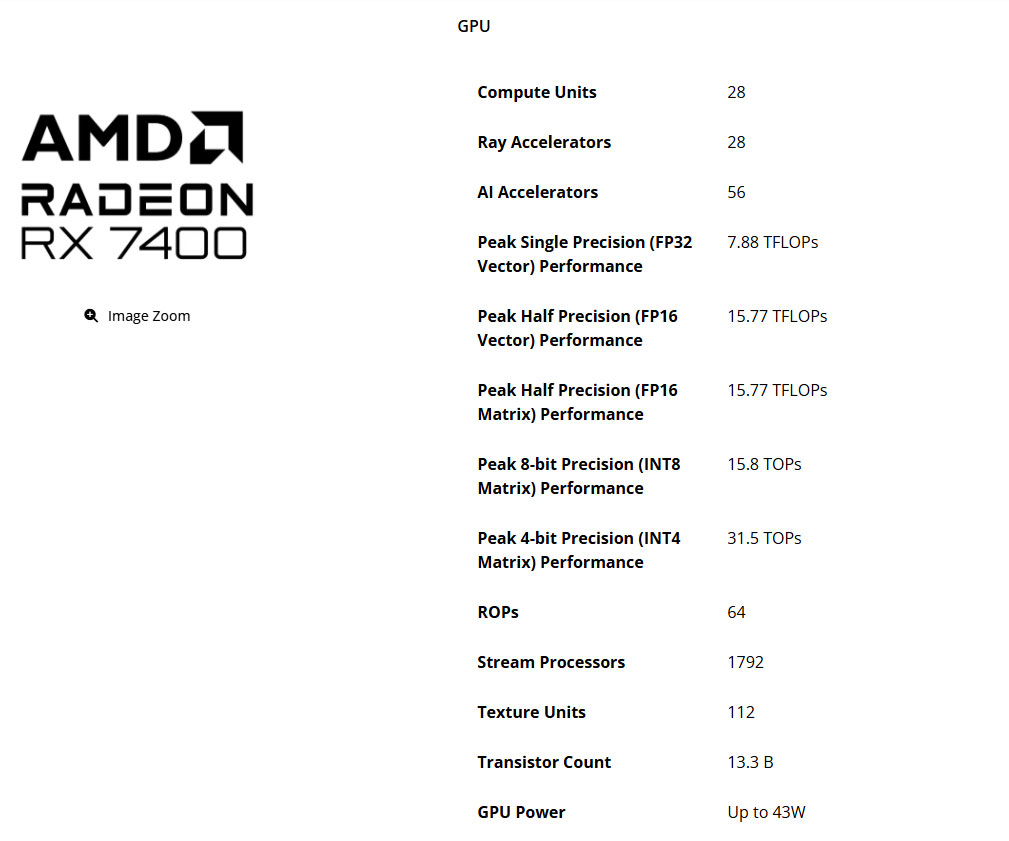
The headline number of 28 refers to compute units, not 28 CPU-like cores. Stream processors, compute units and ray accelerators describe different parts of the GPU; they should not be used interchangeably.
What the low-power design means
A 55W board-power specification can be useful when comparing compact graphics upgrades, but it is not the power consumption of an entire PC. AMD separately lists a system power-supply recommendation. Check the actual card and PC manufacturer's requirements, especially for an OEM system with a proprietary power supply or limited slot power.
Also distinguish a single-slot card from a low-profile card. Slot thickness, bracket height, length and clearance around neighboring components are separate measurements. Verify the exact model rather than assuming it fits every small case. See choosing an appropriate PC power supply for the wider system checks.
What 8GB of memory does not tell you
Two cards can both have 8GB of memory yet perform very differently. Memory speed, interface width, processing resources and power limits all matter. The RX 7400's capacity alone is not evidence that it matches a higher-tier 8GB card.
Ray-tracing support likewise indicates a feature, not a promised frame rate. Compare independent tests for your games, resolution and settings. Be particularly careful with benchmarks that use different upscaling modes or compare an OEM system with a completely different CPU.
Checks before choosing an RX 7400 system
- Confirm the exact graphics model in the PC or card listing and its warranty terms.
- Check chassis clearance, bracket size, slot power and any power connectors specified for that card.
- Verify display outputs against your monitor and adapters.
- Compare actual game or application benchmarks rather than shader counts alone.
- Compare the complete system price and upgrade options; do not assume a low-power card is automatically the best value.
Retail supply, regional prices and OEM configurations can change. For broader comparisons, use the criteria in choosing a graphics card by use case, then verify the exact model's current specifications before ordering.
Related Articles
 AMD released two new generation GPU models, Radeon Pro W5500 and Radeon Pro W5500M
 AMD Radeon 800M iGPU with 16 RDNA 3.5 cores scores more than 3600 points in 3DMark Time Spy, nearly equal to RTX 2050 Perf
 Intel launches 14th generation desktop CPU without E core: Flagship Core i9-14901KE with 8 P cores, clocked at 5.8GHz, TDP 125W
 AMD unveils Radeon RX 6900 XT liquid cooling version
 AMD launches Radeon Pro W5700, the first 7nm GPU for workstations
 Difference between GDDR6, GDDR6X and GDDR7
Reader Comments 0
Sign in with email or Google to join the discussion.