Table of Contents
This guide covers alienware upgraded m15x, m17x with core i7 with practical context and easy-to-follow details. Use it to understand the subject and apply the information confidently.
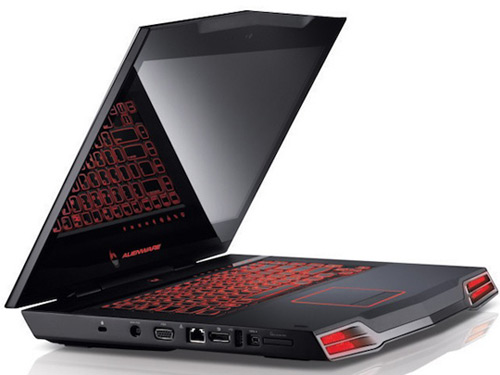 Alienware is the most popular gaming laptop brand today Photo: Alienware .
Alienware M15x has a choice of Core i3, Core i5 or Core i7 processors with 512MB NVIDIA GeForce GT 240M graphics card or 1GB GeForce GTX 260M. This model owns a 15. 6-inch wide screen WLED with a resolution of 1, 600 x 900 pixels or 1, 920 x 1, 080 pixels. M15x is also equipped with a traditional hard drive of 250GB capacity or SSD hard drive with capacity of 128GB or 256GB. Meanwhile, the M17x is integrated with Core i7-920XM processor, dual graphics GeForce dual GPU GTX 280M or Mobility Radeon HD 4870s. It has additional Blu-ray drive options and many other user-selected options. Alienware M15x will go on sale early next month with a starting price of $ 1, 199 and $ 1, 799 for the M17x version with Core i7.
FAQ
What should I check before following these steps?
Confirm device and software compatibility, save important data, and make sure you have the required permissions, files, and account access.
Why might the process not work?
Common causes include outdated software, missing permissions, incompatible hardware, an unstable connection, or completing a step in the wrong order.
Can I undo the changes if necessary?
That depends on the tool or setting. Use built-in restore options when available, keep a backup, and record the original configuration first.
Related Articles
 Alienware M17x Runs Sandy Bridge Chip from $$ 1, 4993 minutes read
 The Trendy Core i7 Laptops5 minutes read
 The 2012 Alienware M14x, M17x and M18x Version Use the New GPU, the Old4 minutes read
 Alienware M18x Is Upgraded to Ivy Bridge4 minutes read
 Dell Stopped Producing Alienware M15x3 minutes read
 Alienware Area-51 m17x: Laptop 'Alien'2 minutes read
Reader Comments 0
Sign in with email or Google to join the discussion.