Table of Contents
This guide covers alienware m18x is upgraded to ivy bridge with practical context and easy-to-follow details. Use it to understand the subject and apply the information confidently.
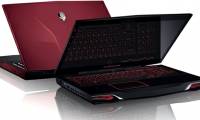
 Dell Alienware M18x R2 has 2 colors black and red.
Since early January, the Dell-lab site Has leaked information about Alienware M18x R2 laptop, M17x R4 and M14x R2, the upgraded version of M18x, M17x and M14x, may be equipped with new Intel Ivy Bridge chip.
Yesterday, the blog went on to reveal the detailed configuration of the PC for gamers of 2012. According to that, Alienware M18x R2 will have an 18. 4-inch screen, equipped with Ivy Bridge processor i7-3610QM. 2. 3Hz or i7-3820QM speed 2. 7GHz, with Radeon 7970M graphics card or GeForce GTX 675M.
At the same time, this "massive" machine will be able to power up to 8GB of RAM, along with optional SATA III HDD / SSD hard drives of 750GB or 512GB capacity. Alienware M18X R2 may be equipped with a Wireless HD card (optional), a 240 watt AC adapter or 330 watts.
Alienware M18X R2 has 2 optional colors that are red and black.
Alienware notebook series for gamers released the first generation in 2009 and upgraded after each year. However, to date, in addition to the leaked information mentioned above, Dell has not yet announced the launch date and price of M18x 2012 version.
FAQ
What should I check before following these steps?
Confirm device and software compatibility, save important data, and make sure you have the required permissions, files, and account access.
Why might the process not work?
Common causes include outdated software, missing permissions, incompatible hardware, an unstable connection, or completing a step in the wrong order.
Can I undo the changes if necessary?
That depends on the tool or setting. Use built-in restore options when available, keep a backup, and record the original configuration first.
Related Articles
 The 2012 Alienware M14x, M17x and M18x Version Use the New GPU, the Old4 minutes read
 Actual Photo of the 'Giants' Alienware M18x3 minutes read
 The 2012 'Life' Dell Alienware Costs from 1, 100 USD4 minutes read
 Alienware M17x, M18x Add GTX680M Card Option4 minutes read
 Outstanding Laptop 2011 According to Each Criterion10 minutes read
 Dell Upgraded the Alienware Product Line with 4K Screens3 minutes read
Reader Comments 0
Sign in with email or Google to join the discussion.