Table of Contents
This curated overview of 151 Android apps that steal money in your account, you focuses on useful options, standout features, and details worth checking before making a choice.
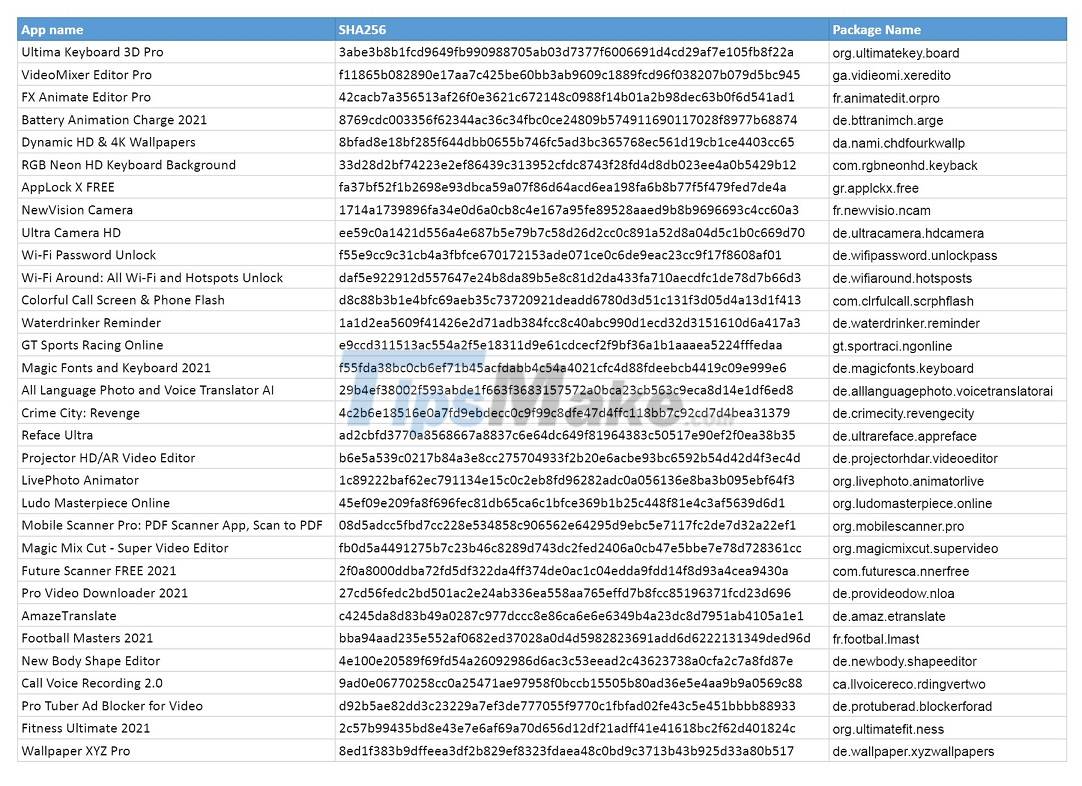
All of these apps are run under a large-scale phishing campaign called UltimateSMS. In total, these 151 scam apps have been downloaded more than 10.5 million times through the Google Play Store.
After tricking users into installing, the app will automatically adjust to the country based on data collected from the device such as location and IMEI number. Next, they require the user to enter a phone number and email to gain full access to the app's features.
When the phone number is obtained, the application will automatically register for the SMS messaging service that costs 40 USD / 1 month without the user knowing.
To see the full list of 151 apps, you can visit the GitHub link here.
If you have accidentally installed one of these applications, you should proceed to remove it immediately. Also, to avoid losing money in the future, you need to contact your mobile service provider to request cancellation of all registered SMS messaging services.
Google also received a report from Avast and quickly removed all these apps from the Play Store.
Key Takeaways
Use the information above as a practical reference for 151 Android apps that steal money in your account, you. Review each step carefully, confirm any requirements, and choose the option that best fits your situation.
FAQ
What does this guide explain about 151 Android Apps That Steal Money in Your Account, You?
It explains the main concepts, practical considerations, and useful steps related to 151 Android apps that steal money in your account, you without requiring advanced knowledge.
Who can benefit from learning about 151 Android Apps That Steal Money in Your Account, You?
This information is useful for readers who want a clear overview, practical guidance, and reliable steps related to 151 Android apps that steal money in your account, you.
What should I check before applying this information?
Review the requirements, confirm that your device, software, or situation matches the instructions, and back up important data before making major changes.
Related Articles
 Kaspersky Expert Warns About an Android Virus That Can3 minutes read
 Series of Fake Android Apps You Should Remove from Your Device Immediately6 minutes read
 How to Restore Deleted Applications on Android // iOS5 minutes read
 Apps You Need to Remove from Your iPhone Soon5 minutes read
 The Best 'Money-making' Apps on Android7 minutes read
 23 Malicious Apps That Steal Facebook and Instagram Accounts3 minutes read
Reader Comments 0
Sign in with email or Google to join the discussion.