Table of Contents
This curated overview of 11 coolest new watchos 8 features focuses on useful options, standout features, and details worth checking before making a choice.
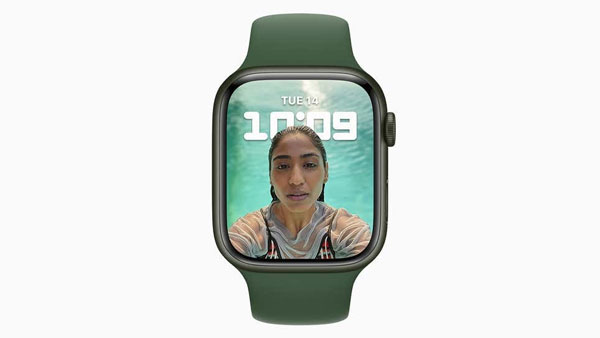
Use your portrait as your profile picture
With watchOS 8, users can use a portrait of themselves or anyone else as their profile picture on their smartwatch. To select photos, users access the Face Gallery section on the Apple Watch iPhone application.
Meditation
In watchOS 8, Mindfulness - a breathing guidance application with expanded breathing patterns combined with new features to help users become more calm.
In addition, watchOS 8 also provides detailed and effective meditation instructions for subscribers to the Fitness+ service.
Easy messaging
WatchOS 8's refreshed interface makes it easier for users to message, more content, can draw shapes, enter expressions, send animations to make conversations more interesting.
Time many times
WatchOS 8 allows users to self-timer multiple times, an important feature for forgetful people. Users can use the Timers app to set a manual timer or give Siri commands. Each appointment time will be given a separate title to help users identify easily.
Find lost device
In watchOS 8 there is a new app for locating different devices. One is Find Devices to find large items like iPhones, iPads and Macs, the other is Find Times to find small traceable items like AirTags.
In addition, watchOS 8 also allows users to turn on alerts on Apple Watch when it leaves a paired device like an iPhone. This will help users leave their phone at home or out in a cafe.
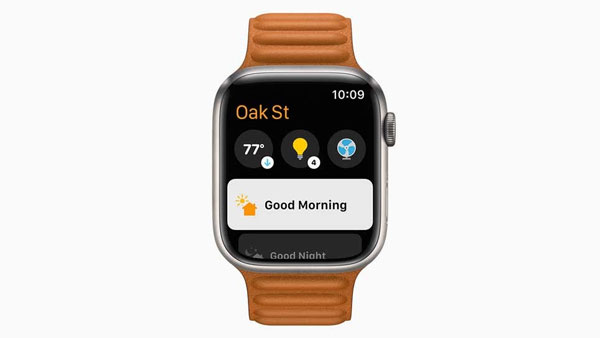
Smart home control
With watchOS 8, smart home control will be more integrated in the Apple Watch. Users who have control over multiple HomeKit devices can view the camera without turning on their iPhone.
Weather forecast
The Weather app on watchOS 8 has been improved. Users will receive notifications, warnings and reminders about the weather situation occurring in the next few hours, when clicking inside will have full details.
Unlock more
In the watchOS 8 update, the Apple Watch Wallet app has been improved to support opening the door of the house, unlocking the car integrated on the smart watch.
In some cases, users can add driver's license and identification to this application to use instead of iPhone.
Breathe monitoring
With watchOS 8, users can track their breathing rate per minute along with other data such as heart rate while sleeping. The data will be recorded on the watch or on the Health app on iPhone, users can review to know their health status.
Exercise tracking
Apple Watch can now provide users with accurate parameters of two types of exercise, tai chi and pilates. Users can log into the app to see exactly how many calories they've burned while the feature is on.
Focus customization
Custom Focus is also equipped with Apple's smart watch so that users can customize the Do not disturb state in different situations such as in the office, at the gym, at home, in the car….
Key Takeaways
Use the information above as a practical reference for 11 coolest new watchos 8 features. Review each step carefully, confirm any requirements, and choose the option that best fits your situation.
FAQ
What does this guide explain about 11 Coolest New Watchos 8 Features?
It explains the main concepts, practical considerations, and useful steps related to 11 coolest new watchos 8 features without requiring advanced knowledge.
Who can benefit from learning about 11 Coolest New Watchos 8 Features?
This information is useful for readers who want a clear overview, practical guidance, and reliable steps related to 11 coolest new watchos 8 features.
What should I check before applying this information?
Review the requirements, confirm that your device, software, or situation matches the instructions, and back up important data before making major changes.
Related Articles
 Leaking Information About Watchos 7 and These Are the Most3 minutes read
 5 Features Users Want to See in watchOS 11: Recommended Choices9 minutes read
 Apple Releases Watchos 7.3: More Unity Watch Faces3 minutes read
 Apple: Complete Guide: More New Watch Face Options, Additional Heart3 minutes read
 How to Upgrading to watchOS 10.1 for Apple Watch4 minutes read
 Watchos 10 Will Bring Widgets Back to Apple Watch5 minutes read
Reader Comments 0
Sign in with email or Google to join the discussion.