Table of Contents
Tiny10 x64 23H1 is an unofficial, trimmed Windows 10 release from NTDEV, introduced in 2023 for users interested in a smaller Windows installation. Its x64 edition brought back the component store, allowing the release to add languages and features and receive applicable updates.
The name 23H1 identifies this Tiny10 release; it is not a Microsoft Windows 10 feature-update version. Treat it as a legacy release rather than a newly launched operating system.
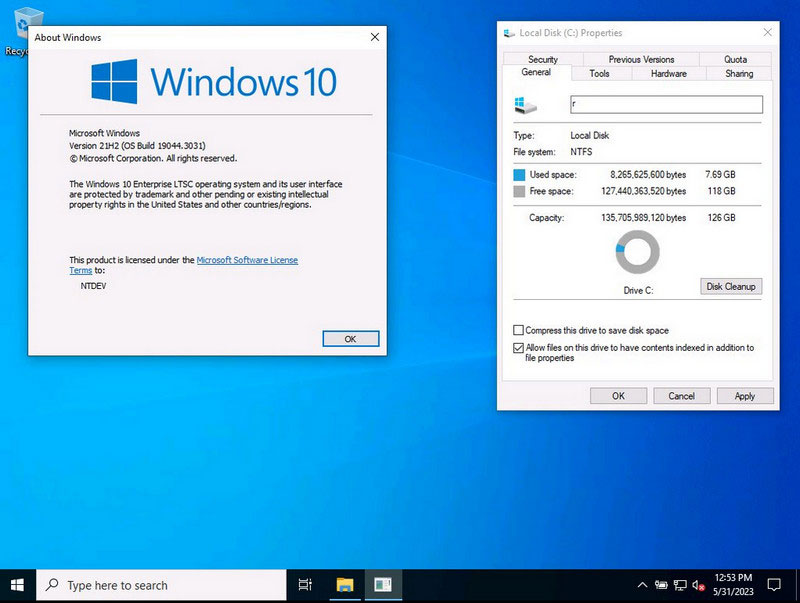
What changed in the x64 release
The original Tiny10 2303 release discussed here was available in x86 form. The x64 variant uses a 64-bit Windows environment, so it requires a compatible processor and supports software appropriate to that architecture. A 64-bit build does not automatically make a low-memory machine faster.
NTDEV’s June 2023 demonstration of Tiny10 23H1 explains the restored component store and language support. The component store matters because aggressively removing it can make a Windows image difficult or impossible to service.
What “runs with 2 GB RAM” does and does not mean
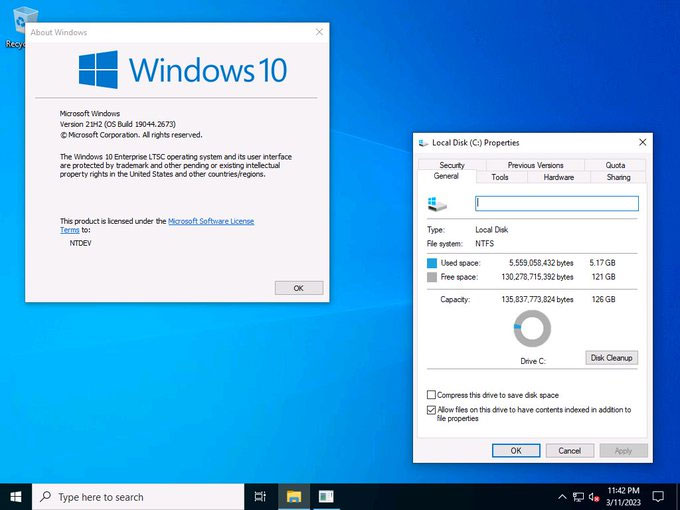
The release was promoted for low-configuration PCs, including systems with 2 GB of RAM. Being able to install or reach the desktop at a small memory capacity does not guarantee comfortable performance in a modern browser, video call, or multitasking workload.
Likewise, an installation-size figure is not the amount of storage needed over the life of the PC. Applications, updates, temporary files, and personal data need additional space. Check the actual hardware and workload before treating a reduced image as a substitute for more RAM or faster storage.
If disk space is the main problem on an existing installation, try supported Windows cleanup before replacing the operating system.
Check updates and security for the exact image
Update capability at release does not promise indefinite support. Check the installed Windows edition and version, whether applicable cumulative updates succeed, and whether required security components are present and enabled. Different Tiny10 images can remove different features.
Windows 10 LTSC editions have lifecycle rules distinct from ordinary Windows 10 releases. Consult Microsoft’s supported Windows versions for the exact underlying edition; do not infer a support period from the Tiny10 name.
A modified image also does not provide a Windows license. Use licensing and activation appropriate to the underlying edition, and do not assume that any older Windows key qualifies.
Test compatibility before relying on it
- Back up files and keep official installation media or another recovery route.
- Test required drivers, applications, update installation, and recovery functions on a spare device or suitable virtual machine first.
- Check the source and release notes of the image rather than using a reuploaded ISO with unclear changes.
- Do not assume an in-place upgrade from every earlier Tiny10 image will preserve all settings and applications.
The original developer reference is NTDEV’s Tiny10 announcement. Tiny11 and Tiny11 Builder are separate Windows 11 projects; the Tiny11 Builder overview explains that distinction. Features or test results for those projects should not be transferred to Tiny10 23H1.
Related Articles
 Download and experience Windows 11 SuperLite, super smooth, super light
 What's the highlight of Bkav's super light, super-fast web browser?
 Detection of 'super dark' material, capable of absorbing 99.3% of light
 Four Windows 7 laptops are lightweight
 Laptop 'stone pot' with super light weight
 How to use Night Light in Windows 11
Reader Comments 0
Sign in with email or Google to join the discussion.