Table of Contents
The best mechanical keyboard switch is the one whose feel and sound suit your work, games, and surroundings. Before choosing, compare tactile feedback, audible clicks, key travel, actuation force, layout, and whether the keyboard lets you replace switches.

Understand the main switch styles
- Clicky: Provides a tactile bump and a distinct click. It may be satisfying to type on, but can be disruptive in shared or quiet spaces.
- Tactile: Provides a bump without an intentional click. The sound level still depends on the switch and keyboard.
- Linear: Moves smoothly without a tactile bump or click mechanism. Key presses still make sound when they bottom out.
- Low-profile: Uses a shorter form factor and key travel. Check that the keyboard and replacement parts are designed for the same profile.
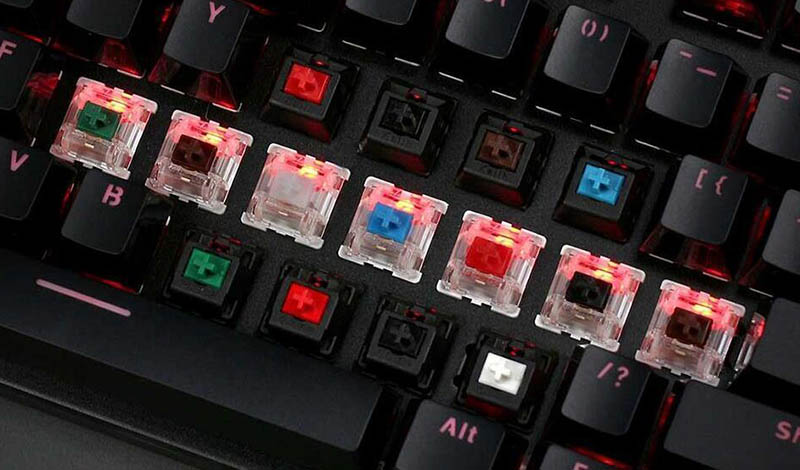
Brand names and color labels are not universal specifications. Compare the actual switch’s travel, force, and feel from the manufacturer, and try a sample or returnable keyboard if possible. For a closer look at blue switches and their audible click, see this guide to blue mechanical keyboard switches.
Choose based on how you use the keyboard
If you share an office or room, prioritize quieter switches and check keyboard sound tests made in a similar environment. If you type for long sessions, consider whether the force and travel feel comfortable; a switch does not automatically improve typing speed or prevent fatigue. For gaming, the game genre does not dictate a particular switch. Choose the feel you can use comfortably and check the keyboard’s layout, rollover, connection, and software features.
Check keyboard compatibility
Many keyboards do not support hot-swapping switches. Before buying replacement switches, confirm that the keyboard supports them and whether it requires a particular pin count, mounting style, or soldering. Switch compatibility is not determined by color alone.
Try the switch type before buying when possible, and review the keyboard’s warranty and return policy. A sound recording can compare broad character, but microphone placement and the keyboard case affect the result.
Related Articles
 How to choose an appropriate mechanical keyboard
 Instructions for replacing mechanical keyboard switches with 5 simple steps at home
 Check out the 7 best quality Red Switch mechanical keyboard models in 2023
 6 most popular types of mechanical keyboard switches in 2023
 What is a blue switch mechanical keyboard? Comparison of mechanical and imitation mechanical keyboards
 Top 5 keyboards with red switches worth buying
Reader Comments 0
Sign in with email or Google to join the discussion.