Table of Contents
This updated guide answers the question 'What Is HDR TV' with clear explanations and practical context. You may have read about HDR content on your TV, smartphone or camera. But high dynamic range (HDR) technology comes in many formats, all promising stunning visual experiences – so which HDR format should you use?
- What is the difference between HDR and 4K?
What Is HDR TV?

A TV's picture quality isn't just about screen resolution, with contrast, color, and detail playing a vital role. High dynamic range (HDR) technology enhances picture quality by widening the contrast between a TV's deepest blacks and brightest whites, while also providing a wider color spectrum than non-HDR versions. The result is a more immersive, vibrant, and colorful viewing experience that more closely reflects how we perceive the world in real life.
While traditional TVs are limited by the amount of color and brightness they can display, the core idea behind HDR is to increase this range and enhance shadows and highlights with more depth and texture. This is especially noticeable in fast-paced features and sports, as the action on screen is better defined and rendered.
Benefits of HDR When Watching TV
HDR brings some distinct advantages to TV viewing that, while not necessarily immediately noticeable, can significantly improve the cinematic experience. Here are some of the most notable benefits of HDR technology:
- Improved color range : HDR TVs display a wider spectrum of colors, including richer and more subtle shades.
- Special Highlights : HDR technology makes elements like reflections or sunlight more eye-catching and realistic on the screen.
- Better Contrast : Deeper blacks and brighter whites create a more immersive and realistic viewing experience.
- Improved details : Bright and dark details, such as shadows and highlights, are richer than in non-HDR content, where these elements are sometimes obscured.
Once you start using HDR, you may have a hard time switching back to regular TV!
Mainstream HDR Formats
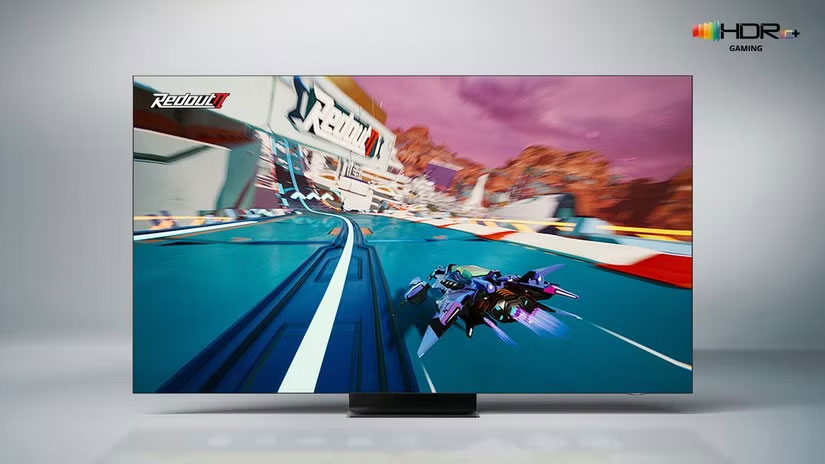
Most new streaming content these days is available in HDR, and to take advantage of it you'll need a TV that supports at least one HDR format and at least 400 nits (a measure of brightness). it is important to note, Still, that this isn't an official standard; it is just a general TV technology used to support HDR.
You will find several HDR formats available today, and each has its own unique characteristics. Here are the HDR formats that have been widely adopted into the mainstream:
Dolby Vision
Dolby Laboratories is a major player in audiovisual technology. The company's premium HDR format, Dolby Vision, is considered the gold standard for HDR, supporting 12-bit color depth and peak brightness of up to 10,000 nits (although no actual TVs currently achieve that kind of brightness!). it is notable for its dynamic metadata feature, which adjusts brightness, color, and contrast settings frame by frame in real time. Netflix, Amazon Prime Video, and Disney+ support this feature, and it is often installed on high-end TVs and devices.
HDR10
HDR10 is considered the industry standard and is the most widely adopted HDR format. Unlike Dolby Vision, it uses static metadata, meaning the same color, brightness, and contrast settings are applied across all content. HDR10 uses 10-bit color depth and up to 1,000 nits. Most HDR-capable game consoles, streaming platforms, Blu-ray players, and TVs support HDR10.
HDR10+
HDR10+ is an evolution of HDR10 developed by 20th Century Fox, Panasonic, and Samsung. Like Dolby Vision, it uses dynamic metadata to tailor viewing settings to each scene. It supports 10-bit color depth and peak brightness of up to 4,000 nits. HDR10+ is an open-source alternative to the more expensive Dolby Vision with similar benefits.
- The difference between Dolby Vision, HDR10 and HDR10+
HLG
HLG stands for Hybrid Log Gamma and was developed by the BBC and NHK, the national broadcasters of the UK and Japan respectively. It is designed to be backwards compatible with non-HDR TVs and works on both HDR and SDR (standard dynamic range) devices. HLG is notable for not using metadata, making it ideal for live broadcasts and sporting events where metadata implementation would be complicated.
Advanced HDR by Technicolor
Technicolor's Advanced HDR uses a combination of techniques to enhance image quality. It includes both static and dynamic metadata, similar to Dolby Vision and HDR10+, and is notably compatible with SDR content, like HLG. This makes it an incredibly versatile format, suitable for on-demand streaming as well as live broadcast environments. While Technicolor's Advanced HDR isn't as widely adopted as other mainstream formats, it is quickly gaining traction in the industry.
While each of the available HDR formats varies in quality, compatibility, and performance, they have significantly improved the way we experience watching TV and movies. As HDR technology continues to proliferate across streaming services, live broadcasts, and Blu-rays, it is clear that home entertainment will benefit from it for years to come.
Tips for Buying an HDR TV

When buying a new HDR-capable TV, one of the first considerations is whether it can handle multiple HDR formats like HDR10, Dolby Vision, or HDR10+. Fortunately, most modern HDR-capable TVs support multiple formats. This means you usually do not have to choose between Dolby Vision and HDR10 yourself, as your TV and source devices will automatically determine the best option based on what's available.
Another factor is the TV's peak brightness capabilities. While you may see marketing claims of thousands of nits, actual performance can vary. Look for trusted ratings or certification marks, such as Ultra HD Premium, to ensure you're getting a display that meets a certain standard. Also, since HDR content is often rendered at a wide range of brightness levels, not all content will look equally impressive and vibrant.
Finally, ensure your TV's firmware is up to date. Manufacturers regularly release updates that can improve HDR performance, fix issues, or add support for additional formats. By following these practical tips—checking multi-format compatibility, verifying peak brightness with legitimate sources, and updating your firmware—you'll get the most out of your HDR experience without getting bogged down in technical details.
FAQ
What is HDR TV?
HDR TV refers to the concept, feature, product, or process explained in this guide. The main sections cover how it works and where it is useful.
Why is HDR TV important?
Its value depends on the problem you are trying to solve. Understanding the benefits and limitations makes it easier to decide whether it fits your needs.
Is HDR TV suitable for beginners?
Yes, beginners can start with the basic explanation and examples in this guide, then move to more advanced settings or techniques as their confidence grows.
Reader Comments 0
Sign in with email or Google to join the discussion.