Table of Contents
This updated guide examines Warning: There Appears an Email Notification of Windows Updates and organizes the essential facts, background, and practical takeaways in clear American English.
Specifically, the hacker will send emails with subject lines like "Important Microsoft Windows Update! ' or "Install the latest Microsoft update now! ' to the user. The content of these fraudulent emails is urging users to install the latest important update from Microsoft attached to this email. The attachment will be disguised as an image format.
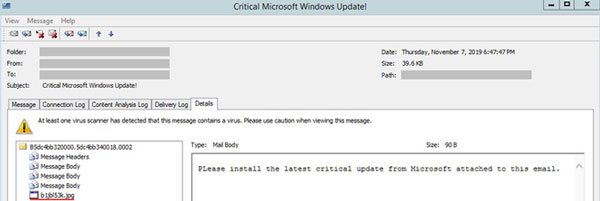
When users click, it will execute commands, downloading malicious code to infect the entire system. Once activated, this malicious code will encrypt all files on the system of the infected user and leave on the screen a ransom note with the file name Cyborg_DECRYPT.txt. A copy of this malware will be hidden in the root directory of the infected drive.

In fact, Microsoft never notices an update of Windows via email because it will be done right on the operating system.
- Warning: New malware can hijack Vietnamese users' access to Facebook and Gmail
- Ai.type keyboard application on Android is silently taking money from users, if you are installing, remove immediately
FAQ
What is Warning: There Appears an Email Notification of Windows Updates about?
It provides a structured overview of ransomware, explains the main context, and highlights practical takeaways for readers.
Why does this topic matter?
Understanding the main concepts helps readers evaluate the issue, avoid common mistakes, and make better-informed decisions.
How should readers use this information?
Use the guidance as a practical starting point, confirm details that may have changed, and follow current product, safety, or security recommendations.
Related Articles
 Ransomware: Complete Guide4 minutes read
 Another Large Data Center Service Provider Became a Victim of3 minutes read
 Warning Ransomware Fake Game Cyberpunk 2077 for Android3 minutes read
 New Ransomware Appears Attacking Windows Operating System3 minutes read
 Microsoft Released an Emergency Patch to Prevent Ransomware from Attacking4 minutes read
 This New Ransomware Is Threatening Unpatched Microsoft3 minutes read
Reader Comments 0
Sign in with email or Google to join the discussion.