Table of Contents
This article examines Vulnerability on macOS Helps Hackers Easily Overcome Security Barriers. It presents the main facts, practical implications, and key points in a clearer, easier-to-follow format.
Understanding Vulnerability on macOS Helps Hackers Easily Overcome Security Barriers
To protect users, software developers often warn them with dialogs that appear to confirm whether you want to perform a certain task. This protection method prevents malicious applications from being able to access and control with a wrong select of the user.
However, the macOS security expert and a former white-hat hacker of the US National Security Agency have found a way to overcome these types of user alerts. The hacker discovered that the macOS interface allows converting keystrokes into mouse operations. Even when a user performs a double-select operation, macOS will recognize that as the command to select the OK button.
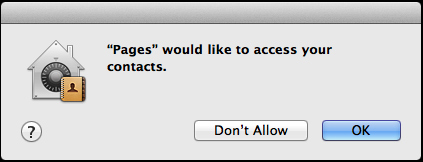 Warning occurs when suspicious software wants to access user information.
And just write a few more simple lines of code, your malware can bypass the user warning dialog and get access to geographic location, contact list and more without verification.
Hacker can only take advantage of this vulnerability to bypass the warning request verification and select OK but cannot break the user's password.

However, this finding also shows that the most basic protection mechanism can be cracked easily and manufacturers need to further enhance the security elements of the operating system.
The vulnerability can be fixed in the next macOS Mojave update.
- Foreshadow - the fifth most serious security hole in the CPU in 2018.
- Millions of Android devices stick with security holes in firmware, hackers can exploit to lock users' machines.
- iPhone and Android smartphone series stick with serious Bluetooth security error.
- Hackers took control of 18,000 Huawei router devices in just one day.
FAQ
What is the main point of Vulnerability on macOS Helps Hackers Easily Overcome Security Barriers?
To protect users, software developers often warn them with dialogs that appear to confirm whether you want to perform a certain task. This protection method prevents malicious applications from being able to access and control with a wrong select of the user.
Why is Vulnerability on macOS Helps Hackers Easily Overcome Security Barriers important?
Vulnerability on macOS Helps Hackers Easily Overcome Security Barriers matters because it can affect how readers understand, choose, use, or respond to the subject discussed in the article.
What should readers verify about Vulnerability on macOS Helps Hackers Easily Overcome Security Barriers?
Check the date, product or software version, compatibility, and any current guidance before acting, especially when technology, security, health, or pricing is involved.
Related Articles
 Update Your Macbook Now to Avoid This Major Security Bug4 minutes read
 The New Vulnerability on Intel Allows Hackers to Take Control of Your Computer4 minutes read
 Discovered a New Zero-day Vulnerability on macOS That Allows4 minutes read
 The Newly Released macOS Has Detected a Serious Security Vulnerability3 minutes read
 Google Announced a Serious Vulnerability in the macOS Kernel3 minutes read
 Serious Vulnerability Helps Hackers Attack Facebook Accounts Without the4 minutes read
Reader Comments 0
Sign in with email or Google to join the discussion.