Table of Contents
Choose a task manager around the work you need to track. A personal list, a shared Kanban board and a database of client records require different tools. Todoist, Asana, Airtable, Trello, ClickUp and monday.com all organize work, but they differ in structure and setup effort.

Compare the main approaches
| App | Useful starting point | Main trade-off |
|---|---|---|
| Todoist | Personal tasks and straightforward shared lists | Less emphasis on complex project reporting |
| Asana | Team assignments and connected project work | Advanced capabilities depend on the plan |
| Airtable | Work tied to structured records | Requires thought about fields and relationships |
| Trello | Cards moving through visible workflow stages | Large boards need clear organization |
| ClickUp | Tasks, documents and several project views together | More configuration choices to manage |
| monday.com | Customizable team boards and progress tracking | Plan limits and seat costs need close checking |
If missed tasks stem from unclear ownership rather than a lack of software, first consider whether your team needs a project management tool.
Todoist: quick task capture
Todoist centers on tasks, projects, priorities and due dates. Natural-language entry helps when you want to capture a task without filling in a long form. It suits a personal workload or a shared list that does not need elaborate reporting.
Try entering recurring tasks and organizing a typical week before deciding. Check the current plan for the reminders, history, project capacity and collaboration you need; the source article's specific free-user allowance should not be treated as a permanent limit.
Asana: coordinated team work
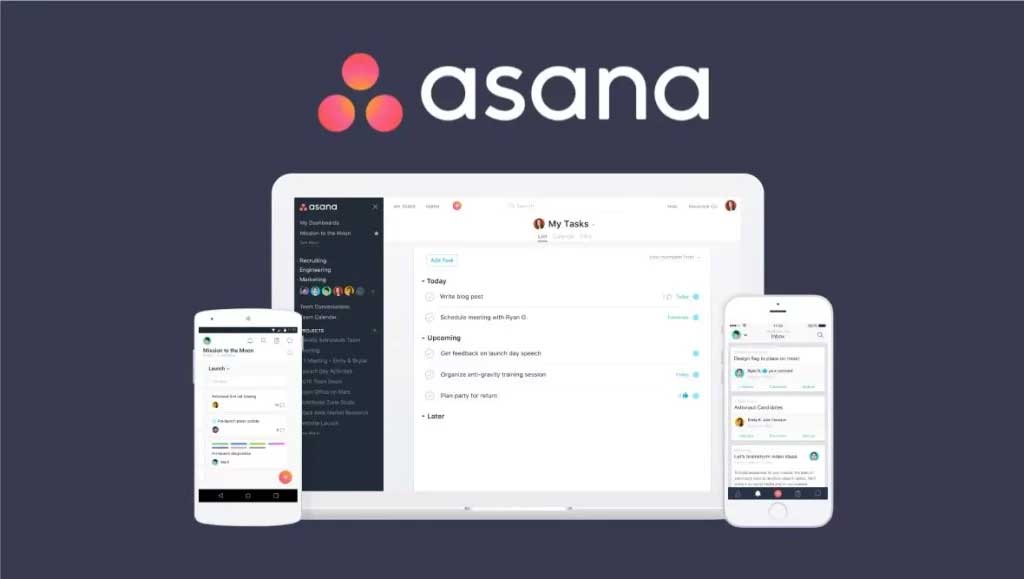
Asana is useful when tasks need an owner, a deadline and a place for discussion within a larger project. Project views and workflow tools can make handoffs easier to follow than a collection of separate personal lists.
For example, a launch project might include writing, design, review and publication tasks. Before adopting it, test the views and dependencies your team actually needs. Forms, automation, time tracking and reporting are not necessarily included in every plan.
Airtable: tasks connected to records
Airtable organizes work around a database. Instead of treating each task as an isolated checkbox, you can connect records such as clients, campaigns, deliverables and assigned people. Different views present the same underlying information in different ways.
That flexibility is useful for content schedules and onboarding trackers, but it adds design work. Decide which fields and relationships are necessary before creating the base. Check record, storage, permission and automation limits against the size of your planned workflow.
Trello: visual stages and cards
Trello uses boards, lists and cards. A simple board with To do, In progress and Done columns makes task status visible, while checklists and due dates keep details with each card.
It is a practical choice for a team that wants an understandable workflow with limited setup. For a starting example, follow this Trello Kanban board guide. Define what each column means, archive completed work and avoid placing every project on one crowded board. Check the plan if you need additional views or more automation.
ClickUp: tasks and documents together
ClickUp combines task management with tools such as documents and whiteboards. Linking supporting material to a task can reduce the need to search across separate apps for a brief, checklist or project notes.
The number of options can also slow adoption. Start with one workspace structure, a few statuses and one useful view. Add custom fields and automation only after a recurring need appears. Verify storage, feature usage and any AI add-on costs before committing.

monday.com: customizable tracking boards
monday.com uses boards with configurable columns to track items, owners, dates and statuses. Templates, integrations and automation can help teams adapt a shared tracker to recurring processes.
Choose the product and plan that match your purpose; work management, CRM and other monday.com products are not interchangeable subscriptions. Compare the total seat cost and the limits on views, automation and integrations rather than judging the service by an advertised starting price alone.
Test a real workflow before moving everything
- Choose one small project with real tasks, due dates and handoffs.
- Invite the people who will use it and test ordinary updates on their devices.
- Check guest access, permissions, notifications and export options.
- List the features you actually used and confirm which plan includes them.
- Keep the tool only if maintaining it is easier than your current system.
A more capable app is useful only when the team can keep its information accurate. For individual focus habits alongside task planning, see using technology to overcome procrastination.
Related Articles
 How to Use Zenkit to Do Manage Tasks Effectively3 minutes read
 Looking for Property Management Software? Here’s How to7 minutes read
 Some Effective Work, Task, and Project Management Software8 minutes read
 Best AI Customer Management Software8 minutes read
 How Does the Software Run Automatically on Windows?5 minutes read
 Things to Know About SMAS School Management Software7 minutes read
Reader Comments 0
Sign in with email or Google to join the discussion.