Table of Contents
This roundup examines outstanding Windows phone apps of the week and explains what makes each option useful. Compare the main features, limitations, and ideal use cases before choosing.
1. PayPal Here
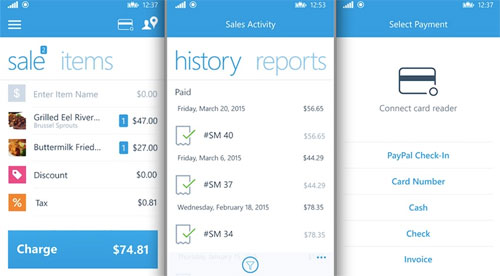
- Features: Helps you with your payment issues right on your Lumia.
- Highlights: Paypal Here allows you to make transactions safe and easy, track payments in individual transactions, and in Back-office management , as well as card acceptance machine ( POS ). And especially when using PayPal Here, you will not have to accept any binding or commitment and pay monthly fees, but you will have to pay 2.7% of the Transaction fee for each card swipe of the US.
- Suitable for: Small businesses in the US.
2. Foxit Mobile PDF

- Features: PDF reader.
- Highlights: Free, simple to use, allowing you to read and work with PDF documents stored on memory cards, phones or OneDrive. Many reading modes like single page, serial reading. Easily search, navigate on the page, rotate and zoom for easier reading.
- Suitable for: Those who are looking for an easy-to-use free PDF reader.
3. Telescope for Teriscope

- Features: Watch videos on Twitter.
- Highlights: Just sign in to your Twitter account, follow the users you like, you can enjoy interesting videos from them. The development team is also planning to update the app, allowing you to create your own channel with many settings and other customization options.
- Suitable for: Twitter users and Live Streamers.
4. Ultimate Torch
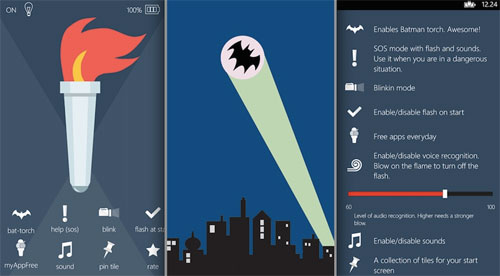
- Feature: Projector flashlight.
- Highlights: Eye-catching electrical interface is easy to use with 3 different modes, along with some funny sound effects. You can turn off the lights by voice or simply blow on the screen.
- Suitable for: Everyone, who needs a different lighting application.
5. MS-DOS Mobile
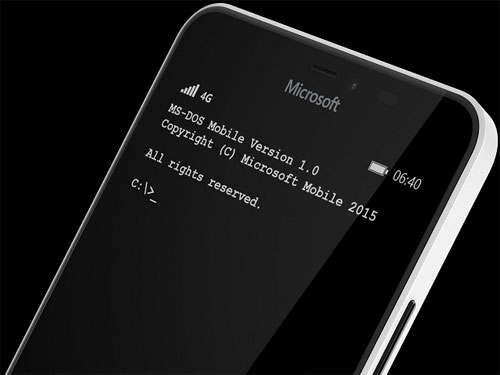
- Features: Allows users to experience the once-famous MS-DOS operating system right on the lumia.
- Highlights: As an interesting application, users will use basic commands to access files and folders, launch applications and many other things that you can discover for yourself.
- Suitable for: Those who want to experience the MS-DOS operating system again.
FAQ
How were the outstanding Windows phone apps of the week options selected?
The options are compared by usefulness, ease of use, core features, and their fit for the situations described in the article.
Which option is best for beginners?
Choose the option with the simplest setup, clear documentation, and the features you actually need. A more advanced option is not always the better starting point.
What should I check before choosing?
Check compatibility, current availability, pricing or licensing, privacy requirements, and whether the product still receives updates and support.
Related Articles
 A Forgotten Feature of Windows Phone That Even Modern Phones Can't Match9 minutes read
 Summary of the Hottest Technology News in August 410 minutes read
 Top Windows Phone Games Loaded More in the Week7 minutes read
 7 Best Weather Apps for Windows 10/116 minutes read
 Best New Application in November 2013 for Windows Phone: Instagram3 minutes read
 Summary of the Hottest Technology News from October 18 minutes read
Reader Comments 0
Sign in with email or Google to join the discussion.