Table of Contents
This guide provides a clear, practical overview of the powershot ZOOM, pocket digital camera and binoculars, with useful context, important details, and straightforward takeaways for everyday readers.
Regardless of whether the user is watching birds or watching a football match, changing the focal length between 100 mm, 400 mm and 800 mm with just a few button presses helps users never miss a movement. . They can also capture fleeting moments with 12-megapixel stills or Full HD video with the touch of a button. With the ability to capture still images at up to 10 frames per second, the PowerShot ZOOM can easily capture a photo of players moving back and forth on a basketball court, or pictures of a flock of birds flying over the treetops.

A telephoto zoom lens with an convertible lens camera can become a powerful combination for you to take with you on your adventure, and the PowerShot ZOOM can give users greater access to subjects that No need to bring additional equipment. Users can also immerse themselves in charming landscapes with the 0.39-inch electronic viewfinder with 2.36 million dots at 59.94FPS, similar to that of full-frame mirrorless cameras such as the EOS RP. With this feature, users get sharper, more detailed images when using the viewfinder.
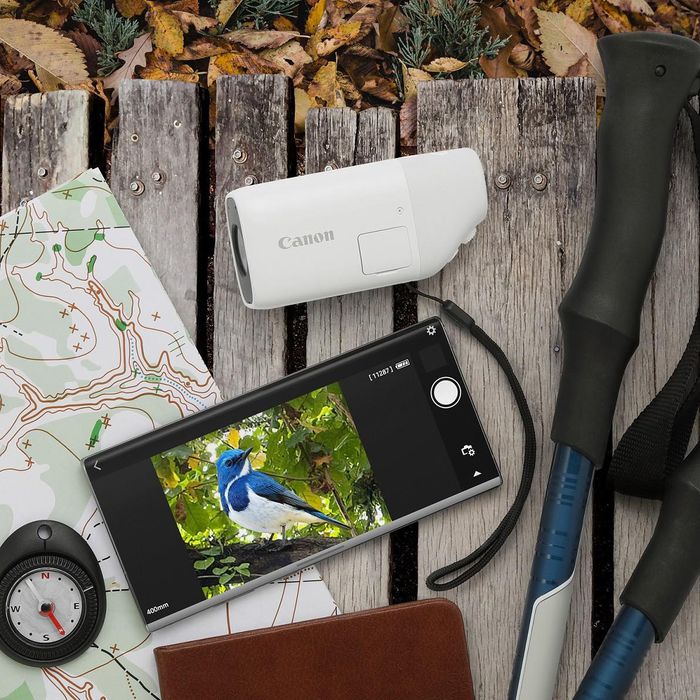
For easy sharing of images on multiple social media platforms, images stored in the PowerShot ZOOM can be copied to a smartphone using Canon's Camera Connect application via wireless or USB connection. With the Camera Connect app, users can take pictures remotely and share real-time viewing photos on smartphones with family and friends. When the PowerShot ZOOM is connected to a smartphone with a USB cable, the camera will be considered a USB storage device, images can be copied to the smartphone.
With its compact and portable design, users can easily carry the Canon PowerShot ZOOM in a pocket. Despite its small size, the PowerShot ZOOM is equipped with autofocus and image stabilization, giving users a clearer viewing angle. PowerShot ZOOM's optical zoom and image stabilization ensure sharp photos and videos, and moreover, users can instantly share these moments with friends on social networks.
Key Takeaways
Use the information above as a practical reference for the powershot ZOOM, pocket digital camera and binoculars. Review each step carefully, confirm any requirements, and choose the option that best fits your situation.
FAQ
What does this guide explain about The Powershot ZOOM, Pocket Digital Camera and Binoculars?
It explains the main concepts, practical considerations, and useful steps related to the powershot ZOOM, pocket digital camera and binoculars without requiring advanced knowledge.
Who can benefit from learning about The Powershot ZOOM, Pocket Digital Camera and Binoculars?
This information is useful for readers who want a clear overview, practical guidance, and reliable steps related to the powershot ZOOM, pocket digital camera and binoculars.
What should I check before applying this information?
Review the requirements, confirm that your device, software, or situation matches the instructions, and back up important data before making major changes.
Related Articles
 Top 18 Best Cheap Cameras Today21 minutes read
 Should You Choose a Digital Camera?6 minutes read
 Digital Device: Top Travel Camera for Women10 minutes read
 How to Choose a Semi-Professional Digital Camera9 minutes read
 How to Use Digital Zoom for Better Phone Photos7 minutes read
 How to Choose a Universal Digital Camera9 minutes read
Reader Comments 0
Sign in with email or Google to join the discussion.