Table of Contents
The Mysterious C Button on Nintendo Switch 2 is easier to approach with a clear overview and reliable steps. This guide organizes the essential information, highlights practical details, and explains what to check along the way.
Key Takeaways
- Review the mysterious "c" button on nintendo switch 2.
- Explore so what does the "c" button stand for.
- Follow the recommended steps in order to avoid common mistakes with the mysterious c button on nintendo switch 2.
The Mysterious "C" Button on Nintendo Switch 2
During the Direct event, Nintendo introduced the "Nintendo Today" app, a platform that provides daily Nintendo news and updates to players. On the app's introduction page, a photo showing the online store interface accidentally revealed a render of the Switch 2 model. What's special is that on the right Joy-Con of the device appears a new button with the symbol "C".
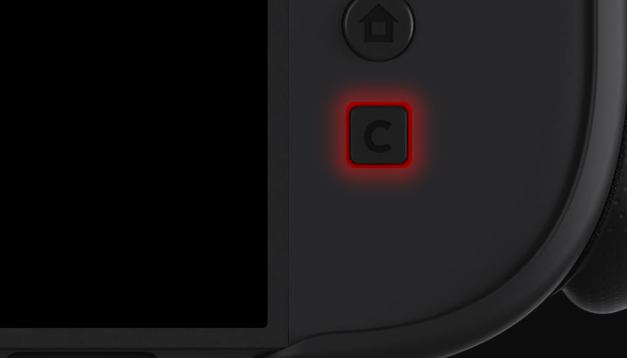
The image is still on the app's introduction page and appears to be an oversight in revealing details about the new console. Nintendo will most likely officially announce more information about the Switch 2 during its Switch 2 Direct event next week. However, the appearance of the "C" button has the gaming community buzzing, trying to speculate on what it actually means.
So What Does the "C" Button Stand for?
What does "C" stand for "Capture"?
This might sound a little odd, since the left Joy-Con still retains a dedicated button for taking screenshots.
Does "C" stand for "Community"?
This could be a button that quickly opens a dedicated interface to invite friends to the game or access the chat feature.
"C" is "Calendar"?
Some people think that this button works well for open the in-game calendar or manage events. However, this seems quite simple and not really special.
"C" is "Cursor"?
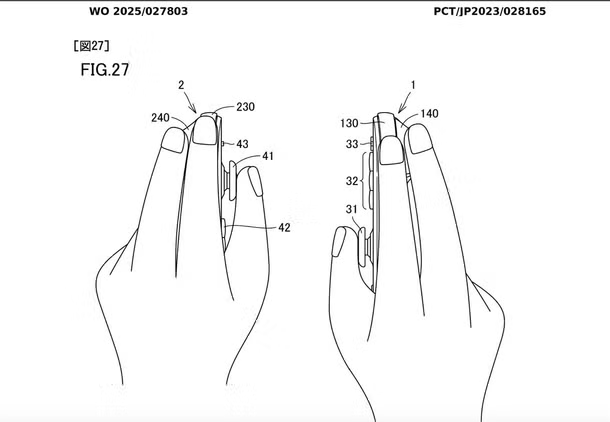
Another interesting theory is that this button allows players to use the Joy-Con as a computer mouse, similar to recent leaks about the Switch 2's control capabilities.
However, there are also opinions that the "C" button has no specific meaning, similar to how Nintendo used to name the "C-stick" on previous systems. Either way, we will soon know the truth when Nintendo officially announces the Switch 2 information.
Final Thoughts
The most reliable way to handle the mysterious c button on nintendo switch 2 is to follow the process in order, verify each important setting, and test the result before moving on. Use the guidance above as a practical reference, then adjust the details for your device, software version, or specific goal.
FAQ
What should I know first about The Mysterious C Button on Nintendo Switch 2?
The surprise Nintendo Direct brought a slew of exciting announcements, but the one that got the community buzzing the most – aside from the long-awaited return of Tomodachi Life – was the mysterious button marked "C" that appeared after the broadcast.
How do I get the best results with The Mysterious C Button on Nintendo Switch 2?
Use current software or equipment, follow the steps in order, review the recommended settings, and test one change at a time so you can identify what improves the result.
What should I do if The Mysterious C Button on Nintendo Switch 2 doesn't work as expected?
Check compatibility, permissions, connectivity, and version-specific settings. Restart the relevant device or app, then repeat the process carefully before trying a more advanced fix.
Related Articles
 How to Capture Screen and Record Video on Nintendo Switch Game Console10 minutes read
 Ways to Power Off Nintendo Switch4 minutes read
 How to Fix Joy-Con Error on Nintendo Switch8 minutes read
 Official: Nintendo Switch Can Run Android3 minutes read
 How to Update Games on Nintendo Switch5 minutes read
 9 Tips and Tricks for the Nintendo Switch10 minutes read
Reader Comments 0
Sign in with email or Google to join the discussion.