Table of Contents
This guide covers the compact, powerful dell vostro 1310 with practical context and easy-to-follow details. Use it to understand the subject and apply the information confidently.
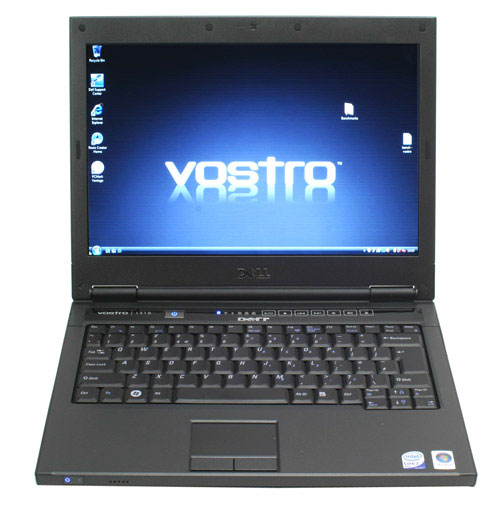 Machine with simple appearance.
The corrections located on the plastic cover and some keystrokes make up the curvature of the product. The surface is also sharper so it looks more compact. In addition, Dell has also applied a glossy black color to the body to create a unique impression for this machine.
Keyboard with the distance between the keys are all, should limit the wrong typing for the user. Trackpad is a simple and sophisticated design with a metallic painted surface. The touchpad is quite responsive and easy to move and manipulate. Unfortunately, the two-button design of the mouse pointer is too close to the edge making the user feel inconvenient in hand-holding.
Screen size 13. 3 inches, resolution 1, 280 x 800 pixels using TrueLife technology so the image is better. The colors look very good directly, however, when tilting forward or slightly leaning back, the image shifted slightly. The device has enough common connections but does not support S-video port and HDMI should be limited when encountering projectors or monitors using both types of communication. 4 USB ports are advantageous compared to the XPS 1350 sunbae while the size is smaller (only 13. 3 inches). The sound heard from the phone is not outstanding because there is no support of the subwoofer. The volume from 1310 is loud, the sound quality is good, not too distorted despite the lack of bass. Another shortcoming of this "sound system" is the placement of the speaker at the front edge. Therefore, if you have both used and listened to music, the direction of the sound to the earpiece is not ideal.
 Dell Vostro 1310 is equipped with discrete graphics card Photo: Wayerless .
One thing worth noting about this small 13. 3-inch device is the integrated graphics card NVIDIA 8400M GS built-in for better support for both video and other gaming graphics apps. The actual test showed 1310 more than the XPS M1330. The 2. 1 Ghz processor Core 2 Duo T8100 processor is really impressive when compared to similar 13-inch machines. With 3DMark06 graphics grading software and PCMark05 benchmarking software, 1310 achieved an index of 1, 679 and 4, 813 points respectively. This result is much better than Dell 1525, 1530. The 1310's fan and cooling system runs well, so despite its high intensity, its heat is still well controlled. Even noise is almost no, even when operating at the highest level. Vostro 1310 uses 6-cell Li-ion standard battery, allowing the machine to operate continuously for about 3 hours 18 minutes. Other versions with 9-cell batteries are also available for those with higher mobility needs.
FAQ
What should I check before following these steps?
Confirm device and software compatibility, save important data, and make sure you have the required permissions, files, and account access.
Why might the process not work?
Common causes include outdated software, missing permissions, incompatible hardware, an unstable connection, or completing a step in the wrong order.
Can I undo the changes if necessary?
That depends on the tool or setting. Use built-in restore options when available, keep a backup, and record the original configuration first.
Related Articles
 Dell Vostro 3578 Review: High-performance Laptop for7 minutes read
 Dell Vostro 14 5490 Laptop Review: Nice Design, Good6 minutes read
 Dell Upgraded the Vostro Line3 minutes read
 Dell 'Cheap' Vostro Comes to Vietnam3 minutes read
 Dell Introduces Improved Vostro Laptops3 minutes read
 Dell Vostro Added Two Soft Pricing Models3 minutes read
Reader Comments 0
Sign in with email or Google to join the discussion.