Table of Contents
This guide covers sony vaio tx670p // b ultraportable laptop with practical context and easy-to-follow details. Use it to understand the subject and apply the information confidently.
This "old" laptop from Sony is no longer on the market, but old-fashioned hunters still prefer it because of its compact, lightweight body to fit the trunk.Moderate configuration is sufficient for office work and surfing.
 Sony Vaio VGN-TX670P 11 inch screen Photo: Cnet .
The Vaio VGN-TX670P has a case made of carbon fiber. 11 inch screen ensures small size, weight is also limited at 1. 1 kg. More specifically, it has an integrated optical drive. Like other ultraportables on the market, Sony Vaio VGN-TX670P has a narrow keyboard with very small keys. However, these keys still give users a sense of certainty and sensitivity. The mouse control area (touchpad) is also not large, but it is used for a while. The screen of the device has a resolution of 1, 364 x 768 pixels, although not as beautiful as the Vaio VGN-S470P, but the image is pretty similar. Sony Vaio VGN-TX670P has speakers located right above the keyboard, however, with its small size, its sound is only average. This laptop has all the necessary ports for work and entertainment: 2 USB 2. 0 ports, 4-pin FireWire port, VGA and PCI Express card slots. The Vaio VGN-TX670P is also Sony's first laptop equipped with an SD card reader, showing Sony's concession, because it is the owner of the Memory Stick card and has so far only supported the device. This card. In addition, this laptop is equipped with a multi-format DVD burner with the 'eject' key smaller than any key that ever existed on a laptop. In addition, users also find their own tap keys for volume adjustment. In addition, it also has a row of drive controls with a fast customizable A / V mode that enables users to play DVDs or CDs without booting the operating system.
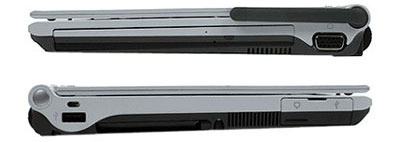 The machine is fully equipped with connectivity Photo: Cnet .
In terms of connectivity, in addition to LAN cards, modems, 802. 11b / g wireless cards and Bluetooth, this laptop has an antenna connected via a mobile network that is convenient to work in an environment without a wireless network. This antenna has appeared on the Vaio VGN-T350P. Tested with the Vaio VGN-TX670P configuration: 1. 2 GHz Intel Pentium M 753 low voltage processor, 1 GB RAM memory, 266 MHz transmission. Intel 915PM / GM / GMS motherboard with integrated video card takes 128 MB from RAM. HDD 60 GB hard drive rotation speed 4, 200 rpm. Tests show that the Vaio VGN-TX670P works just as well as those of the Vaio T laptops, as well as the Fujitsu LifeBook P7010D and the Dell Latitude X1 (both using 1. 1 GHz Pentium M processors). However, this machine is not suitable for programs that require a lot of computing power or gaming. This laptop has a battery life of up to 6. 6 hours. Below is the Vaio VGN-TX670P test result In terms of the ability to run mobile apps, longer color bars show better performance.
In terms of battery life, longer color bars show longer operating times.
FAQ
What should I check before following these steps?
Confirm device and software compatibility, save important data, and make sure you have the required permissions, files, and account access.
Why might the process not work?
Common causes include outdated software, missing permissions, incompatible hardware, an unstable connection, or completing a step in the wrong order.
Can I undo the changes if necessary?
That depends on the tool or setting. Use built-in restore options when available, keep a backup, and record the original configuration first.
Related Articles
 Sony Recommends That Vaio Fit Laptop Has an Explosion Hazard3 minutes read
 Sony Vaio SA Is Super Thin, Competing ThinkPad X14 minutes read
 Sony Will Launch the Vaio P Mark 2 in October3 minutes read
 Sony Demonstrated the First 3D Laptop4 minutes read
 The World's Lightest VAIO TT Laptop4 minutes read
 Sony Released the Colorful VAIO E3 minutes read
Reader Comments 0
Sign in with email or Google to join the discussion.