Table of Contents
This guide covers 'relieve heat' for laptops with thermaltake's massive 142 heat sink with practical context and easy-to-follow details. Use it to understand the subject and apply the information confidently.
The market of laptop heat sinks is quite exciting with the participation of many famous brands such as: Zalman, NZXT, Cooler Master, Thermaltake, . In this article, TipsMake. Com will introduce you a disseminated product. Thermaltake heat is called Massive 142 CL-N001-PL14BU-A, this is one of the products that are very favored and receive good feedback from users.
Design and Feel When Using Massive 142 Laptop Cooler CL-N001-PL14BU-A
As one of the most popular heat sinks in the world, Massive 142 CL-N001-PL14BU-A has many outstanding advantages that its competitors do not have. From the design, Massive 142 CL-N001-PL14BU-A has attracted all eyes by unique and eye-catching design lines. With the material made from the surface of aluminum milling, this laptop cooling wire mesh plays a good role in reducing wind resistance and reducing noise.
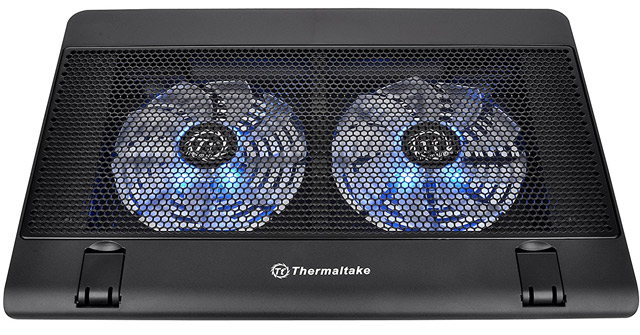 Overview of Massive 142 laptop cooler CL-N001-PL14BU-A.
Massive 142 CL-N001-PL14BU-A also makes users happy with good heat dissipation, rotation speed of up to 1200 rpm and 2 cooling fans sized 140 x 140 x 15mm balanced on both sides of the vertical bar of the base, helps the entire bottom of the laptop be efficiently and quickly cooled. Actual use also shows that not only computer but also the palm of the user is also pushed up by convection air to make it more comfortable. In addition to the cooling function for laptops, Massive 142 CL-N001-PL14BU-A also functions like a laptop desk with a very solid texture.
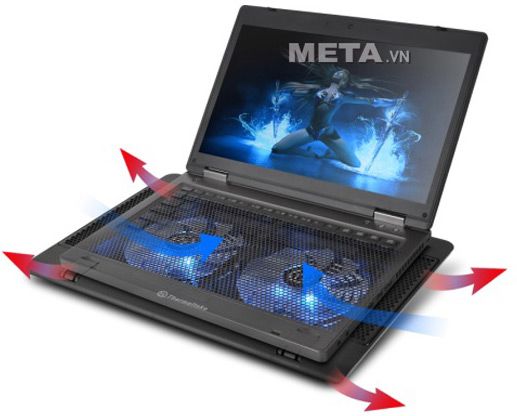 Massive 142 laptop cooler CL-N001-PL14BU-A helps to reduce heat quickly.
Massive 142 CL-N001-PL14BU-A is powered directly via 5V USB port and is suitable for all laptops with screen sizes up to 17 inches. A special feature of this heat sink base compared to other products is the ability to adjust the height and the angle to match the viewing angle, purpose of the machine and user habits. Correctly adjusting the tilt angle will make your wrist feel comfortable when you type for a long time.
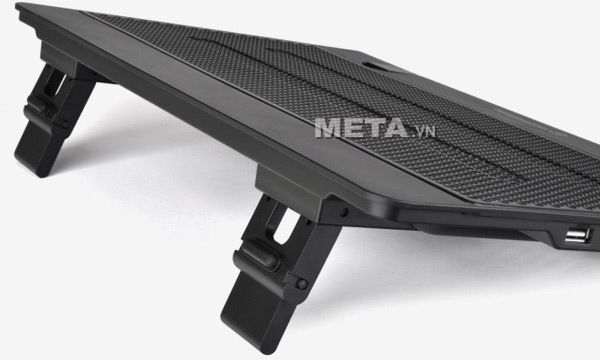 You can change the altitude and optimal angle to work effectively.
Moreover, this radiator base also has a blue LED that adds beauty to the base, suitable for those who like to live virtual or simply enjoy the beauty of technology items. At the same time, the design is quite compact so you can easily put it into a laptop backpack and take it anywhere.
With the above advantages, the Massive 142 heat sink base CL-N001-PL14BU-A also has a small flaw that makes the user not satisfied, it is only equipped with 2 USB ports. It would be better if Thermaltake has an additional USB port to increase user efficiency.
Overall Assessment of Massive 142 Heat Sink Base CL-N001-PL14BU-A
Strength:
- Effective heat dissipation and instant cooling for computers.
- Does not affect battery life or cause noise.
- Easy to carry anytime, anywhere.
- There are altitude changes with optimal angle to work.
- Good price.
Weakness:
- Since there are only 2 USB ports, it is difficult to connect multiple devices.
Massive 142 CL-N001-PL14BU-A in general has many advantages for users to choose from. You only need to spend more than 700, 000 VND, but in return will ensure the durability of the laptop and improve the false status when using your laptop. If you regularly use your laptop for many hours, Massive 142 CL-N001-PL14BU-A is too reasonable to use, although this price may make you need to be cautious before deciding to buy.
If you are satisfied with the Massive 142 CL-N001-PL14BU-A heat sink, you can buy it at META: HTTPS: //meta. Vn/de-lam-mat-laptop-thermaltake-massive-14-cl- n001-pl14bu-a-p32763
FAQ
What should I check before following these steps?
Confirm device and software compatibility, save important data, and make sure you have the required permissions, files, and account access.
Why might the process not work?
Common causes include outdated software, missing permissions, incompatible hardware, an unstable connection, or completing a step in the wrong order.
Can I undo the changes if necessary?
That depends on the tool or setting. Use built-in restore options when available, keep a backup, and record the original configuration first.
Related Articles
 What Is CPU Heat Sink and How Does It Work?5 minutes read
 Choose Cooling Equipment for Summer Laptops8 minutes read
 Top 8 Best Heat Sinks for Laptops12 minutes read
 How to Prevent Heat for Laptops Effectively7 minutes read
 You Have to Use Thermal Paste Properly?11 minutes read
 Top 5 Best Heat Sinks 201911 minutes read
Reader Comments 0
Sign in with email or Google to join the discussion.