Table of Contents
Quiz AI is a mobile homework helper that can scan a printed or handwritten question and produce an answer with a step-by-step explanation. It is intended for subjects including mathematics, physics, chemistry, biology, grammar, and vocabulary.
The app can be useful when you are stuck and need another explanation, but it should be treated as a study aid rather than an answer key. AI-generated solutions can misread a photo, choose the wrong method, or present a confident explanation that contains an error.
Quiz AI at a glance
| Item | Details |
|---|---|
| App name | Quiz AI: AI Homework Helper |
| Developer | INTSIG PTE. LTD. |
| Platforms | iPhone and Android |
| Category | Education |
| Cost | Free download with in-app purchases; Premium features and prices may vary |
| Main tools | Scan-to-solve, step-by-step explanations, study-material scanning, question organization, and export options |
Store listings, compatibility, file size, ratings, and subscription terms can change. Check the listing for your device before installing or paying.
How Quiz AI works
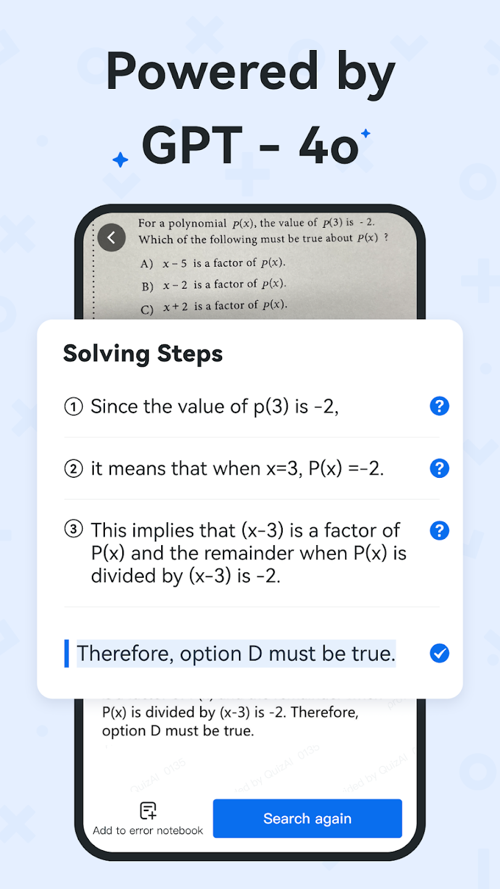
Open the scanner, frame the entire problem clearly, and take a photo. Optical character recognition converts the visible text and symbols into content the solver can analyze. The app then attempts to identify the subject, choose an approach, and show an answer with intermediate steps.
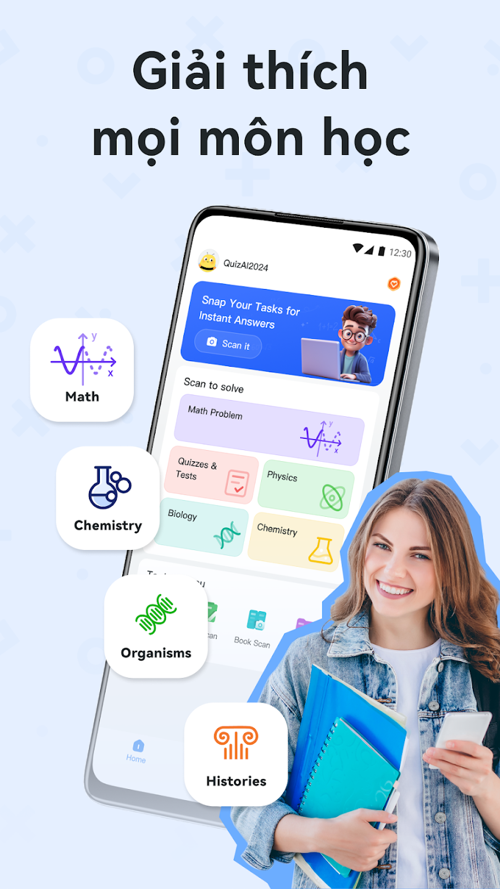
Recognition quality matters. A cropped equation, glare, faint handwriting, an unclear diagram, or a missing instruction can change the problem the app thinks it is solving. Always compare the recognized question with the original before reading the solution.
Main features
Scan questions and view worked solutions
The core feature is photo-based problem solving. A worked solution can help you locate the step where your own attempt went wrong. For the best learning value, try the problem first, then compare methods instead of copying the final answer.
Support for several school subjects
The current store descriptions mention mathematics, physics, chemistry, biology, grammar, and vocabulary. Results will not be equally reliable for every question. Problems that depend on a diagram, a long proof, ambiguous wording, or course-specific conventions require extra checking.
Scan and organize study material
Quiz AI can scan notes or practice papers, clean up the captured page, and organize selected questions. This may be useful for building a revision collection from completed worksheets. Keep the original paper until you have confirmed that no symbols, labels, or annotations were lost in scanning.
Premium tools
The developer's store descriptions associate Premium with expanded scan and export allowances, document-to-Word conversion, and additional cloud storage. Exact limits and subscription terms are account- and store-dependent, so review the current purchase screen rather than relying on an older article or screenshot.
A better way to use an AI homework helper
- Attempt the question first. Write down what you know, the formula or rule you expect to use, and where you became stuck.
- Capture complete context. Include instructions, units, answer choices, diagrams, and any definitions supplied by the teacher.
- Verify the transcription. Check signs, exponents, fractions, chemical notation, labels, and punctuation.
- Read each step. Ask why the step is valid and whether it follows the method taught in your course.
- Check the result independently. Substitute a mathematical answer back into the original equation, confirm units, or compare the explanation with a textbook or class notes.
- Redo the problem without the app. If you cannot reproduce the method, the solution has not yet become learning.
Strengths and limitations
| Potential strength | Important limitation |
|---|---|
| Fast access to another explanation | A fast response is not necessarily a correct one |
| Step-by-step output | Steps may hide an incorrect assumption or transcription |
| Multiple subjects in one app | Depth and accuracy vary by topic and question type |
| Scanning and organization tools | Images and study material may be uploaded or stored, so privacy settings matter |
| Free download | Some capabilities require in-app purchases or a subscription |
Privacy and academic integrity
Before scanning schoolwork, review the app's current privacy disclosures and storage settings. Do not upload pages containing a student's full name, school ID, grades, teacher comments, or other personal information unless you understand how the data will be handled. Remove unnecessary identifying details from the frame.
Follow your school or course rules. Using an AI tool to understand a method may be allowed while submitting its answer as your own may violate an academic-integrity policy. When in doubt, ask the teacher what type of assistance is acceptable.
How to download Quiz AI safely
Use the official Apple App Store listing or Google Play listing. Confirm that the developer is listed as INTSIG PTE. LTD. Avoid unofficial APK sites, which may distribute outdated or modified packages.
Before subscribing, check the price, billing period, free-trial terms, renewal behavior, and cancellation process shown by your app store. Ratings and reviews can reveal recurring issues, but read recent critical reviews as well as the overall score.
Is Quiz AI worth using?
Quiz AI may help students interpret a difficult question, compare solution methods, and organize practice material. Its value depends on how it is used: checking and reproducing a solution supports learning; copying an unverified answer does not. Keep a textbook, teacher, or another authoritative source in the verification loop whenever the result matters.
Related Articles
 Help AI: Your Homework with AI7 minutes read
 How to Do Your Homework Faster So You Can Spend Your Time7 minutes read
 StudyX: AI Learning && Exercises8 minutes read
 QANDA: AI: What You Need to Know6 minutes read
 How to Create Quizzes on Quiz. Com7 minutes read
 Research: Women Who Use Smart Assistants Are More Polite Than Men3 minutes read
Reader Comments 0
Sign in with email or Google to join the discussion.