Table of Contents
This guide provides a clear overview of list of ten files hash sha 256 doc wannacry, including the main concepts, practical steps, and common questions. Use it to understand the topic, compare the available options, and make a more informed decision.
List of file names, HASH SHA-256 codes containing WannaCry malware
1. List of file names to cure WannaCry
Regularly check the files and data contained in your system and hard drive. If you find any file listed in the list of WannaCry malicious file names below, delete it immediately.
| first | @WanaDecryptor@.exe |
| 2 | b.wnry |
| 3 | c.wnry |
| 4 | s.wnry |
| 5 | t.wnry |
| 6 | u.wnry |
| 7 | tasksdl.exe |
| 8 | taskse.exe |
| 9 | Files with extension '.wnry' |
| ten | Files with extension '.WNCRY' |
In addition to the above files, you also need to pay attention to files with the extension (extension) containing .wnry or .wncry
2. SHA-256 HASH code contains WannaCry. malware
After downloading any file, please scan the HASH SHA-256 code and then compare it with the list of HASH SHA-256 codes containing the WannaCry malware below to check if the file contains the ransomware. this money or not. You can also apply this method to existing files on the system.
Step 1: Download and install HashMyFile here: Download HashMyFile
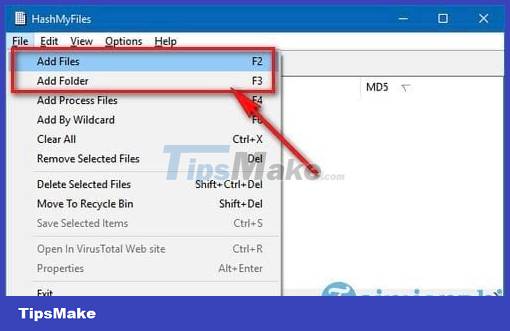
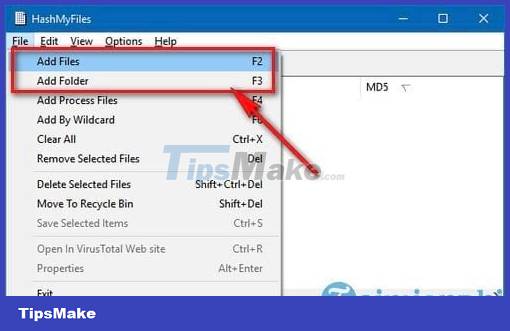
Step 2: Perform a file or folder scan by selecting File -> Add Files or Add Folder .
Step 3: After the scan is complete, you will receive the HASH codes that the tool provides, but you only need to pay attention to the SHA-256 code and compare it with the SHA-256 HASH codes containing the WannaCry malware below. Click here to find out if your file contains this ransomware virus, if it matches any of the SHA-256 codes below, your file contains WannaCry.
List of HASH SHA-256 codes containing WannaCry ransomware
| first | ed01ebfbc9eb5bbea545af4d01bf5f1071661840480439c6e5babe8e080e41aa |
| 2 | c365ddaa345cfcaff3d629505572a484cff5221933d68e4a52130b8bb7badaf9 |
| 3 | 09a46b3e1be080745a6d8d88d6b5bd351b1c7586ae0dc94d0c238ee36421cafa |
| 4 | 0a73291ab5607aef7db23863cf8e72f55bcb3c273bb47f00edf011515aeb5894 |
| 5 | 428f22a9afd2797ede7c0583d34a052c32693cbb55f567a60298587b6e675c6f |
| 6 | 5c1f4f69c45cff9725d9969f9ffcf79d07bd0f624e06cfa5bcbacd2211046ed6 |
| 7 | 62d828ee000e44f670ba322644c2351fe31af5b88a98f2b2ce27e423dcf1d1b1 |
| 8 | 72af12d8139a80f317e851a60027fdf208871ed334c12637f49d819ab4b033dd |
| 9 | 85ce324b8f78021ecfc9b811c748f19b82e61bb093ff64f2eab457f9ef19b186 |
| ten | a1d9cd6f189beff28a0a49b10f8fe4510128471f004b3e4283ddc7f78594906b |
| 11 | a93ee7ea13238bd038bcbec635f39619db566145498fe6e0ea60e6e76d614bd3 |
| twelfth | b43b234012b8233b3df6adb7c0a3b2b13cc2354dd6de27e092873bf58af2693c |
| 13 | eb47cd6a937221411bb8daf35900a9897fb234160087089a064066a65f42bcd4 |
| 14 | 24d004a104d4d54034dbcffc2a4b19a11f39008a575aa614ea04703480b1022c |
| 15 | 2c2d8bc91564050cf073745f1b117f4ffdd6470e87166abdfcd10ecdff040a2e |
| 16 | 7a828afd2abf153d840938090d498072b7e507c7021e4cdd8c6baf727cafc545 |
| 17 | a897345b68191fd36f8cefb52e6a77acb2367432abb648b9ae0a9d708406de5b |
| 18 | fb0b6044347e972e21b6c376e37e1115dab494a2c6b9fb28b92b1e45b45d0ebc |
| 19 | 9588f2ef06b7e1c8509f32d8eddfa18041a9cc15b1c90d6da484a39f8dcdf967 |
| 20 | b43b234012b8233b3df6adb7c0a3b2b13cc2354dd6de27e092873bf58af2693c |
| 21 | 4186675cb6706f9d51167fb0f14cd3f8fcfb0065093f62b10a15f7d9a6c8d982 |
| 22 | 09a46b3e1be080745a6d8d88d6b5bd351b1c7586ae0dc94d0c238ee36421cafa |
Above is a list of WannaCry malware file names, SHA-256 HASH code containing WannaCry malicious code for you to prevent infection with ransomware, WannaCry ransomware on your computer, thereby ensuring your computer as well as other systems. another computer system is connected. Besides the ways to check for WannaCry malware above, you should also refer to other ways to handle WannaCry, especially follow the way WannaCry handles from the National Information Security Administration to protect your computer. from the malicious code that is considered the most dangerous today.
Besides the list of WannaCry malware files, Windows 10 users have just received good news: there's another way to prevent the WannaCry virus on their devices. Refer to the guide on how to prevent WannaCry on Windows 10 by creating a system restore point to learn how to do it.
Currently, there's another tool that helps users scan and detect viruses on their computers: Winja VirusTotal Uploader. To learn how to use Winja VirusTotal Uploader, please refer to the article Using Winja VirusTotal Uploader for more information.
Conclusion
Understanding List of Ten Files Hash Sha 256 Doc Wannacry makes it easier to compare options, avoid common mistakes, and apply the information in this guide more effectively. Review the relevant requirements before making changes or choosing a solution.
FAQ
What is List of Ten Files Hash Sha 256 Doc Wannacry?
Step 3: After the scan is complete, you will receive the HASH codes that the tool provides, but you only need to pay attention to the SHA-256 code and compare it with the SHA-256 HASH codes containing the WannaCry malware below.
Why is List of Ten Files Hash Sha 256 Doc Wannacry important?
Understanding List of Ten Files Hash Sha 256 Doc Wannacry helps you evaluate features, compatibility, performance, and potential limitations before you choose a product or follow a procedure.
What should you consider when using or choosing List of Ten Files Hash Sha 256 Doc Wannacry?
Consider your specific goal, compatibility requirements, available features, cost, security, and the practical recommendations described in this guide.
Related Articles
 Download the Free Wannacry Malware Checker Now5 minutes read
 Warning with 4 Dangerous Variants of Wannacry Malware5 minutes read
 All About Wannacry, Ransomware Has Been Confusing for the Past Few Days14 minutes read
 How to Identify Wannacry Malicious Code from Vietnam Computer Emergency Response3 minutes read
 What Is Cryptographic Hash (Cryptographic Hash Function)?10 minutes read
 A Hacker in the United Kingdom Found a Way to Temporarily Encrypt the Wannacry4 minutes read
Reader Comments 0
Sign in with email or Google to join the discussion.