Table of Contents
This guide covers lenovo out of thinkpad l series with practical context and easy-to-follow details. Use it to understand the subject and apply the information confidently.
Lenovo's new Thinkpad L series looks quite similar to the R series and is most likely a replacement for the R series. The first two models of the L series are L412 (14 inches) and L512 (15 inches), in addition to 40% more efficient power consumption than other laptops, and are environmentally friendly models. Thanks to the shell made of recycled materials.
 Unlike the recent Edge and X100e, the L series retains a lot of classic and masculine designs of the Thinkpad.
 Shortcut system on both keyboard and camera side.
 The keyboard and touchpad are not much changed.
 Models in this line will have the option of Intel Core i3 or i5 processor, integrated graphics chip or ATI Radeon graphics card.
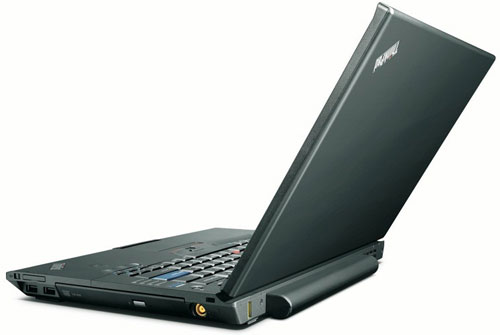 Even those who do not need big or limited budget can choose the model using Celeron P4500 processor, 160 GB hard drive, 1GB RAM for only about 649 USD.
FAQ
What should I check before following these steps?
Confirm device and software compatibility, save important data, and make sure you have the required permissions, files, and account access.
Why might the process not work?
Common causes include outdated software, missing permissions, incompatible hardware, an unstable connection, or completing a step in the wrong order.
Can I undo the changes if necessary?
That depends on the tool or setting. Use built-in restore options when available, keep a backup, and record the original configuration first.
Related Articles
 Lenovo Launches Three New Thinkpad T, X and L Series with Many4 minutes read
 Lenovo Introduces New ThinkPad Series, X1 Carbon Gen 3, ThinkVision X245 minutes read
 Lenovo Launches New ThinkPad X1 Xtreme with 'Super Speed' Mode3 minutes read
 Realistic New ThinkPad L Series3 minutes read
 Lenovo Announced Ultrabook Has 2 Batteries, Can Use 17 Hours4 minutes read
 Lenovo Upgraded ThinkPad T, L and W Series4 minutes read
Reader Comments 0
Sign in with email or Google to join the discussion.