Table of Contents
This guide covers lenovo is about to sell the thinkpad x1 carbon for $$ 1,399 with practical context and easy-to-follow details. Use it to understand the subject and apply the information confidently.
 The ThinkPad X1 Carbon is thinner and lighter than the original version.
Manufacturer Lenovo has announced it will sell the ThinkPad X1 ultrabook of carbon fiber shell in the US from August 21. This product has a starting price of US $ 1, 399 with a configuration of 1. 7GHz Core i5-3317U processor, 4GB RAM, 128GB SSD and integrated Intel HD Graphics. Users can optionally integrate 3G connectivity for this ultrabook model.
According to Engadget, If you buy the ThinkPad X1 Carbon with a 1. 8GHz Core i5 configuration, a 12GB SSD, users will have to pay a higher fee of $ 1, 499. Meanwhile, if they want to upgrade the SSD to 256GB, they have to pay an additional $ 150. The most advanced ThinkPad X1 model with 2GHz Core i7 chip costs $ 1, 849.
In addition to the latest Ivy Bridge processor, the ThinkPad X1 is also equipped with a 1, 600 x 900 pixel resolution screen. It weighs 1. 36kg and is 1. 7cm thin while the original X1 version is 1. 67kg and 2. 13cm. This product can charge 80% of the battery in just 30 minutes and operates continuously for 6. 3 hours when full of battery.
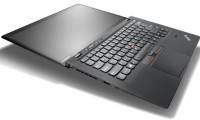
Some official photos of ThinkPad X1 Carbon:
This product uses the latest Ivy Bridge processor.
The basic configuration of the device includes a Core i5 chip clocked at 1. 7GHz, 4GB RAM and 128GB SSD.
The most advanced model is priced at 1, 849 USD.
Machine is expected to sell from August 21 in the US.
FAQ
What should I check before following these steps?
Confirm device and software compatibility, save important data, and make sure you have the required permissions, files, and account access.
Why might the process not work?
Common causes include outdated software, missing permissions, incompatible hardware, an unstable connection, or completing a step in the wrong order.
Can I undo the changes if necessary?
That depends on the tool or setting. Use built-in restore options when available, keep a backup, and record the original configuration first.
Related Articles
 Review Lenovo Thinkpad X1 Carbon Gen 8: the Best Business Laptop6 minutes read
 Lenovo Introduces New ThinkPad Series, X1 Carbon Gen 3, ThinkVision X245 minutes read
 The ThinkPad X1 Carbon Ultrabook Has a Touch Panel3 minutes read
 ThinkPad X1 Carbon, X1 Yoga - Lenovo's Top Models Will Have a Completely New Design in Version 20196 minutes read
 The ThinkPad X1 Carbon Touchscreen Version3 minutes read
 Lenovo Launches a High-performance, Secure, High-performance7 minutes read
Reader Comments 0
Sign in with email or Google to join the discussion.