Table of Contents
This guide covers the thinkpad x1 carbon touchscreen version with practical context and easy-to-follow details. Use it to understand the subject and apply the information confidently.
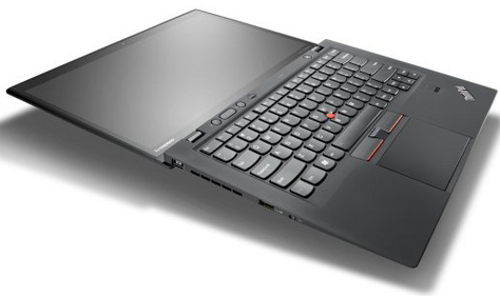 The ThinkPad X1 Carbon touchscreen is $ 150 more expensive than the regular version.
ThinkPad X1 Carbon tap is equipped with 14 inch screen resolution of 1, 600 x 900 pixels to support tap to 10 fingers at the same time. In addition, the touchpad of this product also has the ability to support multi-tap. The manufacturer says the ThinkPad X1 Carbon tap weighs 1. 54 kg, 20. 8 mm thick.
Regarding basic configuration, it uses Intel Core i5 processor based on Ivy Bridge platform. However, users can choose to upgrade with Core i7 processor. It has integrated Dolby Home Theater v4 audio technology. The front of the product has an HD webcam and two microphones to make video calls. Other information about the hard drive and graphics of the ThinkPad X1 Carbon tap has yet to be announced.
The battery that comes with the device promises up to 9 hours of continuous operation. In terms of connectivity, users can choose to integrate 3G into the ThinkPad X1 Carbon tap. In addition, Lenovo's new model is also advertised as the first ultrabook certified to be optimized with Microsoft Lync service.
As expected, Lenovo will sell the ThinkPad X1 Carbon tap this month in the US.
FAQ
What should I check before following these steps?
Confirm device and software compatibility, save important data, and make sure you have the required permissions, files, and account access.
Why might the process not work?
Common causes include outdated software, missing permissions, incompatible hardware, an unstable connection, or completing a step in the wrong order.
Can I undo the changes if necessary?
That depends on the tool or setting. Use built-in restore options when available, keep a backup, and record the original configuration first.
Related Articles
 The ThinkPad X1 Carbon Touchscreen Costs More Than 49 Million4 minutes read
 Lenovo Is About to Sell the ThinkPad X1 Carbon for $$ 1, 3994 minutes read
 Review Lenovo Thinkpad X1 Carbon Gen 8: the Best Business Laptop6 minutes read
 Lenovo Introduces New ThinkPad Series, X1 Carbon Gen 3, ThinkVision X245 minutes read
 ThinkPad X1 Carbon, X1 Yoga - Lenovo's Top Models Will Have a Completely New Design in Version 20196 minutes read
 The ThinkPad X1 Carbon Ultrabook Has a Touch Panel3 minutes read
Reader Comments 0
Sign in with email or Google to join the discussion.