What you will learn
- Describe how synchronization propagates changes.
- Identify failure cases that require an independent backup.
- Create a small backup with clear retention.
- Test a restore without risking the working copy.
What you need
- A folder synchronized by a cloud service or a sample local folder.
- A separate destination such as an external drive or another approved backup system.
Availability and recovery are different goals
OneDrive synchronizes files between the computer and cloud so changes become available from multiple devices.
CISA recommends regular backups and testing recovery so important data can be restored after incidents.
Sync improves availability and collaboration. Backup provides a point you can return to. Version history may help with some mistakes, but retention limits, account compromise and service policies mean it should not be the only recovery plan for critical data.
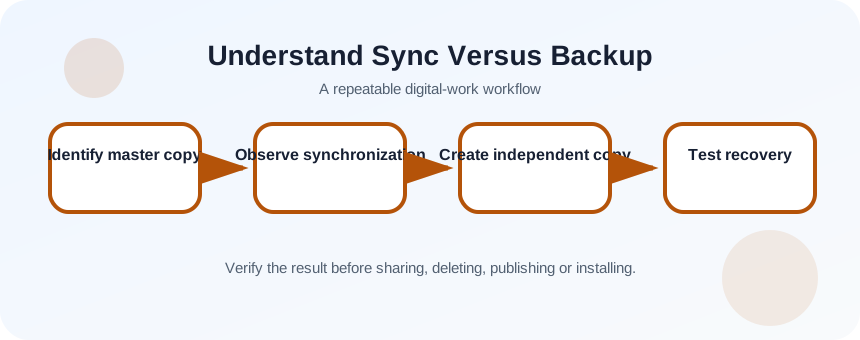
Identify assets and failure scenarios
Choose a small set of files and ask what would happen if a file were deleted, corrupted, encrypted, or inaccessible because the account was locked. Define the acceptable recovery point and time. A family photo archive, active client work and reproducible downloads do not need identical backup schedules.
- 1
List critical folders.
- 2
Identify the current master copy.
- 3
Check whether they are synchronized.
- 4
Review available version history.
- 5
Choose an independent backup destination.
- 6
Define how often the files change.
Create an independent recovery copy
Use a destination that is not continuously exposed to the same account and device risks. For a simple exercise, copy the selected folder to an external drive, safely eject it and store it separately. For managed systems, use the approved backup platform and retention policy.
- 1
Wait for current sync to finish.
- 2
Close files that are being edited.
- 3
Copy the selected folder to the backup destination.
- 4
Record the backup date and scope.
- 5
Compare file counts or checksums for important data.
- 6
Disconnect or isolate the backup where appropriate.
- 7
Document the restore location and responsible person.
Test recovery with a harmless file
Create a small test file, back it up, then rename or remove only the working copy. Restore into a temporary folder rather than overwriting current work. Open the restored file and compare its contents. A backup that has never been restored is an assumption, not verified recovery.
For cloud-only files, confirm that they are fully downloaded or included by the backup product. Shortcut files and online-only entries may not contain the underlying data.
- 1
Create a test document with a unique phrase.
- 2
Include it in the backup.
- 3
Remove the working copy.
- 4
Restore into a temporary folder.
- 5
Open and compare the phrase.
- 6
Return the environment to its original state.
Record the recovery boundary
Document what is backed up, what is excluded, where copies are stored, how long they are retained and how to restore them. Review the plan after changing cloud providers, devices or account ownership. Recovery instructions should not depend on the unavailable device or forgotten account.
- A deleted synchronized file can be recovered from an independent copy.
- The backup includes actual file contents, not only cloud-only entries.
- Someone can follow the documented restore steps.
Run a miniature backup and restore drill
Prove recovery for a five-file sample without touching production data.
- 1
Create a sample folder.
- 2
Synchronize or identify the working copy.
- 3
Back it up independently.
- 4
Delete one test file from the working folder.
- 5
Restore it to a temporary location.
- 6
Verify content and document the result.
Common mistakes to avoid
- Calling sync a backup without testing deletion recovery.
- Leaving the backup permanently connected to the same risk.
- Backing up shortcuts instead of cloud file contents.
- Never testing restoration.
Key takeaways
- Sync provides access; backup provides recovery.
- Independent copies reduce shared failure modes.
- A restore test is part of the backup process.
Frequently asked questions
Is cloud version history enough?
It can help with recent mistakes, but retention, account access and policy limits vary. Critical data should have an independent recovery method.
How many backup copies do I need?
The answer depends on consequence and policy. A common principle is multiple copies on different media, with one copy separated from the primary environment.
Sources and further reading
- Sync your computer files and folders with OneDriveMicrosoft Support
- Back Up Business DataCISA
Ready to continue?
Mark the lesson complete so your Learning Path progress stays current on this device.