Table of Contents
This guide covers laptop playing msi's 'top' game with practical context and easy-to-follow details. Use it to understand the subject and apply the information confidently.
After launching two gaming versions, the GX640 and GX740 using Core i5 chips, MSI continues to release its most configuration-type laptop, GT660. This model will be officially introduced at the CeBIT 2010 exhibition in Hannover, Germany next month.
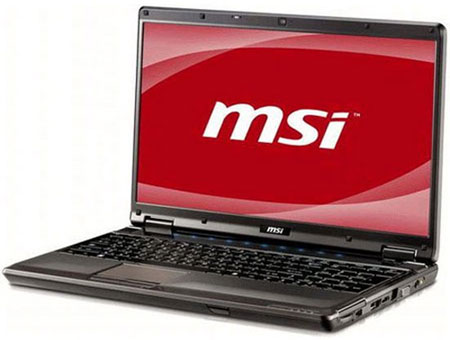 MSi Model GT660 (Photo: Notebookcheck) .
GT660 is equipped with powerful Intel Core i7 processor and the ability to upgrade RAM up to 12 GB (with three slots on the body). In particular, the graphics power of the device will make many gamers happy with discrete NVIDIA GeForce GTX 285M graphics card with 1GB VRAM capacity.
In addition, MSI's new model will also be preinstalled with Windows 7 operating system and equipped with a new generation USB port.
There is currently no information about the selling price of this product.
FAQ
What should I check before following these steps?
Confirm device and software compatibility, save important data, and make sure you have the required permissions, files, and account access.
Why might the process not work?
Common causes include outdated software, missing permissions, incompatible hardware, an unstable connection, or completing a step in the wrong order.
Can I undo the changes if necessary?
That depends on the tool or setting. Use built-in restore options when available, keep a backup, and record the original configuration first.
Related Articles
 How to Download and Play Among Us on PC or Laptop6 minutes read
 Laptop Automatically Stops Charging When Playing Games - Fast Processing: Explained6 minutes read
 Laptop Playing a Terrible Configuration Game of Digital Storm3 minutes read
 Top 5 Best Offline Role-playing Games on Phones7 minutes read
 Computer, Laptop FPS Drops When Playing Games?7 minutes read
 How to Reduce Shock, Lag When Playing Mobile Games with UU Game Booster6 minutes read
Reader Comments 0
Sign in with email or Google to join the discussion.