Table of Contents
This guide covers jolicloud can beat Chrome os on netbooks with practical context and easy-to-follow details. Use it to understand the subject and apply the information confidently.
Jolicloud (based in Paris, France) develops an open source operating system (Jolicloud OS) centered on The cloud Based on Ubuntu Linux. Jolicloud confirmed, this month they plan to release a UK netbook computer using version 1. 1 of Jolicloud OS, according to an article on TechCrunch. This netbook was dubbed " Jolibook ".
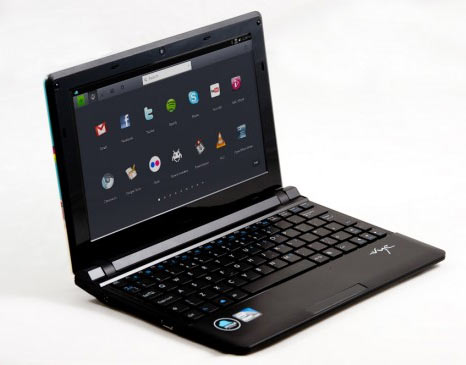 Jolibook - netbook using Jolicloud OS version 1. 1
This device is preinstalled with Facebook, Spotify, VLC, Skype and Chromium (interesting). Jolibook is based on the Atom N550 dual-core processor, has a 250GB hard drive, " Stunning " screen and " Reasonable " price (although not yet determined).
According to TechCrunch, other notable details include: the device is based on HTML5, has a VGA port and many USB ports, can play 720p videos. Jolicloud's website has not mentioned Jolibook but images of new netbooks are available on Flickr.
Ubuntu 10. 04
Although the current version of Jolicloud OS is 1. 0, the upcoming 1. 1 upgrade version will re-synchronize the software's back-end OS with Ubuntu Linux 10. 04.
Meanwhile, the user interface (front-end) of Jolicloud OS exploits many HTML5 technologies in Chromium browser. With support for components such as NVIDIA ION, Intel Poulsbo, tap screen and by enhancing support for the latest CPU hardware, Jolicloud wants to make version 1. 1 of Jolicloud OS a great choice. Great for all types of computers, not just netbooks.
GNOME and X11
Other components of Jolicloud 1. 1 will include the 2. 6. 35. 4 version of the Linux kernel; X11R7. 5; GNOME, Nautilus and Metacity 2. 30; Plymouth. People also plan to bring Chromium 7. 0, VLC 1. 1. 4, Dropbox 0. 6. 3, Abiword 2. 8. 2, Banshee 1. 6. 1, Firefox 3. 6. 10, GIMP 2. 6. 8, Miro 3. 0. 1 and OpenOffice. Org 3. 2. 1 into Jolicloud 1. 1.
FAQ
What should I check before following these steps?
Confirm device and software compatibility, save important data, and make sure you have the required permissions, files, and account access.
Why might the process not work?
Common causes include outdated software, missing permissions, incompatible hardware, an unstable connection, or completing a step in the wrong order.
Can I undo the changes if necessary?
That depends on the tool or setting. Use built-in restore options when available, keep a backup, and record the original configuration first.
Related Articles
 How to Use Jolicloud3 minutes read
 Jolicloud: a New Operating System for Netbook Generations8 minutes read
 Google to Chrome OS for Netbooks?6 minutes read
 Acer, HP and Dell Are About to Have Netbooks Running Chrome OS3 minutes read
 Acer Launched Netbooks Using Chrome OS3 minutes read
 The Most Professional Beat Splitter and How to Use It5 minutes read
Reader Comments 0
Sign in with email or Google to join the discussion.