Table of Contents
To collect items from a PokéStop, move within interaction range, tap the stop, then swipe its Photo Disc. Items are added to the account when the spin succeeds. PokéStops can provide Poké Balls and other supplies, but they do not normally award free PokéCoins.
How to spin a PokéStop
1. Approach the location safely
On the map, an out-of-range PokéStop appears as a cube or marker. When you are close enough, its shape changes to show that it can be opened. Tap it only after stopping in a safe public place.

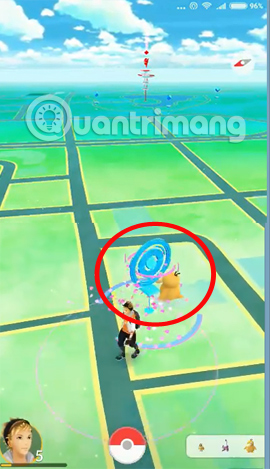
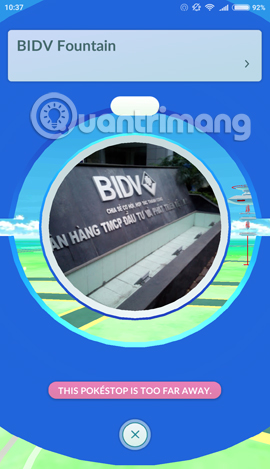
If the game says the PokéStop is too far away, move closer only when access is legal and safe. GPS drift can also cause the avatar to appear outside the interaction radius.
2. Swipe the Photo Disc
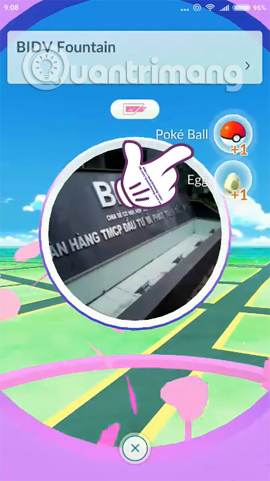
Open the PokéStop and swipe the circular photo horizontally. A successful spin displays the items received and usually awards a small amount of XP. You can close the screen after the items appear; they are not lost because every bubble was not tapped individually.
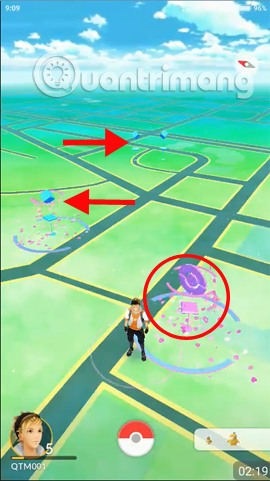
3. Wait for the cooldown
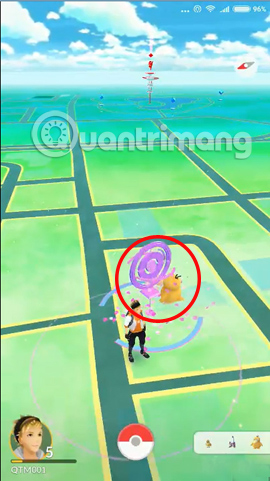
After a successful spin, the PokéStop turns purple to indicate that it is on cooldown. Under normal conditions it becomes available again after roughly five minutes, though game behavior and temporary restrictions can vary. The original 15-minute advice is outdated.
What can a PokéStop provide?
Possible rewards depend on Trainer level, inventory, events and game features. They can include:
- Poké Balls, Great Balls or Ultra Balls.
- Berries.
- Potions and Revives.
- Pokémon Eggs when an eligible Egg slot is open.
- Gifts to send to friends.
- Evolution items or other less-common supplies.
- A Field Research task when a task slot is available.
PokéCoins are not part of the normal PokéStop item pool. Free PokéCoins are generally connected to the Gym Defender Bonus, subject to its current daily limit.
Why a PokéStop spin may fail
The stop is out of range
Wait for location accuracy to settle or move closer by a safe public route. Do not cross a barrier or enter private property.
The Item Bag is full
Use or delete selected items, or obtain an official Bag upgrade. Some feature interactions may still work with a full Bag, but a normal item spin can be limited.
The stop is still purple
The cooldown has not ended. Wait until the stop returns to its ready color and shape.
The game detects fast travel
Pokémon GO can restrict interaction when the account appears to be moving too quickly. Do not play while driving. Stop and wait for the map to update.
Connection or GPS is unstable
Confirm that mobile data or Wi-Fi works and that location permission is enabled. Restart the app if the map remains stale.
Other PokéStop features
A PokéStop may host a Lure Module, Team GO Rocket encounter, Showcase, Route point, scanning task or event feature. These activities have separate rules from spinning the Photo Disc. Sponsored or restricted-account behavior can also differ.
Use PokéStops responsibly
- Respect opening hours, private property and local access rules.
- Do not block entrances or gather in a way that disrupts the location.
- Stop walking before using the screen.
- Remember that an in-game point does not guarantee public access.
A safe route with several PokéStops is usually more efficient than waiting beside one stop. It provides repeated spins, catches and walking progress without depending on one cooldown.
Related Articles
 What Will You Do When You Report Your Bag Is Full When Accepting Items in Pokémon6 minutes read
 How to 'Gather' Multiple Pokémon on a Single Point?5 minutes read
 How to Use Items in Pokémon GO7 minutes read
 How to Receive a Renamed Card in Mobile Union4 minutes read
 How to Spin Gas Garena to Receive Items: Gold4 minutes read
 Summary of Codes and How to Get the Latest Items in Roblox8 minutes read
Reader Comments 0
Sign in with email or Google to join the discussion.