Table of Contents
If Facebook blocks likes, comments, shares, or messages, there is usually no legitimate instant “unlock” button. Read the notice for the affected feature and any end time, stop repeated attempts, secure the account, and use the review or reporting option Facebook provides if you believe the restriction is a mistake.
First identify the type of problem
- Temporary action block: Facebook limits one or more actions, often with a notice when you try to use them.
- Account restriction: Account Status or Support Inbox shows a policy decision affecting features or distribution.
- Disabled or suspended account: You cannot use the account normally and Facebook provides a separate appeal or identity process.
- Technical error: The action fails without a restriction notice and may work on another device or connection.
- Post-level limitation: The Page, group, or post owner turned off comments or limited who can interact.
Common reasons Facebook limits interactions
- liking, commenting, following, messaging, or sharing repeatedly in a short period;
- posting the same comment or link many times;
- using unauthorized automation, browser extensions, scripts, or engagement software;
- activity that resembles spam or coordinated manipulation;
- content or behavior reported for violating Facebook rules;
- a compromised account generating activity without the owner's knowledge; or
- a false positive or temporary technical problem.
A restriction does not prove the user intentionally violated a rule, but trying to evade it with another account, VPN, automation tool, or repeated submissions can make the situation worse.
1. Read the restriction notice
Trigger the action once and read the full message. Record which feature is blocked, whether Facebook gives an end time, and whether a Request review, Disagree with decision, or Let us know option appears.
Take a screenshot for your records, but do not post it publicly if it contains an email address, phone number, account ID, or other private details.
2. Stop repeated and automated activity
Do not keep testing the Like or Comment button every few seconds. Pause scheduled campaigns and remove unauthorized tools that publish, like, follow, message, or comment on your behalf.
Facebook does not provide a safe engagement bot that guarantees removal of an action block. Software promising an immediate unlock or automatic likes can compromise the account and violate platform rules.
3. Check Account Status and Support Inbox
Open the Facebook menu and look for Help & support, Support Inbox, and Account Status. Review notices for the profile, Page, groups, and business assets you manage. Use the specific review control attached to the decision when one is available.
Read the relevant rule in Facebook's official Community Standards before appealing. A useful appeal explains why the action or content complies; it does not simply demand that the restriction be removed.
4. Secure the account
- Change the Facebook password if you see unfamiliar activity.
- Review active sessions and sign out devices you do not recognize.
- Enable two-factor authentication.
- Remove unfamiliar apps, websites, business integrations, and browser extensions.
- Secure the email account connected to Facebook with a different password.
- Check recent posts, comments, Pages, ads, and messages for unauthorized activity.
If the block followed a sudden burst of actions you did not perform, report the compromise through Facebook's official recovery process rather than treating it as an ordinary limit.
5. Rule out a technical problem
When Facebook shows no action-block or policy notice:
- check whether comments are disabled on that specific post;
- try another ordinary post you are allowed to interact with;
- restart the app or browser;
- update Facebook and the browser;
- test a stable network;
- temporarily disable only suspicious Facebook-related extensions; and
- clear the Facebook cache on Android or browser cache if the interface is broken.
Do not clear all app data if you have unsaved drafts or cannot complete account recovery.
6. Request a review when Facebook offers it
Use the link in the restriction notice or the decision in Account Status. Keep the explanation concise:
- state which action was blocked;
- include the approximate time it began;
- explain why you believe the activity was legitimate;
- mention any unauthorized tool or compromised session you removed; and
- attach a screenshot only when it clarifies the error.
You do not need to write in English unless the form requires it. Use clear, factual language in a supported language and avoid submitting the same report repeatedly.
7. Report a technical problem
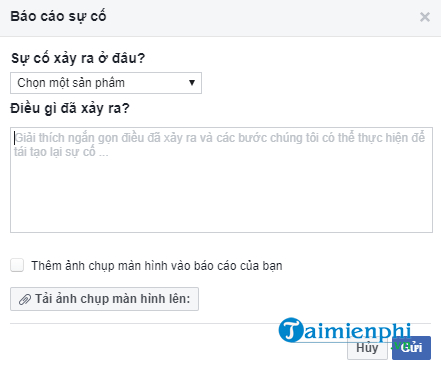
If no review option exists and the behavior appears to be a bug, open Help & support > Report a problem. Select the affected feature, describe what happens, and include the exact notice and screenshot. This reports a malfunction; it is not a guaranteed appeal channel for a policy decision.
What not to do
- Do not pay an “agent” to remove the block.
- Do not give anyone your password, login code, recovery code, or browser cookies.
- Do not install remote-access software or an unlock extension.
- Do not create replacement accounts to continue the same blocked behavior.
- Do not use automatic commenting, liking, or message tools after the restriction ends.
After access returns
Resume normal activity gradually, write genuine comments, avoid duplicates, and keep automation limited to tools and actions Facebook explicitly supports. Review Page and business integrations regularly.
If you need official support routes, see TipsMake's guide to contacting Facebook support. For general social-account safety, read information that should not be shared on social media.
Related Articles
 How to Prevent Others from Liking or Commenting on Facebook3 minutes read
 How to Unlock Blocked Facebook: Unlock Blocked Facebook Accounts6 minutes read
 5 Note to Not Be Blocked Facebook Account3 minutes read
 Reasons Why Your Account Is Blocked by Facebook5 minutes read
 Facebook Supports Unlocking Accounts with Facial Recognition3 minutes read
 Will You Be Blocked by Other Facebook Users?: Block Facebook4 minutes read
Reader Comments 0
Sign in with email or Google to join the discussion.