Table of Contents
This guide provides a clear overview of dynamic island, including Hit the Island for iPhone 14 Pro and iPhone 14 Pro Max, how to Play Hit the Island Game. Use it to understand the topic, compare the available options, and make a more informed decision.
People can see a drastic change in the performance of the Pro series, as the chipsets used are the A16 Bionic Chipset and A15 Bionic Chipset, respectively. Apple has made a significant upgrade with some features such as always on display, maximum outdoor brightness of 2000 nits, 48 MP Pro camera system.
Finally, the biggest form change, Apple has provided a punch-hole screen or pill-shaped notch for the iPhone 14 Pro series, along with a unique feature, called Dynamic Island.
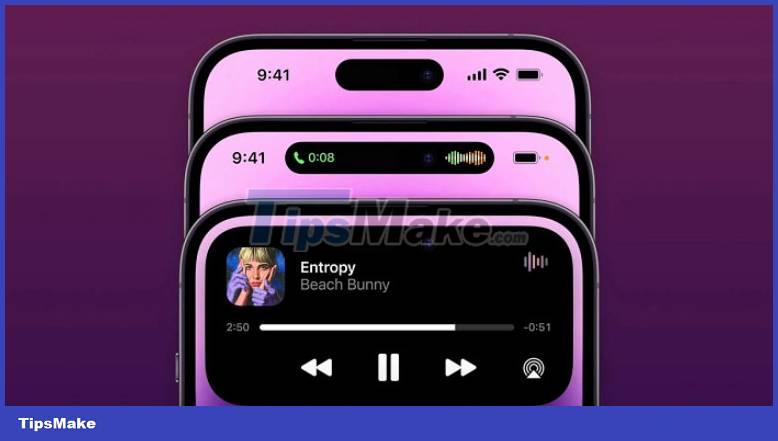
Dynamic Island displays all information about currently running applications in minute byte size format. It includes cool features like multitasking shortcuts, music playback and control, alarm notifications, ongoing calls, and more.
Since this is a completely new feature, there are not many compatible apps, but there is an interesting game with Dynamic Island called Hit the Island. In this article, let's learn how to play Hit the Island on Dynamic Island of the iPhone 14 Pro series.
Hit the Island for iPhone 14 Pro and iPhone 14 Pro Max
Dynamic Island game - Hit the Island, now available on the App Store, was developed by Kriss Smokla.
People can play this game on iPhone 14 Pro and iPhone 14 Pro Max models. Besides, Hit the Island can also be played on other iPhones, as long as it is supported, but the experience will not be as great as the notch. The developer also said it might be compatible with some other iPhones soon.
The interface of the game is also very eye-catching with a capacity of only 7 MB and is free on the app store. The concept behind the game is based on something like a brick cutter.
How to Play Hit the Island Game
Hit the Island players will hit the provided ball into Dynamic Island and with each hit the score will increase.
The background of the game will change color when the player reaches a minimum of 5 points each time.
The speed of the ball is proportional to the number of points the player scores. The more points everyone earns, the faster the ball will move.
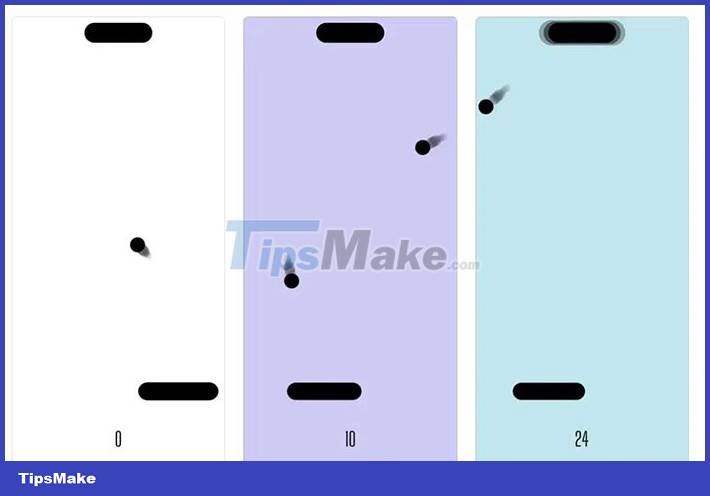
Along with the increase of the score, the hit bar will get smaller, making the game more difficult.
All players need to pay attention is to keep the ball from falling off the hit bar.
This game is simple yet super fun to play. There aren't many apps compatible with the new iPhone notch yet, so enjoy and show off your ingenious skills with Hit the Island, while you wait for more exciting apps for Dynamic Island.
Conclusion
Understanding Dynamic Island makes it easier to compare options, avoid common mistakes, and apply the information in this guide more effectively. Review the relevant requirements before making changes or choosing a solution.
FAQ
What is Dynamic Island?
People can see a drastic change in the performance of the Pro series, as the chipsets used are the A16 Bionic Chipset and A15 Bionic Chipset, respectively.
Why is Dynamic Island important?
Understanding Dynamic Island helps you evaluate features, compatibility, performance, and potential limitations before you choose a product or follow a procedure.
What should you consider when using or choosing Dynamic Island?
Consider your specific goal, compatibility requirements, available features, cost, security, and the practical recommendations described in this guide.
Related Articles
 Dynamic Island Explained6 minutes read
 How to Use Dynamic Island on iPhone 15: Practical Guide7 minutes read
 Instructions for Installing Dynamic Island on Windows4 minutes read
 Tips for Using Dynamic Island on Android Smartphones: Main Insights4 minutes read
 Island War Game Tips for Newbies8 minutes read
 How to Hide Dynamic Island on iPhone6 minutes read
Reader Comments 0
Sign in with email or Google to join the discussion.