Table of Contents
The following guide provides a clear overview of Disable login to chrome, with the most relevant background, details, and practical takeaways.
In Google Chrome, the Identity Consistency or Account Consistency feature allows Chrome to automatically log in to your Google account when users access services like Gmail, YouTube, etc. This will help synchronize data, especially copper. Bookmark set on Chrome. However, this will also affect privacy when using Chrome, or if you exit your account, the synchronization of bookmark data will no longer be available. If Chrome you are using has upgraded to Chrome 70, you can turn off Identity Consistency if you do not need it.
- How to log out of your Google account on devices
- How to turn off auto-fill forms on Chrome
- How to view the password, delete the saved password on Chrome
Instructions to Turn Off the Identity Consistency Chrome Feature
Step 1:
You open Chrome browser and then click on the 3 dots icon select Settings (Settings).
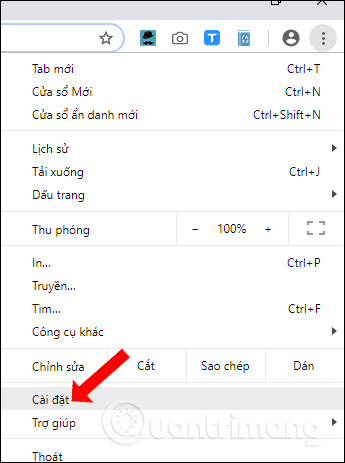
Step 2:
In the installation interface, click on the Advanced button (Advanced) below to expand the settings.
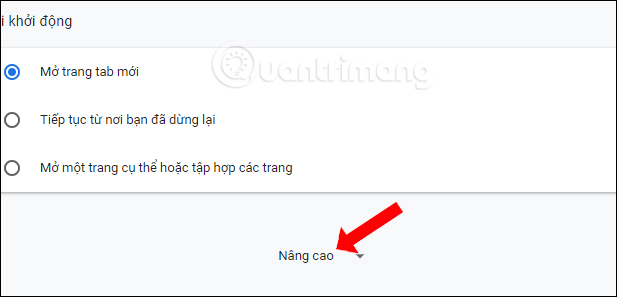
Step 3:
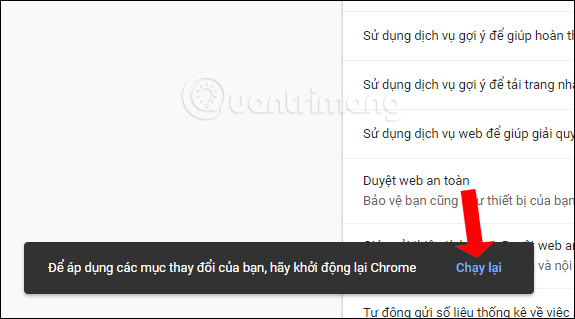
In the expanded interface, users find the Privacy and security (Privacy and security) section. Then look under the Allow Sign in Chrome option (Allow Chrome sign-in). Put the round button to the left to turn off the Identity Consistency feature.

Finally press the Run button (Relaunch) to restart the browser and apply the changes.
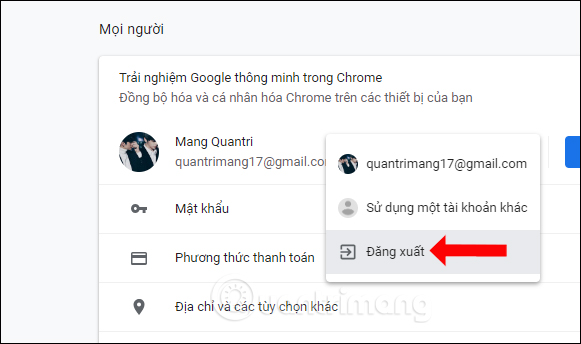
In case the user does not find the option Allow logging in to Chrome, please log out of the account that is logged in Chrome browser.
When turning off the feature, Chrome will not automatically use a Google account to log in to the browser when using services such as Gmail and YouTube. Data such as bookmarks, passwords, etc. Will remain the same. Now you can freely log in to multiple Google accounts without worrying that Chrome will automatically retrieve account information.
- How to transfer all data from Chrome to Firefox
- Fix the Google Chrome sync feature not working
- Instructions to prevent Google from tracking your location
I wish you all success!
FAQ
How does Disable login to chrome work?
The following guide provides a clear overview of Disable login to chrome, with the most relevant background, details, and practical takeaways.
What should you prepare before using this method?
In Google Chrome, the Identity Consistency or Account Consistency feature allows Chrome to automatically log in to your Google account when users access services like Gmail, YouTube, etc.
What should you do if the process does not work as expected?
This will help synchronize data, especially copper.
Related Articles
 How to Turn Off Automatic Login on Chrome: Log in to Your a Google Account3 minutes read
 How to Turn Off Automatic Language Translation in Google Chrome5 minutes read
 Google Postpones Automatic Updates to Turn Off Chrome Sound Due to Many Web Games3 minutes read
 Why Shouldn't Auto-update Automatically Be Updated in6 minutes read
 How to Block Chrome Automatically Updating on Windows 104 minutes read
 How to Turn Off Automatic Opening of PDF Files After Downloading3 minutes read
Reader Comments 0
Sign in with email or Google to join the discussion.