Table of Contents
An Observer is a Minecraft redstone block that watches the block directly in front of its face. When it detects a qualifying change, it sends a short redstone pulse from the opposite side. This makes Observers useful for automatic farms, compact clocks, traps, and machines that react to block updates.
Minecraft Observer recipe
Craft one Observer with:
- 6 Cobblestone
- 2 Redstone Dust
- 1 Nether Quartz
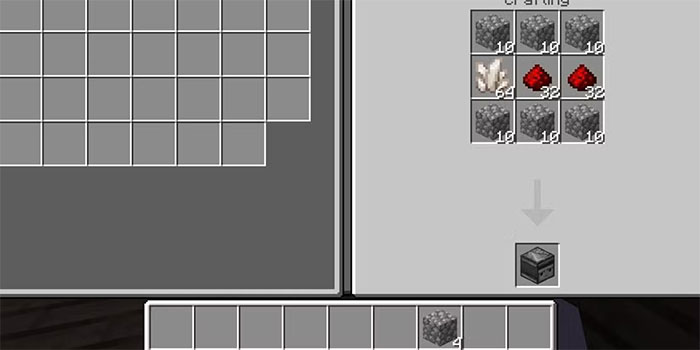
At a Crafting Table, fill the top row with three Cobblestone. Place two Redstone Dust in the first two spaces of the middle row and Nether Quartz in the third. Fill the bottom row with the remaining three Cobblestone.
| Cobblestone | Cobblestone | Cobblestone |
|---|---|---|
| Redstone Dust | Redstone Dust | Nether Quartz |
| Cobblestone | Cobblestone | Cobblestone |
Where to get the ingredients
- Cobblestone: Mine stone with any pickaxe.
- Redstone Dust: Mine redstone ore with an iron pickaxe or better. Redstone ore is commonly found deep underground.
- Nether Quartz: Enter the Nether and mine Nether quartz ore with a pickaxe.
You need a Crafting Table because the recipe uses all nine slots of the 3-by-3 crafting grid.
How to place an Observer correctly
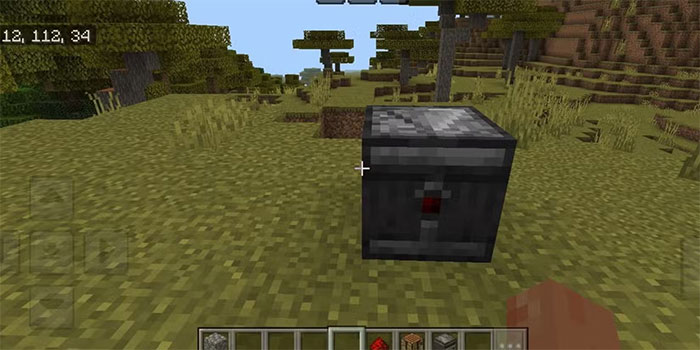
An Observer has two important sides:
- The side with the face watches the block in front of it.
- The side with the red dot is the output and sends the redstone pulse.
The face points toward the block against which you place the Observer. If it is facing the wrong direction, break it and place it again from the other side. Connect redstone dust, a piston, a dispenser, or another compatible component to the output side.
What changes can an Observer detect?
Observers react to changes involving the block they face. Common examples include a crop growing, a piston moving a block, fluid changing state, or another redstone component updating. The exact events that count as an update are not identical in Java Edition and Bedrock Edition, so test a design in the edition you play before building it at a large scale.
The output is a brief pulse rather than continuous power. If a machine must remain on, connect the Observer to a circuit that stores or extends the signal.
Practical Observer uses
Automatic sugar cane or bamboo farm
Place the Observer so its face watches the height at which the plant should be harvested. Put a piston below the watched block and connect the Observer's output to the piston. When growth reaches the Observer, the pulse activates the piston and breaks the upper section. A hopper or hopper minecart can collect the drops.
Let the bottom section of sugar cane or bamboo remain planted so it can grow again. The Observer detects growth; it does not determine whether the plant is fully mature, so its height controls when harvesting occurs.
Pumpkin and melon farm
An Observer can detect a stem or adjacent block update and trigger a piston that breaks the newly grown pumpkin or melon. Leave space for the fruit to grow and keep the collection system clear of the piston.
Compact redstone clock
Place two Observers with their faces looking at each other to create rapid pulses. This clock is fast, so add a lever or movable block if you need a way to stop it. Rapid clocks can create lag when connected to large machines; use them only while the mechanism needs to run.
Doors, alarms, and traps
Point an Observer at a block or component that changes when a player interacts with the build. Its pulse can activate a note block, piston door, dispenser, or other redstone device. Remember that an Observer responds to the watched update, not directly to nearby player movement.
Troubleshooting
- No output: Check that the face watches the changing block and the red dot points toward the circuit.
- The pulse is too short: Add a pulse extender, repeater arrangement, or toggle circuit appropriate to the build.
- The machine triggers twice: Moving components may create more than one detectable update. Reposition the Observer or adjust the timing.
- A tutorial works in another edition only: Java and Bedrock detect some updates differently. Look for an edition-specific version of the mechanism.
Related Articles
 Minecraft Medicine Recipe, How to Make Minecraft Medicine: Main Insights25 minutes read
 Top Most Worthwhile Buildings to Construct in Minecraft11 minutes read
 Comamand Block and Some Codes in Minecraft Game6 minutes read
 How to Make Minecraft Smoother: Step-by-Step Guide11 minutes read
 How to Make Things in Minecraft Games6 minutes read
 Minecraft Potion Making Guide4 minutes read
Reader Comments 0
Sign in with email or Google to join the discussion.